
A PHP retry loop lets you resend failed HTTP requests instead of stopping the script after the first error. This is useful when a request fails because of a temporary server error, rate limit, or connection problem.
In this tutorial, we will build a PHP cURL retry function that retries temporary failures and stops after a defined retry limit.
Create a PHP cURL Retry Loop
Create a file named retry.php and add the code shown below.
<?php
$apiKey = 'YOUR_API_KEY';
$maxAttempts = 5;
$parameters = [
   'api_key' => $apiKey,
   'url' => 'https://www.scrapingbee.com',
];
$url = 'https://app.scrapingbee.com/api/v1/?'
   . http_build_query($parameters);
$retryableStatusCodes = [429, 500, 502, 503, 504];
$ch = curl_init($url);
curl_setopt_array($ch, [
   CURLOPT_RETURNTRANSFER => true,
   CURLOPT_CONNECTTIMEOUT => 10,
   CURLOPT_TIMEOUT => 30,
]);
for ($attempt = 1; $attempt <= $maxAttempts; $attempt++) {
   $response = curl_exec($ch);
   if ($response === false) {
       echo "Attempt {$attempt}: cURL error: "
           . curl_error($ch)
           . PHP_EOL;
   } else {
       $statusCode = curl_getinfo($ch, CURLINFO_HTTP_CODE);
       echo "Attempt {$attempt}: HTTP {$statusCode}" . PHP_EOL;
       if ($statusCode >= 200 && $statusCode < 300) {
           echo "Request successful." . PHP_EOL;
           echo $response . PHP_EOL;
           break;
       }
       if (!in_array($statusCode, $retryableStatusCodes, true)) {
           echo "The request failed with a non-retryable status code."
               . PHP_EOL;
           break;
       }
   }
   if ($attempt === $maxAttempts) {
       echo "Maximum retry limit reached." . PHP_EOL;
       break;
   }
   $delay = 2 ** ($attempt - 1);
   echo "Retrying in {$delay} seconds..." . PHP_EOL;
   sleep($delay);
}
curl_close($ch);
Remember to replace YOUR_API_KEY with your ScrapingBee API key before running the script.
How the PHP Retry Logic Works
The script sends an HTTP request using cURL and will try up to five times.
curl_exec() performs the request. With CURLOPT_RETURNTRANSFER enabled, it returns the response body on success or false if a cURL-level error occurs (such as a connection failure). Note that HTTP error codes like 404 or 503 do not cause curl_exec() to return false on their own, so the script also checks the HTTP status code separately using curl_getinfo().
The script stops retrying as soon as it gets a successful response, meaning any status code in the 200–299 range.
It will retry only on these specific status codes:
- 429 – Too Many Requests
- 500 – Internal Server Error
- 502 – Bad Gateway
- 503 – Service Unavailable
- 504 – Gateway Timeout
Test The Retry Loop
To test the retry loop against an endpoint that always fails, edit the $url assignment itself, since $ch = curl_init($url) reads it immediately, before the loop starts. Reassigning $url later in the script has no effect on the request that has already been initialized.
Replace this:
$url = 'https://app.scrapingbee.com/api/v1/?'
   . http_build_query($parameters);
With this:
$url = 'https://postman-echo.com/status/503';
Run the code from the terminal with:
php retry.php
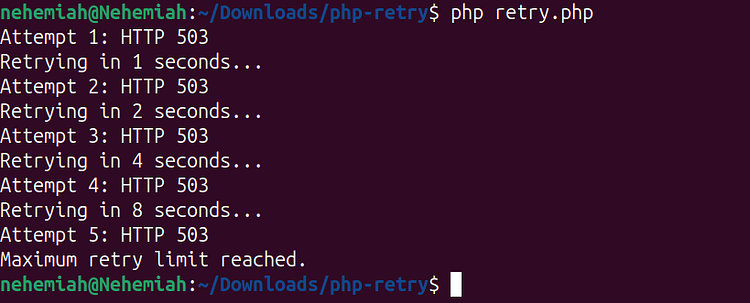
Output should be:
To test a successful request, replace that line with:
$url = 'https://postman-echo.com/status/200';
Then run the script again with:
php retry.php
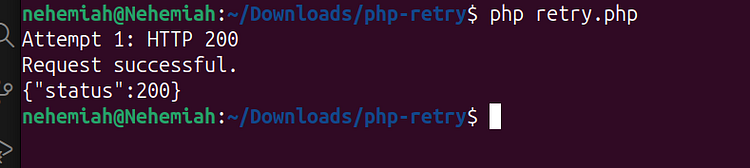
The loop should stop after the first successful response:
Common Issues
curl_init() Is Undefined
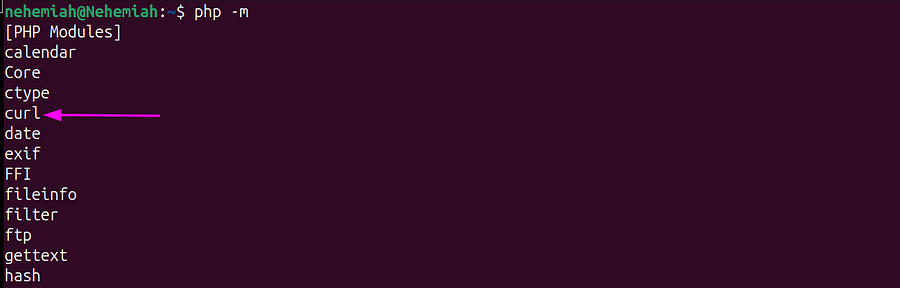
The PHP cURL extension is not installed or enabled. Install or enable the extension for your operating system, then confirm that curl appears in the output of:
php -m
The Script Keeps Retrying a Successful Request
Ensure the script reads the HTTP status code after curl_exec() and stops for any 2xx response:
if ($statusCode >= 200 && $statusCode < 300) {
   echo "Request successful." . PHP_EOL;
   break;
}
The Test URL Returns an Empty Reply
An empty reply (curl: (52) Empty reply from server, or a 000 status) means the connection never completed — usually a network or firewall issue rather than the endpoint itself. Confirm with:
curl -i https://postman-echo.com/status/200
The Script Retries Client Errors
Status codes such as 400, 401, 403, and 404 usually require changing the request. Do not retry them unless the API documentation says the error is temporary.
The Script Takes Too Long
Reduce the request timeout, retry limit, or delay between attempts. The example waits for 1, 2, 4, and 8 seconds between retries.
Conclusion
A PHP cURL retry loop helps your script recover from temporary connection errors, rate limits, and server failures.
The script should retry only temporary failures, wait between attempts, and stop after the set limit. Permanent client errors should be returned immediately so the request can be corrected instead of repeated.
Go back to tutorials