
Every time you perform an action on a web page, such as clicking a button, submitting a form, or loading another page, Chrome sends an HTTP request behind the scenes. A cURL request is simply a copy of that request that you can run again from your terminal.
We'll use govtech.com as the example site, but the same steps work for any website. To get a curl request from the browser, follow these steps:
Step 1: Go to the target URL in Google Chrome.
Step 2: Right-click anywhere on the page, select Inspect, then open the Network tab in the DevTools.
Step 3: Press Ctrl + L to clear the current requests log. Then perform the action like scrolling, clicking a button, or navigating to another page to generate the requests.
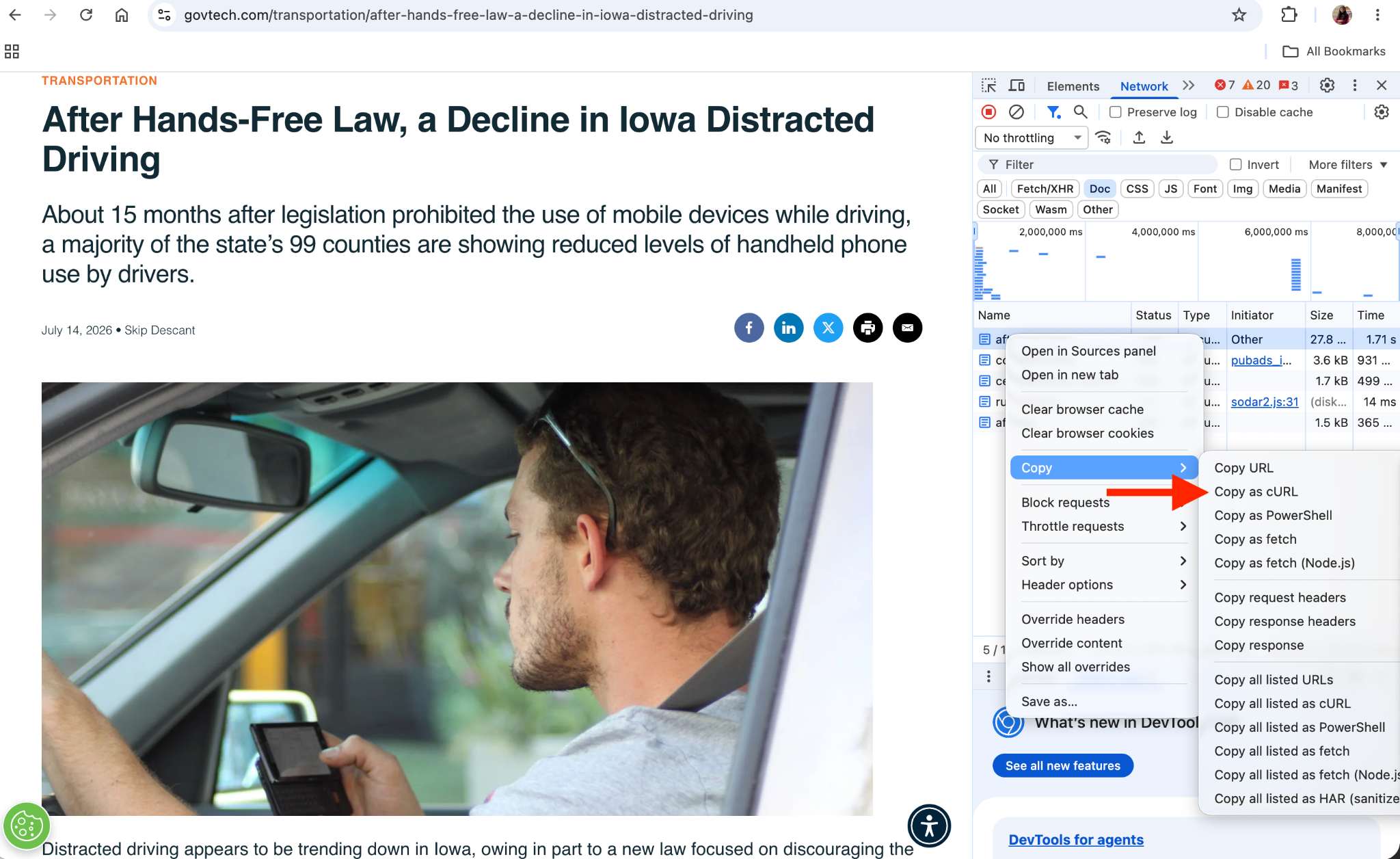
Step 4: Now pick the request you want as cURL. You can use the Doc, JS, CSS, or other filters to narrow down the requests and find the one you need. If you're not sure you've got the right one, double-click it and validate the response that opens in a separate page.
Step 5: Once you identify the request, right-click on it and select "Copy as cURL".
What a copied curl command looks like
When you get curl from the network tab, you'll notice it's much longer than a command you'd write by hand. That's because Chrome includes every header, cookie, and other request details it actually sent:
curl 'https://ep2.adtrafficquality.google/sodar/sodar2/255/runner.html' \
  -H 'Accept: text/html,application/xhtml+xml,application/xml;q=0.9,image/avif,image/webp,image/apng,*/*;q=0.8,application/signed-exchange;v=b3;q=0.7' \
  -H 'Accept-Language: en-GB,en-US;q=0.9,en;q=0.8' \
  -H 'Connection: keep-alive' \
  -b 'ssm_au_c=kzDa7AEw7Ft8Muzt4vl4vnh5HpR6KcZrv63WN4VLDrsUgAAAARqCgRSgs0lDXT9UinjCgHGRnG1aMIJV/1Ow+49UWecs=' \
  -H 'If-Modified-Since: Tue, 23 Jun 2026 02:06:19 GMT' \
  -H 'Referer: https://www.govtech.com/' \
  -H 'Sec-Fetch-Dest: iframe' \
  -H 'Sec-Fetch-Mode: navigate' \
  -H 'Sec-Fetch-Site: cross-site' \
  -H 'Sec-Fetch-Storage-Access: active' \
  -H 'Upgrade-Insecure-Requests: 1' \
  -H 'User-Agent: Mozilla/5.0 (Macintosh; Intel Mac OS X 10_15_7) AppleWebKit/537.36 (KHTML, like Gecko) Chrome/149.0.0.0 Safari/537.36' \
  -H 'sec-ch-ua: "Google Chrome";v="149", "Chromium";v="149", "Not)A;Brand";v="24"' \
  -H 'sec-ch-ua-mobile: ?0' \
  -H 'sec-ch-ua-platform: "macOS"'
You can directly use this cURL command in your terminal or API platforms like Postman and Insomnia to test requests, try different scenarios, or replay the same request outside the browser to debug an issue.
If you need the request in another programming language, you can convert it using this cURL converter.
Go back to tutorials