The key to scraping without getting blocked in 2026 is to mirror what legitimate traffic looks like to the target server. In practice, that can be as basic as routing requests through high-quality residential proxies, or as resource-intensive as configuring headless browsers with realistic fingerprints and pacing your requests to mimic natural browsing behavior.
The catch? Websites have become far better at identifying automated traffic. They combine multiple detection techniques, including IP reputation, TLS and HTTP fingerprinting, browser fingerprinting, and behavioral analysis, and you must appear as a real browser across each layer, simultaneously. The goal is to blend with human traffic and avoid triggering anti-bot solutions altogether.
Despite these challenges, web scraping remains the most viable solution for extracting public data at scale. Businesses rely on web scraping for various reasons, including:
- E-commerce price monitoring
- News aggregation
- Lead generation
- SEO (search engine results page monitoring)
- Bank account aggregation
This post will guide you through the techniques websites use to block scraping and the strategies you can employ to overcome these barriers.
Key takeaways
- Detection is layered: sites score your IP, TLS fingerprint, browser fingerprint, and behavior, and you must pass every layer simultaneously.
- Residential or mobile proxies are the baseline for anti-bot-protected websites, as datacenter IPs are more likely to be flagged as automated traffic.
- undetected-chromedriver is a legacy Selenium patch that anti-bot systems can now detect. Up-to-date alternatives include nodriver, Camoufox, and curl_cffi (TLS impersonation).
- CAPTCHAs are a symptom, not the problem. Fix the upstream: IP, fingerprint, and behavior signals, and most challenges disappear.
Web scraping without getting blocked 2026 best solution
If you're seeking a straightforward way to scrape web data without getting blocked and without the hassle of managing proxies yourself or handling complex scraping rules, consider using a web scraping API like ScrapingBee. Our tool simplifies the entire process by managing all the infrastructure and unblocking tactics, letting you focus purely on extracting the data you need.
To try out the ScrapingBee API, sign up for a free ScrapingBee account, and you'll receive 1,000 free API credits to get started. A base request costs 1 credit; JavaScript rendering costs 5; premium_proxy costs 25 with JavaScript rendering or 10 without; and stealth_proxy costs 75 credits.
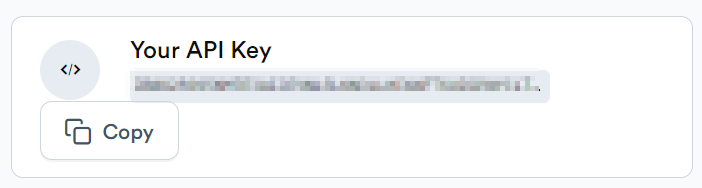
Upon logging in, navigate to your dashboard and copy your API token; you'll need this to send requests.
Next, install the ScrapingBee Python client:
pip install scrapingbee
Alternatively, you can add it to your project's dependencies if you are using a tool like Poetry:
scrapingbee = "^2.0"
Now, you're ready to use the following Python snippet to start scraping:
from scrapingbee import ScrapingBeeClient

client = ScrapingBeeClient(api_key="YOUR_API_KEY")

response = client.get(
    YOUR_URL_HERE,
    params={
        'premium_proxy': True,
        'country_code': 'gb',
        "block_resources": True,
        'device': 'desktop',
        "wait": "1500",
        'js_scenario': {
            "instructions": [
                {"wait_for": "#slow_button"},
                {"click": "#slow_button"},
                {"scroll_x": 1000},
                {"wait": 1000},
                {"scroll_x": 1000},
                {"wait": 1000},
            ]
        }
    },
    headers={"key": "value"},
    cookies={"name": "value"}
)


print(response.content)
This script uses ScrapingBee's capabilities to manage proxies, headers, and cookies, as well as to execute dynamic interactions with JavaScript-heavy sites.
For more advanced scraping projects, you might also consider leveraging the ScrapingBee integration with Scrapy.
Using a web scraping API like ScrapingBee saves you from dealing with various anti-scraping measures, making your data collection more efficient and less prone to blocks.
Check out our dedicated tutorials on how to bypass different anti-scraping technologies:
Why you're getting blocked: how detection works in 2026
According to Imperva's 2025 Bad Bot report, automated traffic now accounts for 51% of all web activity. As a result, modern websites are stricter, evaluating requests across multiple detection layers, assigning trust scores, or, in some cases, making a binary bot/human decision before serving page content.
The nature of the block you encounter often indicates which detection layer flagged your request.
An instant 403 error on the first request means your headers or TLS fingerprint gave you away before any page content loaded. A page that renders fine in a browser but fails from a Python requests script often points to a TLS fingerprint issue (your handshake doesn't match a real browser's). Blocks that arrive mid-session usually signify a rate-limiting or IP reputation problem. An endless CAPTCHA loop means you have a negative trust score — the sum of all the signals in the detection pipeline has tipped against you.
While the implementation and architecture vary by website and anti-bot provider, the core detection layers are roughly the same:
- IP and ASN reputation: Datacenter IPs, known proxy ranges, and addresses with a history of bot activity are often flagged and blocked early in the request cycle.
- TLS fingerprinting (JA3 and its successor, JA4): TLS parameters exposed during an HTTP connection are hashed into JA3 or JA4 fingerprints. Since real browsers and HTTP clients produce unique fingerprints, anti-bot systems can quickly identify bots during the TLS handshake, before any HTML is served.
- HTTP/2 fingerprinting: The order of your HTTP/2 parameters carries a similar signature that's easy to distinguish from that of a real browser.
- Browser fingerprinting across 40+ attributes: Various client-side properties, including canvas and WebGL rendering, fonts, screen dimensions, and plugin lists, are compared against a real browser. A classic identifier is the navigator.webdriver property, often set to false or true by automated browsers.
- CDP automation leaks: Popular automated browsers like Puppeteer and Selenium control browsers via the Chrome DevTools Protocol (CDP), and commands like Runtime.Enable generate distinguishable results, regardless of any spoofed TLS or browser fingerprint.
- Behavioral analysis: user behavior is continuously tracked throughout a session, and any deviation from what's expected from a natural user is flagged. That includes mouse movements, scroll patterns, clicking accuracy, navigation sequence, among others.
Hard targets like Amazon run several of these simultaneously. Passing one layer only moves you to the next, and you must satisfy all at once.
Tips for web scraping without getting blocked
1. Use proxies
If you're making a high number of requests from the same IP address, websites might recognize and block you. This is where proxies come in. Proxies allow you to use different IP addresses, making your requests appear to come from various locations worldwide. This helps avoid detection and blocking.
Proxies are generally affordable: datacenter proxies cost roughly $0.50 - $3 per GB, residential proxies $1 - $8 per GB, ISP (static residential) proxies $1.50 - $5 per IP per month, and mobile proxies $2 - $15+ per GB. However, costs can escalate if you're making tens of thousands of requests daily. You'll also need to monitor your proxy pool, as IPs often become inactive and need to be replaced.
Rotate your proxies
Detecting patterns in IP addresses is a common way websites identify and block scrapers. By using IP rotation services like ScrapingBee, you can distribute your requests across a pool of IPs. This masks your real IP and makes your scraping activity look more like regular user behavior. Although most websites can be scraped using this method, some with sophisticated detection systems might require residential proxies.
Check out our guides on how to set up a Rotating Proxy in both Selenium and Puppeteer.
Use residential/stealth proxies
Residential proxies are IP addresses provided by internet service providers to homeowners, making them appear to be typical user IPs. They are less likely to be identified and blocked compared to data center proxies. For tasks that require higher security and lower detectability, consider using stealth proxies, which are designed to be undetectable as proxies. These are especially useful for scraping websites with aggressive anti-scraping measures.
Another world of networking not to miss would be the mobile world. Mobile 3G and 4G proxies run on IP address blocks assigned to mobile network operators and offer a beautiful, native-like approach for sites and services that cater predominantly to mobile-first or mobile-only users.
Create your own proxies
Setting up your own proxies can be an efficient solution, and CloudProxy is a robust tool for this. It's a Docker image that lets you manage cloud-hosted proxies across platforms such as AWS and Google. These custom proxies, although datacenter-based, can use ISP-assigned addresses to more closely mimic typical user behavior, enhancing the stealth of your scraping activities.
Manage your proxies in one place
While many services offer proxy management, paid options are generally more reliable than free proxies, which are often slow and quickly blocked. Paid proxies provide the quality and reliability essential for effective web scraping.
Remember, the quality of your proxies significantly impacts your scraping success, making investment in a good proxy service worthwhile. Check out our comprehensive list of rotating proxy providers.
2. Use a headless browser
Headless browsers are an ideal solution for interacting with webpages that employ JavaScript to unlock or reveal content. They operate like regular browsers but without a graphical user interface, allowing you to automate and manipulate webpage interactions programmatically.
How do headless browsers work?
Headless browsers are essentially full browsers stripped of their user interface. They can render web pages and execute JavaScript just like regular browsers, but are operated entirely through scripts. This means they can programmatically navigate pages, interact with DOM elements, submit forms, and even capture screenshots without needing a visible UI.
This capability makes them highly effective for web scraping because they can accurately emulate human user interactions on a webpage. This includes complex tasks such as handling AJAX-loaded content, cookies, and sessions. They also handle SSL certificates and run complex, JavaScript-heavy sites that might otherwise be inaccessible via simpler HTTP requests.
The power of headless browsers lies in their ability to be scripted and controlled remotely, allowing for automation of web interactions at scale. Additionally, they offer more precise control over the browsing context, such as setting custom user agents, manipulating the viewport size, and even spoofing geolocations, which can be crucial for testing geo-specific or responsive designs.
Their ability to seamlessly integrate with various programming environments and frameworks adds to their versatility, making them a preferred choice for developers who need to automate testing or perform extensive web scraping while mimicking real user behavior.
Here's a quick overview of open-source headless browsers:
| Tool | Engine | Protection tier it still gets through |
|---|---|---|
| Nodriver | Chromium, via direct CDP (patched) | Fingerprinting and basic JS challenges; struggles with forced, interactive Turnstile challenges |
| Camoufox | Firefox (hardened fork) | Fingerprinting, JS challenges, and moderate behavioral checks. The strongest open-source option in 2026 |
| Playwright | Chromium, Firefox, WebKit | Basic JS rendering only. Detected at the fingerprint layer without added stealth patches |
| Puppeteer | Chromium/Chrome | Basic JS rendering only. The stealth-plugin ecosystem has been largely unmaintained since early 2025 |
| Selenium | Chrome, Firefox, Edge, Safari | Detected at the browser fingerprinting layer without stealth patches |
| Cloudscraper | No real browser: HTTP client + JS interpreter | Legacy/basic JS challenges only. Fails against modern bot management, Turnstile, and fingerprinting checks |
Nodriver
Nodriver is the official successor to undetected chromedriver, an open-source Selenium patch developed by the same author. Unlike most fortified Selenium versions, Nodriver communicates directly with Chrome via the Chrome DevTools Protocol (CDP). This approach masks the automation signals exposed by Selenium-based tools, including the Runtime.Enable detection vector that modern anti-bot systems use to identify automated browsers.
Check out our Nodriver scraping guide for a step-by-step walkthrough on setting up and using the tool to scrape the web.
Camoufox
Camoufox is a stealthy, minimalist, custom-built version of Firefox designed specifically for web scraping. Unlike traditional automation tools that rely on Chromium-based browsers, Camoufox leverages Firefox's flexibility to remain undetectable by anti-bot systems. It includes built-in fingerprint spoofing, stealth patches, and proxy support, making it a powerful tool for scraping highly protected websites. Since it is fully compatible with the Playwright API, transitioning existing Playwright scripts to Camoufox requires minimal effort. If you need an anti-bot solution that bypasses browser fingerprinting tools like CreepJS, Camoufox is one of the most effective choices available. Check out our expert-level Camoufox tutorial.
Playwright
Playwright is another excellent choice for web scraping and automation. It supports multiple browsers and offers robust features for handling modern web applications. Learn more about web scraping with Playwright.
Puppeteer
Puppeteer is a Node.js library that provides high-level control over Chrome or Chromium. Puppeteer is ideal for tasks that require manipulating web pages that heavily rely on JavaScript. Enhance your Puppeteer usage with Puppeteer Stealth and learn how to set up rotating proxies in Puppeteer.
Selenium
Selenium is a powerful browser automation library. It supports Chrome, Firefox, Edge, Safari, and other major browsers through a comprehensive API. Originally built for testing, Selenium has since become a popular choice for web scraping, especially on dynamic pages. If you'd like a detailed Selenium starter guide, check out our Selenium web scraping tutorial.
That said, Selenium leaves traces of automation that anti-bot systems quickly identify, which is why an ecosystem of fortified Selenium patches exists. The most popular of these patches is the undetected chromedriver. Because it never plugs the Runtime.Enable CDP leak, among other things, it's now a legacy tool, and modern anti-bot tools detect it reliably. For an up-to-date alternative, use Nodriver, the official successor to undetected chromedriver.
Cloudscraper
Cloudscraper is a Python library designed to bypass Cloudflare's earlier anti-bot measures, but it has since fallen behind Cloudflare's current bot management systems. If you're looking to update an old scraper, check out our comprehensive tutorial on how to use Cloudscraper. To scrape Cloudflare-protected sites without getting blocked, curl_cffi or a managed scraping API is a better alternative.
Although using these tools on a local computer is straightforward, scaling them for larger projects can pose challenges. For scalable web scraping solutions that offer smooth, natural browsing behavior, consider using a service like ScrapingBee.
Check out our tutorial on how to bypass Cloudflare antibot technology at scale.
3. Understand browser fingerprinting
Anti-bot systems now check 40+ attributes, including Canvas and WebGL rendering, fonts, AudioContext output, and screen dimensions. These signals are correlated into a fingerprint used to determine whether a requesting environment is a real browser.
A classic identifier for automated browsers is the navigator.webdriver attribute, which often has an undefined value in real browsers. Setting this attribute to false is itself an automation flag.
Anti-bot systems also look for attribute inconsistencies. For example, a browser reporting Windows-specific fonts while presenting a macOS user agent, or a mobile viewport paired with desktop hardware characteristics, is easily flagged as a bot.
If you're interested in learning more, visit Antoine Vastel's blog, which focuses on browser fingerprinting and detecting bots.
4. Understand TLS fingerprinting
TLS, short for Transport Layer Security, evolved from SSL and forms the backbone of HTTPS security.
This protocol is key to keeping data private and unchanged while it moves between two apps, such as a web browser and a server. TLS fingerprinting uniquely identifies browsers based on their specific TLS configurations. This involves two main steps:
- TLS handshake: This is the initial setup in which a client and server exchange details to verify identities and establish key aspects of their connection.
- Data encryption and decryption: Once the handshake is successful, they use the protocol to encrypt and decrypt data they exchange. For more on this, check out Cloudflare's detailed guide.
The most common fingerprinting format is JA3, but anti-bot systems also use JA4, the successor format that handles TLS 1.3 and QUIC. Akamai deployed JA4 in 2026, reinforcing TLS fingerprinting as a critical first line of defense in its detection system.
This method is even more selective than typical browser fingerprinting because it relies on fewer data points, such as:
- TLS version
- Handshake version
- Supported cipher suites
- TLS extensions
The TLS check happens before any HTML is served, which is usually why a page works in the browser but returns a 403 in Python requests. TLS fingerprinting is also often paired with HTTP/2 fingerprinting, which analyzes protocol-level parameters, such as SETTINGS frames and header order.
To check your browser's TLS fingerprint, visit SSL Labs for a detailed analysis.
How do I change it?
curl-impersonate and its Python port, curl_cffi, can replicate a real browser's TLS and HTTP/2 fingerprint, and have supported HTTP/3 since v0.15.
Keep in mind that these tools have no JavaScript engine and only address the TLS layer. So, while they can help you scrape a website that's primarily gated by TLS fingerprinting, they won't bypass browser fingerprinting or JavaScript challenges.
Here are some guides on how to adjust your TLS version and cipher suite in different programming languages:
- Python with HTTPAdapter and requests
- Node.js with the TLS package
- Ruby with OpenSSL
5. Set request headers and change your user agent
When accessing a webpage, your browser sends a request to an HTTP server. A crucial part of these requests is the HTTP headers, which carry key information about your browser and device to the server. One of the most significant headers for web scraping is the "User-Agent" header.
Why modify user agents?
The User-Agent header identifies the browser type and version to the website. Servers can use this information to tailor content or, in some cases, block suspicious or non-standard user agents. Default user agents from command-line tools like cURL can be a dead giveaway that the request isn't coming from a typical web browser. For example, a simple curl request to www.google.com makes it very easy for Google to identify that the request didn't originate from a human using a browser, largely due to the basic user agent string cURL uses.
To see what headers your request sends, you can use tools like httpbin.org, which displays the headers of incoming requests.
Updating and rotating user agents
To avoid detection:
- Set a popular user agent: use a user agent string from a well-known browser. This can be extracted from the latest versions of browsers like Google Chrome, Safari, or Firefox. Alternatively, you can find popular user agents on the following resource. You can also use solutions like Fake-Useragent (for Python), User Agents (for JS), Faker (for Ruby), Fake User Agent (for Rust) that can generate a user-agent string for you.
- Keep user agents up to date: browser versions update frequently. Using an outdated user agent can make your scraper stand out. To reduce your chances of getting blocked, regularly update the user agents in your scraping scripts.
- Rotate user agents: To further disguise your scraping activity, rotate through several user agents. This prevents patterns such as too many requests coming from the same user, which is easily detectable.
Beyond user agents
While changing the user agent is fundamental, it's often not enough on its own. Consider these additional headers for more sophisticated scraping:
- Referrer header: This header indicates the previous webpage from which a link was followed. Including a referrer can make requests appear more natural, as if they are coming from a genuine user browsing the web.
- Accept-Language: This header can help present your requests as originating from a specific region, matching the language preferences of typical users in that locale.
Modern browsers also send Client Hints headers, such as sec-ch-ua and sec-ch-ua-platform, and these should be consistent with your user agent string.
Setting headers in cURL is straightforward. For example, to set a User-Agent, you would use the -H option:
curl -H "User-Agent: Mozilla/5.0 (Windows NT 10.0; Win64; x64) AppleWebKit/537.36 (KHTML, like Gecko) Chrome/138.0.0.0 Safari/537.36" \
https://example.com
Alternatively, you can use the -A option:
curl -A "Mozilla/5.0 (Windows NT 10.0; Win64; x64) AppleWebKit/537.36 (KHTML, like Gecko) Chrome/138.0.0.0 Safari/537.36" \
https://example.com
And to include a referrer:
curl \
  -H "User-Agent: Mozilla/5.0 (Windows NT 10.0; Win64; x64) AppleWebKit/537.36 (KHTML, like Gecko) Chrome/138.0.0.0 Safari/537.36" \
  -H "Referer: https://www.google.com/" \
  https://example.com
By carefully managing these headers, you can enhance your chances of successfully scraping data without being blocked, ensuring your requests are indistinguishable from those of regular users.
6. Use a CAPTCHA-solving service
CAPTCHAs are usually a symptom, not the problem itself. They mostly appear when an anti-bot system suspects bot behavior but not enough to warrant an outright block. In other words, you can avoid most CAPTCHAs by ensuring your requests mirror those of a real user. That includes IP quality, accurate TLS and browser fingerprints, and consistent browsing behavior throughout the session.
Additionally, modern CAPTCHA systems extend well beyond the traditional "select all motorcycles" grid. They now include challenges like Cloudflare Turnstile, which runs invisibly in the background, and reCAPTCHA v3's background 0-1 scoring, to name a few. These challenge types are virtually impossible to solve manually. You're better off avoiding them altogether.
That said, some challenges can be unavoidable, and you'll need to solve them. Basic visual CAPTCHA challenges could be solved with software like OCR, but others require human effort. Services like 2Captcha and Death by Captcha use real people to solve CAPTCHAs for a fee.
Keep in mind that solving a CAPTCHA challenge doesn't erase the signals that triggered it in the first place. If your session remains suspicious, you'll most likely continue to receive CAPTCHA challenges or ultimately be blocked.
7. Randomize your request rate
Sending web requests at exactly one-second intervals for extended periods is a clear giveaway of scraping activities. No real user uniformly browses a website, and anti-scraping technologies easily detect such behavior.
Imagine you need to scrape product data from a URL like https://www.myshop.com/product/[ID] for IDs from 1 to 10,000. Going through these IDs at a constant rate is an obvious sign of scraping. Instead, try these more subtle methods:
- Randomize ID access: Mix up the order of IDs to mimic the random access patterns of human browsing.
- Vary request timing: Introduce random delays between requests, varying from a few seconds to several minutes, to avoid detection.
Additionally, use these advanced strategies to disguise your scraping further:
- Diverse user agents: Switch between different user agents to appear as various devices and browsers.
- Behavioral mimicry: Occasionally click on random links or linger on pages as if reading to mimic real user actions.
These tactics help mask your scraping activities and create more human-like interactions with the website, minimizing the chances of setting off anti-bot defenses.
8. Be kind to the server, understand the rate limit
When deploying web scrapers, it's crucial to act courteously towards the servers you interact with. Bombarding a server with rapid requests can not only degrade the service for others but might also lead to your scraper being blocked or banned.
As you notice your requests slowing down, this is a signal to adjust your pace. Slowing down your request rate can prevent the server from becoming overloaded and maintain a smoother operation for both your scraper and other users.
Additionally, understanding and respecting websites' rate limits is essential. Many sites use rate limiting to control the amount of incoming and outgoing traffic, ensuring fair usage among all users. Here are some strategies to comply with these limits:
- Adapt to server feedback: Pay attention to HTTP response headers that indicate how many requests you can safely make in a given period. Adjust your scraping speed accordingly.
- Implement backoff strategies: If you encounter error codes like 429 (Too Many Requests), implement a backoff strategy. This involves progressively increasing the delay between requests if repeated attempts fail, allowing the server time to recover.
- Monitor server performance: Keep an eye on the server's response times. A sudden increase in latency might suggest that the server is struggling, prompting you to further reduce your request frequency.
By applying these practices, you'll be able to scrape data more responsibly, minimizing the risk of getting blocked and promoting a more sustainable interaction with web resources.
Strategic rate limiting
Understanding and respecting the server's rate limit is crucial for discreet web scraping. Maintaining a moderate pace helps your scraper blend in with normal traffic and avoid detection. Web crawlers often move through content faster than humans, which can overload server resources and affect other users, especially during busy times.
How to determine a server's rate limits
Knowing a server's rate limits is key to avoiding anti-scraping measures. Here's how you can figure them out:
- Read the website's terms of service and API documentation: Often, rate limits are stated clearly here.
- Observe response headers: Look for headers like RateLimit-Limit, RateLimit-Remaining, and RateLimit-Reset that provide rate limit info.
- Monitor server response times and error codes: Increase your request frequency until you notice slower responses or get HTTP 429 errors, indicating you've hit the limit.
- Contact the website administrators: If unsure, ask the admins directly for guidance on acceptable request rates.
Optimal crawling times
Choosing the best time to scrape can vary by website, but a good rule is to scrape during off-peak hours. Starting just after midnight, local time to the server, usually means less user activity and lower risk of impacting the server or attracting attention to your scraping.
By following these guidelines, you promote ethical scraping, improve the effectiveness of your data collection, and ensure you respect the server and other users.
9. Consider your location
Location plays a crucial role in web scraping without drawing undue attention. Many websites target specific geographic demographics, and accessing these sites from IPs outside their main service area can raise suspicions.
For example, a Brazilian food delivery service mainly serves customers within Brazil. Using proxies from the U.S. or Vietnam to scrape this site would likely trigger anti-scraping measures, as it would stand out. Websites often monitor for such geographic inconsistencies as part of their security efforts to protect their data.
A notable case involved a company blocking all IP ranges from a certain country after detecting excessive scraping activities originating from there. Such severe actions emphasize the need to align your scraping efforts with the expected usage patterns of the target site.
Here are some strategies to align with geographic norms:
- Use localized proxies: Utilize proxies corresponding to the website's primary user base to blend in with legitimate traffic, reducing the likelihood of being flagged as an outsider.
- Understand local behavior: More than just using local IPs, mimic how local users typically interact with the site - considering browsing times, page interactions, and language settings.
- Monitor for geo-blocking techniques: Keep up with common geo-blocking methods and develop strategies to bypass them, ensuring uninterrupted access while respecting the site's operations.
By considering these factors and planning your scraping activities strategically, you can greatly decrease the risk of detection and blocking. Adopting these practices not only makes your data collection efforts more respectful but also ensures they remain sustainable and under the radar.
10. Move your mouse
When scraping websites, one effective way to avoid detection as a bot is to simulate human-like interactions, such as random mouse movements. Websites often track user behavior to identify automated scripts, which typically do not exhibit irregular or human-like interactions like random mouse movements.
Moving the mouse helps make your scraping activities appear more human. Many advanced websites use sophisticated techniques to detect scraping, such as analyzing cursor movements, click patterns, and typing speeds. By simulating these behaviors, you can reduce the risk of being flagged as a bot, which can lead to your IP being blocked or served misleading data.
Simulating mouse movements can bypass certain types of bot detection systems. These systems look for consistent patterns or the absence of certain expected interactions that are typical of human users. By adding randomized mouse movements and clicks, your scraper can imitate the non-linear and unpredictable patterns of a real user, thus blending in more effectively.
Using Selenium, an automation tool designed primarily for testing but also highly effective for web scraping, you can easily simulate mouse movements. Selenium provides a comprehensive API for mouse interactions, including moving the cursor, dragging and dropping elements, and performing complex click sequences. Check the Selenium documentation on how to implement these actions.
This approach not only helps avoid detection but also enables interaction with pages that require hover states to display content or to trigger JavaScript events based on mouse location. Implementing these strategies can significantly enhance the capability of your scraping scripts to access content as if they were being navigated by a human user.
11. Scrape their content API
Increasingly, websites are not just delivering plain HTML but are also providing API endpoints. These are often unofficial and undocumented but offer a more standardized way of interacting with the site. APIs can simplify scraping tasks because they typically involve less complex elements like JavaScript.
Reverse engineering of an API
The primary steps involved include:
- Analyzing web page behavior: Watch how the website behaves during user interactions to identify relevant API calls.
- Forging API calls: Replicate these API calls in your code to programmatically fetch data.
For example, if you want to extract all comments from a popular social network, you might click the "Load more comments" button and observe the network traffic in your browser's developer tools. You'll likely see an XHR request that fetches the comments.
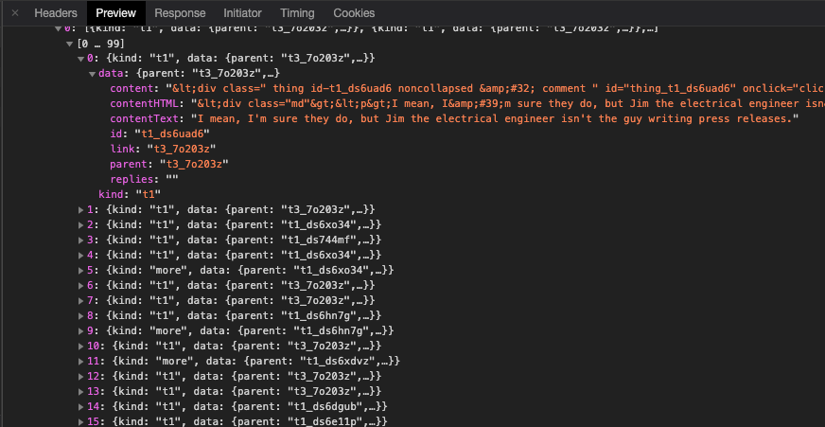
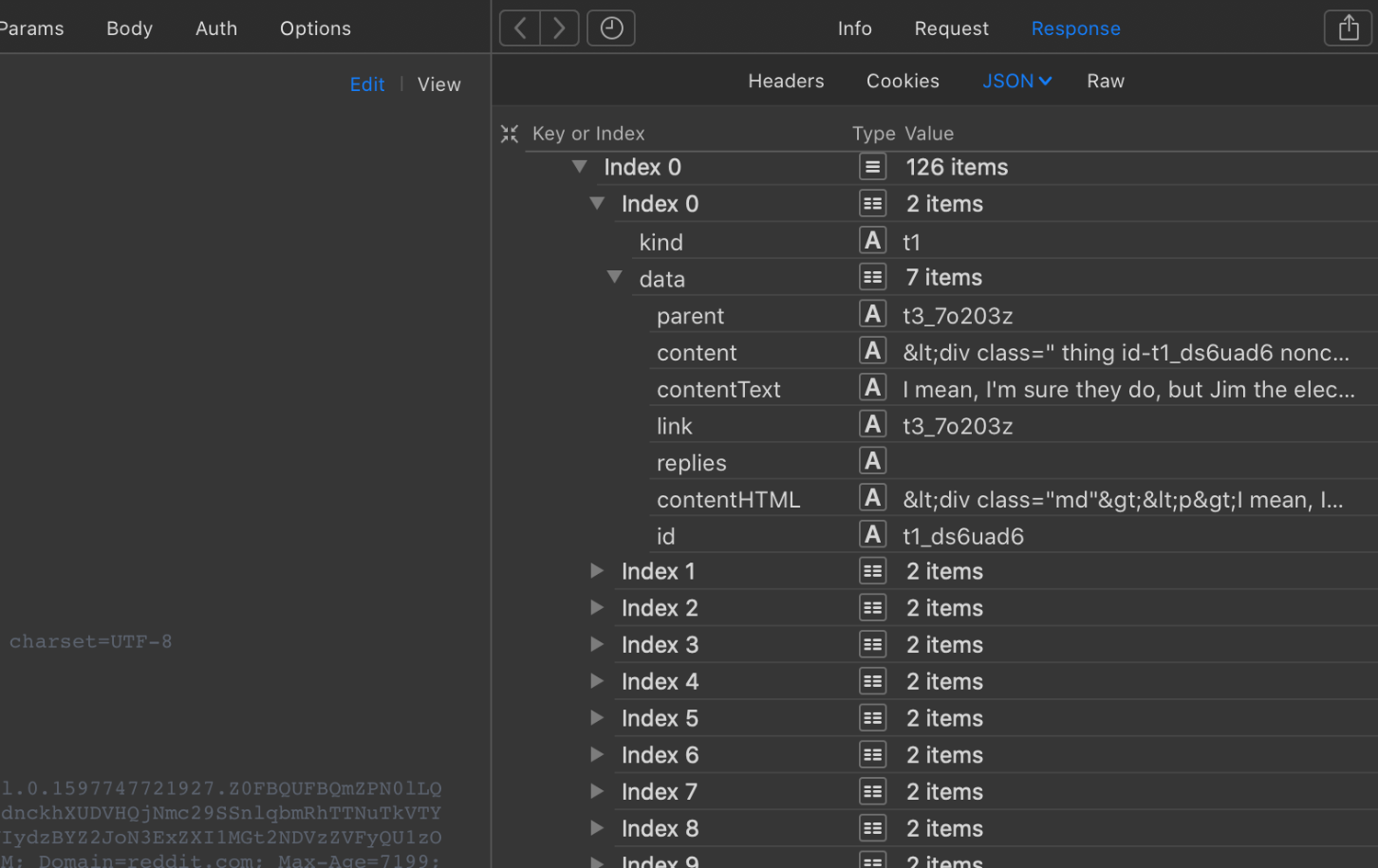
In this case, the response is usually a JSON object with all the data you need. By checking the Headers tab, you can gather the details necessary to replicate the request. Understanding the parameters and their values is essential and may take several attempts to perfect, especially if the API uses single-use tokens to prevent simple replays.
Use your browser's developer tools for this analysis. Exporting requests as a HAR file can help you examine them more deeply in tools like Paw or Postman.
Reverse engineering mobile apps
API debugging techniques also apply to mobile apps. You might need to intercept and replicate requests made by mobile apps, which can be tricky for a couple of reasons:
- Intercepting requests: This often involves using a Man-In-The-Middle (MITM) proxy, such as Charles.
- Request obfuscation: Mobile apps tend to hide their requests more effectively than web apps, making analysis more challenging.
A well-known example is Pokémon Go, where Niantic identified and banned players who used cheat tools that overlooked additional, hidden parameters in the API requests.
Another interesting example is the reverse engineering of Starbucks' unofficial API. This API employed advanced methods such as device fingerprinting, encryption, and single-use requests, adding layers of complexity to the reverse-engineering process.
12. Avoid honeypots
Web crawlers can easily trigger traps known as honeypots set by website administrators to catch and block unauthorized scrapers. These traps are typically invisible to human users.
Honeypots often take the form of links invisible to users but detectable by bots. Here's how to identify and avoid these setups:
- Invisible links: Avoid links styled with CSS properties such as display: none or visibility: hidden, or positioned off-screen (e.g., position: absolute; left: -9999px).
- Camouflaged links: Be wary of links that match the background color (e.g., color: #ffffff on a white background). Your scraper should ignore these links.
- Link relevance: Only follow links that are relevant to your scraping objectives. Irrelevant links might be decoys.
To effectively bypass honeypots, consider these best practices:
- Respect robots.txt: Adhering to the guidelines in this file helps avoid areas likely to contain honeypots.
- Analyze content reliability: Validate the data collected by your scraper against trusted sources to ensure accuracy, as some honeypots provide false information.
- Simulate human behavior: Mimic human browsing patterns by varying the pace of requests and not following every link on a page.
- Regularly update scraping logic: Continuously refine your scraping methods to adapt to new types and techniques of honeypots.
By following these guidelines, you can more effectively evade honeypots, enhancing the sustainability and effectiveness of your web scraping efforts.
13. Route through Tor
Tor, also known as The Onion Router, anonymizes web traffic sources by routing them through volunteer-operated relays. However, it isn't a practical way to avoid getting blocked when web scraping.
The exit node pool is the problem: it's public and shared by every Tor user. Most anti-bot systems maintain a list of these nodes and block them proactively, so your Tor requests can get rejected as quickly as you make them. Even if you manage to gain access, routing through relays is slow and therefore an impractical approach for large-scale scraping.
In a nutshell, Tor is an anonymity tool, not a practical evasion method in 2026.
14. Reverse engineer the anti-bot technology
As web technologies evolve, so do the strategies websites use to detect and block automated scraping. These anti-bot technologies can involve complex algorithms designed to analyze user behavior, request patterns, and other hallmarks of automated activity.
Cloudflare has shifted from pure bot-blocking to something more economic. Since July 2025, it has blocked AI crawlers by default on new domains, and its Pay Per Crawl program returns an HTTP 402 (Payment Required) response to crawlers that haven't paid for access. It also runs AI Labyrinth, a honeypot that serves fabricated content to bots it catches, alongside standard Turnstile challenges. See our Cloudflare scraping guide for more information.
DataDome leans almost entirely on machine learning. Its system runs hundreds of foundational models plus more than 85,000 customer-specific models. It's especially common on European sites, in part due to its emphasis on EU data compliance. Our DataDome scraping guide provides more depth.
Akamai has invested more heavily in TLS-layer detection than any other major vendor. It pioneered commercial TLS fingerprinting years ago and rolled out JA4 fingerprinting in 2026. These actions indicate that TLS fingerprinting is a major detection layer in the Akamai pipeline.
Stop getting blocked with ScrapingBee
ScrapingBee combines premium and stealth proxies, JavaScript rendering and fingerprint management behind a single API call, satisfying every detection layer discussed in this guide. Simply send your target URL, enable the features you need, and get back clean HTML or JSON. The best part? You get 1000 free API credits on sign-up, with no credit card required.
Web scraping blocking FAQs
Why does my scraper get a 403 when the page works in my browser?
Most often, it's a TLS fingerprint mismatch. Python requests and similar HTTP clients send a TLS and header signature that no real browser produces, so anti-bot systems reject the request before any HTML is served. If the target site relies solely on network-layer fingerprinting (TLS and HTTP/2), a browser-impersonating client like curl_cffi can get you over the hop. If it also runs browser fingerprinting or requires JavaScript, you'll need a stealth browser paired with residential proxies.
Can websites detect Selenium and Playwright?
Yes. Vanilla Selenium and Playwright leak automation signals, such as navigator.webdriver, missing browser APIs, and the CDP Runtime.Enable calls that anti-bot systems flag instantly. That said, fortified versions of these headless browsers, such as nodriver, SeleniumBase UC Mode, Patchright, or Camoufox, patch these leaks and help you survive longer.
Do I need residential proxies or are datacenter proxies enough?
You need residential proxies for reliable web scraping. Datacenter proxies work on unprotected sites but are blocked on-site by defended targets because they're known to rarely carry human traffic. Residential proxies appear to be real ISP users and pass reputation checks. Use datacenter proxies for open sites and residential or mobile proxies for protected ones.
How do I check if a website allows scraping?
Read the site's robots.txt for disallowed paths and crawl-delay rules, check the Terms of Service for scraping clauses, and look for an official API. If an API exists, the website provides direct access to its data via that API, and you should use it instead. Scraping publicly available data is generally lawful, but logged-in areas and personal data are subject to much stricter rules.
How do I bypass Cloudflare when scraping?
To bypass Cloudflare when web scraping, you need every layer right. In practice, that means browser-grade TLS and browser fingerprints, residential IPs, and consistent sessions. Cloudflare checks TLS and HTTP/2 fingerprints, runs JavaScript challenges, scores IP reputation, and serves Turnstile when in doubt. A managed scraping API handles all of this in one call. For a step-by-step walkthrough, see our guide on how to bypass Cloudflare.
Why do CAPTCHAs keep appearing even after I solve them?
Because CAPTCHAs are a symptom, not the root problem. If your IP, fingerprint, or behavior still scores as automated, the site keeps challenging you no matter how many puzzles you pass. Rather than focusing on solving CAPTCHAs, ensure you're not leaving any traces of automation. A clean residential IP, consistent cookies, and human-like pacing, and most CAPTCHAs stop appearing.

Ilya is an IT tutor and author, web developer, and ex-Microsoft/Cisco specialist. His primary programming languages are Ruby, JavaScript, Python, and Elixir. He enjoys coding, teaching people and learning new things. In his free time he writes educational posts, participates in OpenSource projects, tweets, goes in for sports and plays music.