If you're wondering how to find someone's IP address legally, there are six realistic methods: checking email headers, using netstat during an active direct connection, reading your own server or app logs, running an IP lookup tool on an address you already have, asking the person directly, or using DNS to find a public website's IP. Each method works only in a specific context. An IP address shows network information, such as a country, rough region, and ISP, not a person's identity.
This guide is for troubleshooting, security, website administration, and privacy education. It is not a guide to stalking, harassment, doxxing, or unauthorized access, and you should only collect or use IP data when you have a lawful reason to do so.
Key takeaways
- You can only legally see someone's IP when they connect to something you control, it shows up in an email or a direct connection, or they share it with you.
- An IP reveals a country, a rough region, and the ISP that owns the connection range. It never reveals a name, phone number, or a home address.
- Tools that claim to get an IP address from a phone number are scams.
- Linking an IP to a real person requires ISP records and legal authority, available only through official legal channels.
If privacy is your concern, it is often smarter to focus on protecting your own connection instead. You can learn more about options in this guide on How to hide my IP address for free.
6 legal ways to find someone's IP address
1. Check email headers
Every email you receive carries routing metadata in its headers. In Gmail, open the message, click the three-dot menu in the top-right corner, and select "Show original." Scroll to the "Received" fields. Each server the message passed through added one entry. The bottom Received entry is usually closest to the sending mail system, but it may still show only the sender's email provider rather than the sender's personal IP.
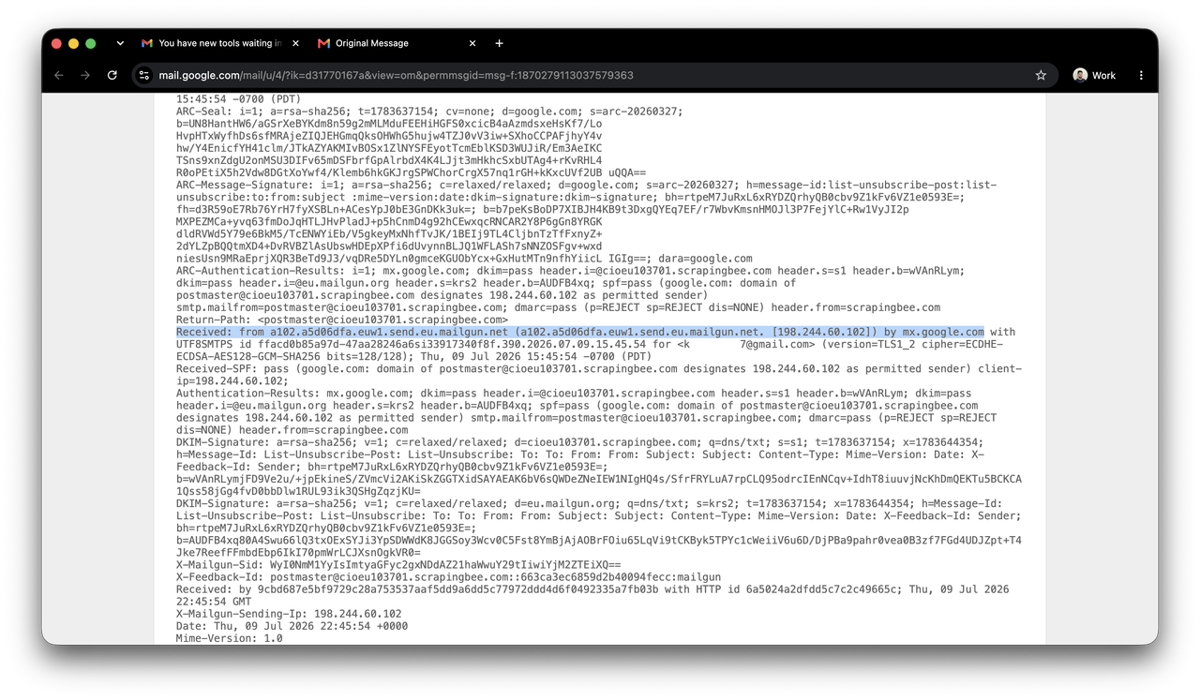
The result depends on the sender's mail provider. Gmail and Outlook route outbound messages through their own infrastructure, so the IP you find traces back to Google or Microsoft. Email from self-hosted or legacy mail servers is more likely to show the sender's actual connection IP.
Use this only to investigate the email you received.
2. Use netstat during a direct connection
netstat lists active network connections on your machine. When you're connected directly to another person's device, their IP shows up in the foreign address column. Run netstat -an on macOS or Linux, or netstat -n on Windows, while a direct session is active. Look for connections in the ESTABLISHED state.
Here's what it could look like:
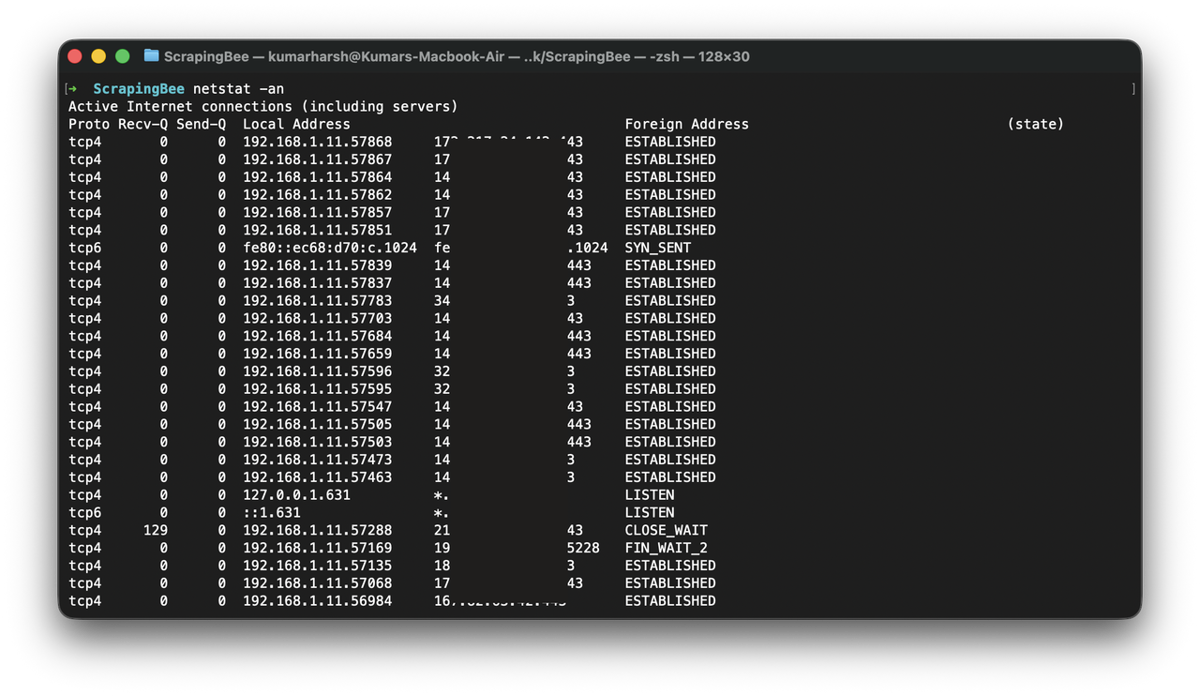
The key constraint is that the connection must be direct. Modern messaging apps (WhatsApp, Signal, Discord, Telegram) relay all traffic through their own servers, so netstat returns the relay server's IP in those cases. P2P file transfers and some multiplayer game engines still establish direct peer connections, which is where this method is effective.
Only run this on your own machine.
3. Read your own server or app logs
If you run a web server, you receive the client IP with every request. Most frameworks expose it directly:
In Node.js with Fastify:
fastify.get('/', async (request, reply) => {
  const clientIp = request.ip;
  console.log('Client IP:', clientIp);
  return 'Hello';
});
In Ruby on Rails:
class HomeController < ApplicationController
  def index
    client_ip = request.remote_ip
    Rails.logger.info "Client IP: #{client_ip}"
  end
end
In Django:
def home(request):
    client_ip = request.META.get('REMOTE_ADDR')
    print("Client IP:", client_ip)
If your app runs behind a reverse proxy, load balancer, or CDN, check the X-Forwarded-For header. The IP in REMOTE_ADDR will belong to the proxy layer. Most hosting platforms configure this correctly, but verify it for your stack.
This applies only to servers you own or administer.
4. Run an IP lookup on an address you already have
Once you have an IP from your logs or another legitimate source, a lookup tool gives you network context. Services like ipinfo.io or ipapi.com query databases built from ISP registration records and routing data.
A lookup returns the country, a region estimate, the ISP name, and whether the IP belongs to a residential connection, a corporate network, or a datacenter. The datacenter flag is useful for identifying bots, scrapers, or VPN exit nodes hitting your server.
City-level estimates can be off by hundreds of kilometers. VPN and proxy users appear to be located at their exit node, which may be in a different country.
Look up only IPs you obtained through legitimate means.
5. Ask them directly
For troubleshooting or access control, have the person open a what-is-my-ip page and share the result with you. Sites like whatismyip.com or ipinfo.io show their current public IP instantly. This gives you an accurate, consent-based result without any guesswork.
It's the right approach when you need to whitelist an IP on your server, set up remote access, or debug a connection issue with a specific user. The IP reflects their connection at that moment. On dynamic connections, it changes when their router reconnects or their ISP refreshes their session.
Get consent before asking, and use the IP only for the stated purpose.
6. Look up a website's IP with DNS
Every public domain resolves to an IP through DNS. Three command-line tools give you the result:
nslookup example.com
dig example.com
ping example.com
All three return the IP the domain currently resolves to. This is standard network debugging and part of how the web works.
For large sites, the returned IP belongs to a CDN edge node or load balancer. Traffic routes through distributed infrastructure, and the address reflects the node closest to your location. For small or self-hosted sites, the IP maps directly to the origin server.
Use this for infrastructure work, DNS debugging, or verifying hosting configuration.
Can you find someone's IP address from a phone number?
There's no public mapping from a phone number to an IP address. Phone numbers and IP addresses belong to separate infrastructure systems, assigned by different providers under different protocols. Any tool claiming to find someone's IP address by phone number is a scam or a phishing page designed to harvest your data or install malware.
The six methods above all require either an active network connection to something you control, or the person sharing their IP with you directly. A phone number sits outside both contexts. The only path from a phone number to an IP address runs through telecom provider records, and that requires legal authority and a formal request to the carrier.
If you have a legitimate need, the practical path is to ask the person to share their IP directly (method 5 above), review connection logs from a service they use that you operate, or pursue legal channels if the situation warrants it.
How to trace an IP address to a location
To trace an IP address to a location, paste it into a geolocation lookup service such as ipinfo.io or ipapi.com. The result comes back immediately and includes the country, a city or region estimate, the ISP name, and a residential or datacenter classification. Some tools also return latitude and longitude coordinates, though these mark the center of the IP's registered network block, which can span an entire city.
IP geolocation works by querying databases that map IP ranges to countries, cities, and internet providers. These databases come from ISP registration records and network routing data. Results are estimates, and city-level accuracy is inconsistent across different tools and regions.
Common accuracy issues are:
- The tool shows the ISP's office location instead of the user's actual area
- Results resolve to the nearest major city in a region
- The city or region returned can be off by hundreds of kilometers
Privacy tools shift the apparent location further:
- A VPN routes traffic through a server in another country
- Tor routes traffic through multiple relays worldwide
- Corporate networks show the company's central gateway location
- Mobile carriers pool thousands of users under shared IP ranges
When you see a location from a geolocation tool, treat it as a rough network estimate based on infrastructure registration. ISP records with timestamps are the only source that can link an IP to a specific customer, and accessing those requires legal authority.
VPNs were originally built for secure remote access to company networks. Today many people use them for privacy, and in some regions because of heavy internet censorship. Either way, they make IP-based location data less reliable.
Understanding IP addresses, privacy, and limits
So, what's an IP address?
Alright, let's make this super simple. Think about an IP (Internet Protocol) address like a phone number for your device, whether it's your PC, laptop, or smartphone. When you call someone, there's a country code, maybe an operator code, and then the actual number. It doesn't tell you the exact apartment someone is sitting in, but it tells the system where to route the call. An IP works the same way. It helps the internet know where to send the data.
In plain terms, an IP address is:
- A number or ID assigned to your internet connection
- Given to you by your ISP (Internet Service Provider)
- Used to route traffic back and forth between you and websites
Your ISP is the company you pay for home internet or mobile data (yeah the same one you send way too much money to every month just to be online). You don't invent your IP and you don't usually control it. It gets assigned automatically when you connect.
It's important to understand that an IP identifies a connection on a network, not a person and not even a specific device forever.
Here's what happens in real life, step by step:
- You turn on your laptop
- You connect to Wi-Fi
- Your router talks to your ISP
- Your connection gets assigned a public IP
- Now websites know where to send data back
What an IP cannot tell you
An IP address is a network identifier assigned to a connection, and the data it exposes stops at the network level. It gives you a country, a rough region, and an ISP name. Personal details sit outside that scope entirely:
- The person's full name
- Their phone number or social media accounts
- Their exact home address, street, or apartment
- What device they were using
- Who was sitting at the screen
There's a deeper technical limit to IP addresses too. One public IP address can represent many people simultaneously. Every device on a home Wi-Fi network shares one public IP. An office of hundreds of employees looks like a single IP to the outside internet. A coffee shop puts all its customers behind the same address. On mobile networks, thousands of users cycle through shared IP ranges.
Even when you have an IP, the connection could belong to any number of people at that moment. Narrowing it to a specific customer requires ISP logs with timestamps, and accessing those logs requires legal authority.
What someone's IP address can really show you
Alright, now let's talk about what an IP can actually reveal in the real world. As we've already discussed, an IP address is not a magic tool, and it does not show a blinking dot on a map with someone's exact house.
What it can usually show is basic network-level information, such as:
- The country the IP is registered in
- The city or general region (rough estimate, not exact)
- The internet provider (ISP) that owns the IP range
- Whether it belongs to a corporate network, hosting company, or data center
That's pretty much it for normal public lookups. For example, if you check an IP, you might see something like "Germany, Berlin area, ISP: Example Telecom." If someone wanted more precise information, like the exact customer behind that IP at a specific time, that would require access to ISP logs. Internet providers keep records of which customer was assigned which IP and when. Getting that data usually requires legal authority, such as a court order or an official investigation.
Also, very important: using someone's IP address to harass, threaten, intimidate, or scare them is illegal in many countries. Even if you only know their city or ISP, trying to weaponize that information can land you in serious trouble.
So yes, an IP can tell you something. But it's basic network info, not a secret identity file.
IP addresses in greater detail
Up to this point, we've covered the basics. In this section, we'll go a bit deeper into how IP addresses actually work: IPv4 vs IPv6, static vs dynamic addresses, public vs private IPs, and why all of this matters in real life. You can skip this part if you only needed a quick overview, but if you want a clearer technical picture, this will help.
Static vs dynamic IP addresses
So, here's yet another important thing: many IP addresses are temporary. Most home connections use dynamic IPs. That means the address can change over time. For example:
- You have one IP today
- Your router reconnects
- Your ISP refreshes your session
- Next week you have a different IP
On mobile networks, it can change even more often. For everyday users, an IP is usually just a temporary session label, not a lifelong identifier.
Static IPs are the opposite. They stay the same. These are more common for:
- Servers
- Business internet connections
- Hosting providers
- Cloud infrastructure
If you run a website on a cloud server, that server may have a fixed public IP assigned by the host.
But even here, things are not always direct. Many websites sit behind CDNs or reverse proxies. In that case, users see the IP of the CDN provider, not the actual origin server. So even a "stable" IP often represents shared infrastructure, not a single machine and definitely not a specific person.
In short, dynamic IPs are normal for everyday users, static IPs are more common for servers, but neither one equals a human identity.
IPv4 and IPv6
There are two main types of IP addresses:
- IPv4, which looks like four numbers separated by dots, for example 203.0.113.10
- IPv6, which looks much longer and includes letters and colons, for example 2001:0db8:85a3:7f2e:4c9a:1b2d:9e3f:6a10
By the way, with IPv6, many providers assign a stable prefix to your connection. Devices often rotate the device part, but the prefix can still be consistent for a while.
You don't need to memorize either format. Just know that both do the same core job: they identify a connection on a network so data knows where to go. If you're wondering which is faster, check out our guide: Which is faster IPv4 or IPv6.
IPv6 exists because the global supply of available IPv4 addresses ran out as more devices came online. It provides a much larger address pool to accommodate continued internet growth.
Public vs private IP addresses
A lot of confusion comes from mixing up public and private IP addresses.
A private IP is what your device gets inside your local network. At home, your laptop might have something like 192.168.0.15. That address only works inside your Wi-Fi. It is not visible to the wider internet. Your router then uses one public IP address to talk to the outside world. That public IP is what websites see when you visit them.
Here's the simple flow:
- Your laptop → gets a private IP
- Your router → has a public IP
- Websites → only see the public IP
And yes, websites themselves usually also have public IP addresses. If a site is available on the internet, it must have a public IP (or sit behind infrastructure that has one). The only time a server does not use a public IP is when it's inside a private internal network.
So when someone says "I saw your IP," they are usually talking about your public IP, not the 192.168.x.x address inside your house. Those internal addresses are reused by millions of networks and mean nothing outside your own router.
This setup is normal. It's technically called network address translation, but you don't need to remember the term. Just remember this: private IP stays inside your network, public IP is what the internet sees.
Working with IP addresses on systems you run
IP addresses are a routine part of running web infrastructure. Website owners log them for security and debugging. Companies monitor network traffic to detect suspicious activity. Customer support teams check IP regions to catch fraud. Security systems use IP data to block spam, bots, and brute-force attacks.
The common thread is that you're working with systems you own or operate, and you have a defined purpose. If someone hits your login endpoint 500 times in a minute, blocking that IP is a reasonable security response. If suspicious orders come from a known bad IP range, reviewing that data protects your business.
If you're rotating IPs to scrape at scale, managing proxies, CAPTCHA handling, and browser fingerprinting manually gets complex quickly. ScrapingBee's web scraping API handles proxy rotation, fingerprinting, and CAPTCHA solving so you can focus on the data. Read the guides on web scraping without getting blocked and rotating and residential proxies to see how it fits into your pipeline. You can start with 1,000 free API calls and no credit card required.
Logging IPs and privacy laws
Note: In this article I share general information — it is not a legal advice and I'm not a lawyer. If you need guidance for a specific situation, talk to a qualified legal professional.
Quick reality check: in many places, IP addresses are considered personal data. Under laws like GDPR in the EU and similar regulations in other regions, an IP address can count as information that relates to an identifiable person. That means you cannot just collect and store IP logs forever "just in case."
This isn't the wild west, so there are rules. If you run a website or app, you should:
- Have a clear reason for logging IPs, such as security or fraud prevention
- Mention it in your privacy policy
- Keep logs only as long as necessary
- Protect that data from leaks or misuse
- Avoid using IP data for unrelated purposes later
The rule is simple: collect less, keep it short, use it only for the reason you stated, and respect the people behind the connections.
Common myths about IP tracking
Myth 1: An IP address gives you someone's exact home address
No, it doesn't. An IP can usually show a country and maybe a rough city-level estimate. It does not reveal a street, apartment number, or building. Getting a real physical address requires ISP logs with timestamps and legal processes, not a random IP lookup tool.
Myth 2: One IP address equals one person
Also wrong. A single public IP can represent an entire household, an office full of employees, or everyone on the same café Wi-Fi. On mobile networks, thousands of users can rotate through shared IP pools. An IP identifies a connection, not a specific human being.
Myth 3: If I get someone's IP, I can fully track them
Getting someone's IP does not unlock a secret tracking dashboard. Without access to provider records and legal authority, you cannot tie that IP to a named individual.
Myth 4: Using a VPN makes you completely untraceable
A VPN hides your home IP from websites, but it does not make you invisible. The VPN provider still sees your connection, and websites still see an IP, just a different one. Privacy tools reduce exposure, but they do not remove accountability or legal boundaries.
Myth 5: If I ban someone's IP, they can never come back
Not true. An IP ban blocks a connection, not a person. Many users have dynamic IPs that change over time. They can also switch networks or use a VPN. There's another issue: as you already know, IP addresses get reassigned. The same IP you banned today might belong to a completely different person tomorrow. If your ban is permanent, you risk blocking random users who did nothing wrong.
IP bans help against obvious abuse, but they are not a permanent solution.
Frequently asked questions (FAQs)
Is it illegal to trace someone's IP address?
No. Looking up an IP address isn't illegal. Every website you visit logs your IP as part of normal server operation. What's illegal is misuse: using an IP to harass, threaten, stalk, or gain unauthorized access to a system. Linking an IP to a specific person requires ISP records and legal authority.
Can you get someone's IP address from a phone number?
No. Phone numbers and IP addresses belong to separate infrastructure systems, and no public lookup connects them. Sites that claim to find an IP from a phone number are scams or data-harvesting pages. Use the six methods above if you have a legitimate need, or work through legal channels.
Can I get someone's IP address from a message or social media?
Platforms don't expose user IP addresses to other users. The only way to see someone's IP is if they connect to a server or system you control. Sites marketing "IP grabber" tools are scams or phishing pages. For legitimate options, see the six methods above.
What can someone do if they know my IP address?
An IP address exposes your country and ISP. Basic network probing is possible if your firewall is weak, which is why standard router security matters. If you deal with scraping blocks, read What to do if your IP gets banned.
Can police track an IP address to a person?
Yes, through legal process. Police can request ISP records showing which customer held a specific IP address at a given date and time, typically via a court order. That level of identification requires lawful authority and isn't available through public lookup tools.
Can I hide my real IP address, and is that legal?
Every site you visit sees an IP because traffic requires a return address. VPNs and proxies replace your home IP with a different exit point. Both are legal in most jurisdictions. What matters is your purpose and compliance with platform terms. For managed IP rotation at scale, see ScrapingBee's web scraping API.

Ilya is an IT tutor and author, web developer, and ex-Microsoft/Cisco specialist. His primary programming languages are Ruby, JavaScript, Python, and Elixir. He enjoys coding, teaching people and learning new things. In his free time he writes educational posts, participates in OpenSource projects, tweets, goes in for sports and plays music.