To scrape Yandex search results, you need more than a basic requests.get() call and a couple of CSS selectors. Yandex actively filters automated traffic, challenges suspicious requests with SmartCaptcha, and may return a captcha page with HTTP status 200, which means your scraper can fail without raising an obvious error.
This tutorial shows how to build a Yandex scraper with ScrapingBee's generic HTML API. We will start with the proxy setup and request parameters, then parse organic titles, links, and snippets with Python and BeautifulSoup. We will also cover AI extraction and extract_rules for cases where Yandex changes its markup, loop through multiple result pages, remove duplicates, and export the collected data to CSV.
The later sections port the same scraper to Node.js with Cheerio and show how Yandex image search differs from regular web search. Instead of relying on rendered <img> elements, we will read image results from the JSON embedded in the page state.
Along the way, we will look at SmartCaptcha, IP blocking, request costs, regional targeting, and the boundary between public search-result scraping and content behind a login. All examples use public, pre-login Yandex pages.
TL;DR
- Yandex can flag datacenter IPs quickly and respond with SmartCaptcha. Premium proxies can work, but Stealth was the only mode that stayed stable across repeated requests in my June 2026 tests.
- ScrapingBee has no dedicated Yandex endpoint. Use the generic HTML API for public web, image, maps, and other Yandex pages.
- HTTP
200does not guarantee real results. Yandex may return a captcha body with the same status, so validate the HTML before parsing. - Yandex markup changes over time. Use fallback selectors,
extract_rules, or AI extraction when hard-coded selectors start returning empty results. - The tutorial includes working Python and Node.js scrapers, pagination, CSV export, image search, and a request-credit breakdown.
Why scraping Yandex is hard: SmartCaptcha and IP blocking
Yandex fingerprints incoming requests and sends suspicious traffic to SmartCaptcha, its in-house anti-bot system. A basic script running from a datacenter IP can hit a challenge after only a few requests, so changing the User-Agent header alone will not get you far.
SmartCaptcha can evaluate traffic before the user clicks anything. It looks for behavior that does not resemble normal browsing and may show an invisible check, a checkbox, or a more involved challenge. The official Yandex SmartCaptcha documentation explains how the system works.
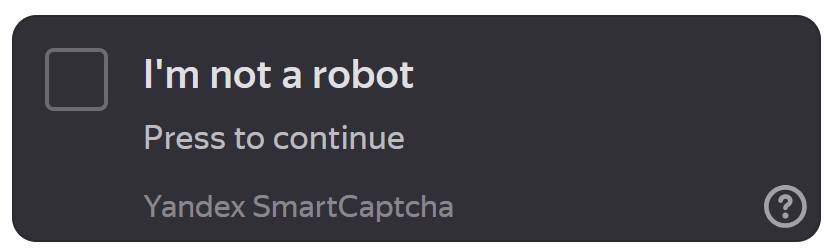
IP reputation is usually the main problem when you scrape Yandex search results. In my June 2026 tests, a datacenter IP sometimes reached SmartCaptcha after only a few requests. In the same tests, yandex.ru challenged datacenter traffic more often than yandex.com. This behavior can vary by IP range, region, and time.
The usual fix is to use residential or stealth proxies and add delays between requests. These options make traffic look closer to normal browser activity, but they do not guarantee a bypass. Avoid sudden request bursts, keep sessions consistent, and retry blocked pages with exponential backoff.
This is one of the most common web scraping challenges, and proxy quality usually matters more than clever request headers.
What you can and can't legally scrape from Yandex
You can generally scrape public Yandex search results that anyone can view without signing in, but the exact legal position depends on your location, purpose, and how you collect and use the data. Public result pages are commonly scraped for rank tracking, market research, and search engine optimization (SEO) tools.
The main boundary is authentication. A public search result page is one thing. A page available only after signing into a Yandex account is another. Do not scrape content behind a login, and do not send account cookies or credentials through ScrapingBee. ScrapingBee does not support post-login scraping.
Even public pages are not a free-for-all. Check Yandex's terms and robots.txt rules before running a scraper. Pace your requests, respect rate limits, and avoid sending large bursts that could disrupt the service. A scraper that behaves like a badly written denial-of-service script is not doing anyone a favor.
Personal data needs extra care. Search results may contain names, contact details, or links to user-generated content. Laws such as the General Data Protection Regulation (GDPR) can apply even when personal data is publicly visible. Avoid collecting sensitive or regulated data unless you have a valid reason, a lawful basis, and proper safeguards.
The practical rule is simple: scrape only public, pre-login results, collect only what your project needs, and stop when the target tells you to stop. This section is general guidance, not legal advice.
Setting up the ScrapingBee HTML API for Yandex
ScrapingBee does not have a dedicated Yandex endpoint. To build a Yandex search API workflow, send the full Yandex search URL to the generic ScrapingBee HTML API with premium_proxy=true. For pages that still return SmartCaptcha or blocked content, use stealth_proxy=true instead. During my own tests, stealth proxy was the only mode that returned stable Yandex results across repeated requests. Premium proxies worked for some pages, but SmartCaptcha appeared more often.
This generic setup works across public Yandex surfaces. You can request web results, image search pages, maps, and other public URLs through the same API.
Create a free ScrapingBee account and copy the API key from the dashboard. A free account includes 1,000 API credits.
Store the key in an environment variable rather than putting it directly in the script:
export SCRAPINGBEE_API_KEY="your-api-key"
On Windows PowerShell:
$env:SCRAPINGBEE_API_KEY="your-api-key"
Do not commit the key to source control or paste it into prompts sent to AI agents.
Install the requests package before running the Python example:
python -m pip install requests
The following script sends a Yandex search URL through a Premium proxy and handles the most common failures:
import os
import sys
from urllib.parse import urlencode

import requests

API_URL = "https://app.scrapingbee.com/api/v1/"
API_KEY = os.getenv("SCRAPINGBEE_API_KEY")

if not API_KEY:
    sys.exit(
        "Missing SCRAPINGBEE_API_KEY. "
        "Set it as an environment variable before running the script."
    )

query_string = urlencode({"text": "python web scraping"})
yandex_url = f"https://yandex.com/search/?{query_string}"

params = {
    "api_key": API_KEY,
    "url": yandex_url,
    "premium_proxy": "true",
    "render_js": "false",
}

try:
    response = requests.get(API_URL, params=params, timeout=120)
except requests.Timeout:
    sys.exit("The request timed out after 120 seconds.")
except requests.ConnectionError as exc:
    sys.exit(f"Could not connect to ScrapingBee: {exc}")
except requests.RequestException as exc:
    sys.exit(f"The request failed: {exc}")

if response.status_code != 200:
    error_preview = response.text[:500].strip()

    sys.exit(
        f"ScrapingBee returned HTTP {response.status_code}.\n"
        f"Response: {error_preview or 'No response body'}"
    )

print(f"Downloaded {len(response.content):,} bytes")
print(
    "Request cost:",
    response.headers.get("Spb-cost", "not reported"),
    "credits",
)

with open("yandex-results.html", "wb") as file:
    file.write(response.content)

print("Saved the response to yandex-results.html")
The url parameter contains the page you want to fetch. The premium_proxy option routes the request through ScrapingBee's Premium proxy pool. Setting render_js=false avoids running a browser when the initial HTML already contains the search results.
Enable JavaScript rendering when Yandex returns an incomplete page:
params["render_js"] = "true"
For tougher blocks, remove the Premium proxy option and switch to Stealth with JavaScript rendering:
# Don't forget to remove params["premium_proxy"] = "true"
params["stealth_proxy"] = "true"
params["render_js"] = "true"
Use one proxy mode per request. Do not enable both premium_proxy and stealth_proxy.
You can also add country_code when you need results from a specific location:
params["country_code"] = "de"
Country targeting requires a Premium or Stealth proxy. Classic datacenter proxies do not support geotargeting.
ScrapingBee credit costs
The HTML API charges credits based on the proxy type and whether JavaScript rendering is enabled.
| Request type | Credit cost |
|---|---|
| Classic without JavaScript | 1 |
| Classic with JavaScript | 5 |
| Premium without JavaScript | 10 |
| Premium with JavaScript | 25 |
| Stealth with JavaScript | 75 |
| AI extraction | 5 additional credits |
These credit costs are current as of June 2026. Check ScrapingBee pricing before estimating the cost of a larger crawl.
Only billable responses consume credits. ScrapingBee currently charges for 200, 404, and 410 responses. Errors caused by invalid parameters, exhausted credits, concurrency limits, or internal API failures are not normally billed.
The Spb-cost response header reports the exact number of credits used by each request.
Scraping Yandex web search results step by step with Python
To scrape Yandex with Python:
- build the search URL;
- send it through ScrapingBee with
premium_proxy=true; - validate the returned HTML;
- parse each organic result with BeautifulSoup.
We already built a basic ScrapingBee request in the previous section. Now we will extend it into a small Yandex scraper that returns the title, URL, and snippet for each organic result.
If this is your first Python scraper, the broader web scraping with Python guide covers the underlying request and parsing concepts.
Install the Python packages
The script uses requests for the API call and beautifulsoup4 for parsing the returned HTML.
python -m pip install requests beautifulsoup4
Store your ScrapingBee API key in an environment variable:
export SCRAPINGBEE_API_KEY="your-api-key"
On Windows PowerShell:
$env:SCRAPINGBEE_API_KEY="your-api-key"
Build the Yandex search URL
A standard Yandex web search URL accepts these query parameters:
| Parameter | Purpose | Example |
|---|---|---|
text | Search query | python web scraping |
lr | Yandex region ID | 84 |
p | Zero-based page index | 0 |
The first page uses p=0. The second page uses p=1, and so on.
Python's urlencode() function handles spaces and special characters in the query:
from urllib.parse import urlencode

query_params = {
    "text": "python web scraping",
    "lr": 84,
    "p": 0,
}

yandex_url = "https://yandex.com/search/?" + urlencode(query_params)
The resulting URL looks like this:
https://yandex.com/search/?text=python+web+scraping&lr=84&p=0
Parse Yandex organic results
Yandex places the main results inside the #search-result list. Each result is usually an li element with the serp-item class.
Inside each result:
.OrganicTitle-Linkpoints to the result URL..OrganicTitle-LinkTextcontains the title..OrganicTextContentSpancontains the description.
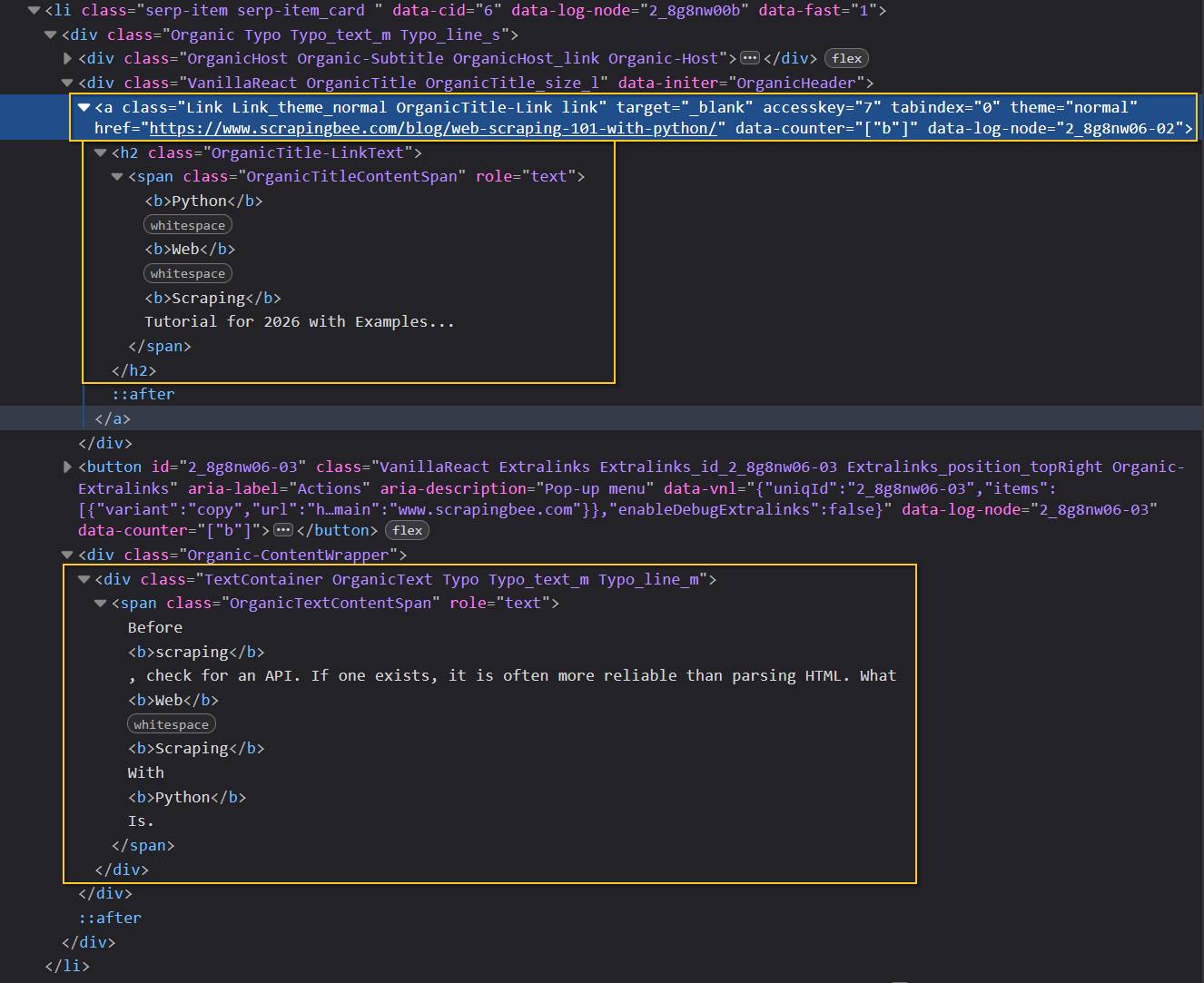
The title may contain nested span, b, and other formatting elements. Joining stripped_strings extracts their text without preserving the markup or repeated whitespace.
Complete Python script
The following script fetches one Yandex results page, checks that the body is not a captcha page, extracts the organic results, and prints the first five entries.
import os
import sys
from pprint import pprint
from urllib.parse import urlencode

import requests
from bs4 import BeautifulSoup


SCRAPINGBEE_URL = "https://app.scrapingbee.com/api/v1/"


class YandexChallengeError(RuntimeError):
    """Raised when Yandex returns a captcha page instead of results."""


class YandexPageError(RuntimeError):
    """Raised when the response does not match the expected Yandex markup."""


def normalized_text(element) -> str:
    """Join nested text nodes and remove repeated whitespace."""
    if element is None:
        return ""

    return " ".join(element.stripped_strings)


def validate_yandex_body(soup: BeautifulSoup):
    """
    Return the main results container or raise an error for a challenge page.

    Yandex may return HTTP 200 for both a real results page and SmartCaptcha,
    so checking the status code alone is not enough.
    """
    result_list = soup.select_one("#search-result")

    if result_list is not None:
        return result_list

    captcha_selectors = (
        ".CheckboxCaptcha",
        ".AdvancedCaptcha",
        "[class*='SmartCaptcha']",
        "form[action*='captcha']",
        "iframe[src*='captcha']",
        "#checkbox-captcha-form",
    )

    if any(soup.select_one(selector) for selector in captcha_selectors):
        raise YandexChallengeError(
            "Yandex returned a captcha page with HTTP 200. "
            "Retry later or switch to stealth_proxy=true."
        )

    page_title = normalized_text(soup.title).lower()
    body_preview = normalized_text(soup.body)[:2000].lower()

    if "captcha" in page_title or "smartcaptcha" in body_preview:
        raise YandexChallengeError(
            "Yandex returned a captcha page with HTTP 200. "
            "Retry later or switch to stealth_proxy=true."
        )

    raise YandexPageError(
        "The response contains neither #search-result nor a known captcha "
        "marker. Yandex may have changed its HTML."
    )


def parse_yandex_results(html: str) -> list[dict[str, str]]:
    """Extract organic result titles, URLs, and snippets from Yandex HTML."""
    soup = BeautifulSoup(html, "html.parser")
    result_list = validate_yandex_body(soup)
    results = []

    for item in result_list.select("li.serp-item"):
        link = item.select_one(
            ".OrganicTitle a.OrganicTitle-Link[href], "
            ".OrganicTitle a.Link[href]"
        )
        title_node = item.select_one(".OrganicTitle-LinkText")
        snippet_node = item.select_one(
            ".Organic-ContentWrapper .OrganicTextContentSpan"
        )

        if link is None or title_node is None:
            continue

        title = normalized_text(title_node)
        url = link.get("href", "").strip()
        snippet = normalized_text(snippet_node)

        if not title or not url:
            continue

        results.append(
            {
                "title": title,
                "url": url,
                "snippet": snippet,
            }
        )

    return results


def fetch_yandex_results(
    query: str,
    region: int = 84,
    page: int = 0,
) -> list[dict[str, str]]:
    """Fetch one Yandex results page through ScrapingBee and parse it."""
    api_key = os.getenv("SCRAPINGBEE_API_KEY")

    if not api_key:
        raise RuntimeError(
            "Missing SCRAPINGBEE_API_KEY. "
            "Set it as an environment variable before running the script."
        )

    yandex_url = "https://yandex.com/search/?" + urlencode(
        {
            "text": query,
            "lr": region,
            "p": page,
        }
    )

    params = {
        "api_key": api_key,
        "url": yandex_url,
        "premium_proxy": "true",
        "render_js": "false",
    }

    try:
        response = requests.get(
            SCRAPINGBEE_URL,
            params=params,
            timeout=(10, 120),
        )
    except requests.Timeout as exc:
        raise RuntimeError("The ScrapingBee request timed out.") from exc
    except requests.ConnectionError as exc:
        raise RuntimeError("Could not connect to ScrapingBee.") from exc
    except requests.RequestException as exc:
        raise RuntimeError(f"The request failed: {exc}") from exc

    if response.status_code != 200:
        error_preview = response.text[:500].strip() or "No response body"

        raise RuntimeError(
            f"ScrapingBee returned HTTP {response.status_code}: "
            f"{error_preview}"
        )

    return parse_yandex_results(response.text)


def main() -> None:
    try:
        results = fetch_yandex_results(
            query="python web scraping",
            region=84,
            page=0,
        )
    except (RuntimeError, YandexChallengeError, YandexPageError) as exc:
        sys.exit(f"Error: {exc}")

    if not results:
        print("Yandex returned no organic results for this query.")
        return

    pprint(results[:5], sort_dicts=False)


if __name__ == "__main__":
    main()
Run the script:
python yandex_scraper.py
The terminal output will be a list of dictionaries:
[
    {
        "title": "Python Web Scraping Tutorial",
        "url": "https://example.com/python-scraping",
        "snippet": "A practical introduction to collecting web data with Python.",
    },
    {
        "title": "Web Scraping with Beautiful Soup",
        "url": "https://example.org/beautiful-soup-guide",
        "snippet": "Learn how to parse HTML and extract structured information.",
    },
]
Your actual results will depend on the query, region, page number, and the current Yandex index.
Why the body validation matters
Do not treat every HTTP 200 response as a successful search page. ScrapingBee may complete the request correctly while Yandex responds with a SmartCaptcha page that also uses status 200.
Without body validation, the parser would find zero results and silently return an empty list. That makes a blocked request look like a valid query with no matches.
The script avoids that problem in two stages:
- It first looks for the known
#search-resultcontainer. - If the container is missing, it checks for known captcha elements and text markers.
If neither appears, the script raises YandexPageError. This usually means Yandex returned another kind of error page or changed its HTML structure.
Handling missing fields
Not every Yandex result card has the same structure. Search pages may contain videos, image packs, answer boxes, ads, and other widgets alongside normal organic links.
The parser only keeps cards that contain both a title and a destination URL:
if link is None or title_node is None:
    continue
A missing snippet is allowed. In that case, the script returns an empty string for the snippet field.
This keeps the output shape consistent:
{
    "title": "Example result",
    "url": "https://example.com/",
    "snippet": "",
}
CSS selectors on search pages can change without notice. Treat them as parser configuration rather than permanent API fields, and test them against saved HTML whenever Yandex updates its layout.
Handling pagination and saving results to CSV
Yandex uses the p parameter for pagination, where p=0 is the first page. Loop through the first three page indexes, wait 2 to 4 seconds between requests, remove duplicate URLs, and write the collected rows to a CSV file.
The code below reuses the manual fetch_yandex_results() parser from the previous Python section. Add these functions to the same file and replace the parser's original main() function with the version below.
import csv
import random
import sys
import time


def save_results_to_csv(
    results: list[dict[str, str]],
    filename: str,
) -> None:
    fieldnames = ["title", "url", "snippet"]

    with open(filename, "w", encoding="utf-8", newline="") as csv_file:
        writer = csv.DictWriter(csv_file, fieldnames=fieldnames)
        writer.writeheader()
        writer.writerows(results)


def main() -> None:
    query = "python web scraping"
    all_results: list[dict[str, str]] = []
    seen_urls: set[str] = set()

    for page in range(3):
        print(f"Scraping page {page + 1}...")

        try:
            page_results = fetch_yandex_results(
                query=query,
                region=84,
                page=page,
            )
        except (RuntimeError, YandexChallengeError, YandexPageError) as exc:
            sys.exit(f"Error on page {page + 1}: {exc}")

        for result in page_results:
            url = result["url"]

            if url in seen_urls:
                continue

            seen_urls.add(url)
            all_results.append(result)

        print(
            f"Found {len(page_results)} results, "
            f"{len(all_results)} unique results collected."
        )

        if page < 2:
            delay = random.uniform(2, 4)
            print(f"Waiting {delay:.1f} seconds...")
            time.sleep(delay)

    if not all_results:
        sys.exit("No results were collected.")

    output_file = "yandex_results.csv"
    save_results_to_csv(all_results, output_file)

    print(
        f"Saved {len(all_results)} unique results "
        f"to {output_file}."
    )


if __name__ == "__main__":
    main()
The resulting yandex_results.csv file contains one row per unique URL:
title,url,snippet
Python Web Scraping Tutorial,https://example.com/tutorial,A practical Python scraping guide.
Beautiful Soup Documentation,https://example.org/bs4,Documentation for parsing HTML with Python.
Add a longer delay when switching to a different search query. Each results page also creates a separate ScrapingBee request, so scraping three pages costs three times as many request credits as scraping one page.
CSV works well for small exports and quick analysis. For larger runs, SQLite is a better next step because it supports indexed lookups, updates, and deduplication without keeping every URL in memory.
Parsing without brittle selectors: extract_rules and AI extraction
Yandex changes its search-result markup often, so a parser tied to one exact CSS selector can stop working without warning. ScrapingBee gives you two alternatives:
extract_rulesmoves selector-based parsing into the API request;- AI extraction returns structured data from plain-language instructions without requiring CSS selectors.
Published Yandex scraping tutorials often use different selectors for the same organic result. That does not always mean one of them is wrong. Yandex can change class names, test different layouts, or return different markup based on the domain, region, and request profile.
The usual symptom is painfully boring: yesterday your script returned ten results, and today it returns an empty list. The request still has HTTP status 200, so nothing looks broken until you inspect the HTML.
A fallback order might look like this:
- Try the primary selectors you verified against the current page.
- Add secondary selectors for known layout variants.
- Move parsing into ScrapingBee with
extract_rules. - Use AI extraction when the markup is unstable, unfamiliar, or not worth maintaining.
The last option costs more, but it removes the selector-matching code from your scraper.
Extract Yandex results with AI extraction
ScrapingBee's AI web scraping feature can turn a Yandex results page into structured JSON without BeautifulSoup or field-level CSS selectors. You describe each result in plain language, define the expected fields, and let the API extract the title, URL, and snippet.
AI extraction adds 5 credits to the normal request cost. It is useful when Yandex changes its internal class names or returns different markup across regions and layouts.
There is one important schema detail. In my Yandex test, a single list rule with nested result objects returned incomplete and unrelated fields. Defining each search result as a separate item produced the expected titles, URLs, and snippets, so that is the approach used below.
To extract several structured search results reliably in this example, define each result as a separate item:
{
  "result_1": {
    "type": "item",
    "output": {
      "title": "...",
      "url": "...",
      "snippet": "..."
    }
  },
  "result_2": {
    "type": "item",
    "output": {
      "title": "...",
      "url": "...",
      "snippet": "..."
    }
  }
}
The script below generates five of these rules, sends them to ScrapingBee, validates the returned URLs, and converts the response into a list of result dictionaries.
import json
import os
import sys
from pprint import pprint
from urllib.parse import urlencode, urlparse

import requests


SCRAPINGBEE_URL = "https://app.scrapingbee.com/api/v1/"
TIMEOUT = (10, 180)
RESULT_LIMIT = 5


def build_result_rule(position: int) -> dict:
    """Build an AI extraction rule for one organic result."""
    return {
        "description": (
            f"The organic Yandex web search result displayed at position "
            f"{position}. Ignore sponsored results, ads, navigation links, "
            f"related searches, image blocks, and video blocks."
        ),
        "type": "item",
        "output": {
            "title": (
                "The exact visible title of this search result."
            ),
            "url": (
                "The absolute HTTP or HTTPS destination URL linked "
                "from this search result."
            ),
            "snippet": (
                "The exact visible descriptive text shown below this "
                "result's title. Return an empty string only when the "
                "result card contains no descriptive text."
            ),
        },
    }


AI_EXTRACT_RULES = {
    f"result_{position}": build_result_rule(position)
    for position in range(1, RESULT_LIMIT + 1)
}


def build_yandex_url(
    query: str,
    region: int = 84,
    page: int = 0,
) -> str:
    """Build a Yandex search URL from a query, region, and page index."""
    if not isinstance(query, str) or not query.strip():
        raise ValueError(
            "The search query must be a non-empty string."
        )

    if not isinstance(region, int) or region < 0:
        raise ValueError(
            "The region must be a non-negative integer."
        )

    if not isinstance(page, int) or page < 0:
        raise ValueError(
            "The page index must be a non-negative integer."
        )

    return "https://yandex.com/search/?" + urlencode(
        {
            "text": query.strip(),
            "lr": region,
            "p": page,
        }
    )


def normalize_results(
    payload: object,
) -> list[dict[str, str]]:
    """Validate the AI response and return a consistent result list."""
    if not isinstance(payload, dict):
        raise RuntimeError(
            "AI extraction returned JSON, but not a JSON object."
        )

    results: list[dict[str, str]] = []

    for position in range(1, RESULT_LIMIT + 1):
        raw = payload.get(f"result_{position}")

        if not isinstance(raw, dict):
            continue

        title = str(raw.get("title") or "").strip()
        url = str(raw.get("url") or "").strip()
        snippet = str(raw.get("snippet") or "").strip()

        parsed_url = urlparse(url)

        if (
            not title
            or parsed_url.scheme not in {"http", "https"}
            or not parsed_url.netloc
        ):
            continue

        results.append(
            {
                "title": title,
                "url": url,
                "snippet": snippet,
            }
        )

    return results


def fetch_yandex_results_with_ai(
    query: str,
    region: int = 84,
    page: int = 0,
) -> list[dict[str, str]]:
    """Fetch and extract one Yandex results page with AI extraction."""
    api_key = os.getenv("SCRAPINGBEE_API_KEY")

    if not api_key:
        raise RuntimeError(
            "Missing SCRAPINGBEE_API_KEY. Set it as an "
            "environment variable before running the script."
        )

    params = {
        "api_key": api_key,
        "url": build_yandex_url(query, region, page),
        "premium_proxy": "true",
        "render_js": "false",
        "ai_selector": "#search-result",
        "ai_extract_rules": json.dumps(
            AI_EXTRACT_RULES,
            ensure_ascii=False,
        ),
    }

    try:
        response = requests.get(
            SCRAPINGBEE_URL,
            params=params,
            timeout=TIMEOUT,
        )
    except requests.Timeout as exc:
        raise RuntimeError(
            "The ScrapingBee request timed out."
        ) from exc
    except requests.ConnectionError as exc:
        raise RuntimeError(
            "Could not connect to ScrapingBee."
        ) from exc
    except requests.RequestException as exc:
        raise RuntimeError(
            f"The request failed: {exc}"
        ) from exc

    if response.status_code != 200:
        preview = response.text[:500].strip() or "No response body"

        raise RuntimeError(
            f"ScrapingBee returned HTTP {response.status_code}: "
            f"{preview}"
        )

    try:
        payload = response.json()
    except requests.exceptions.JSONDecodeError as exc:
        preview = response.text[:500].strip() or "No response body"

        raise RuntimeError(
            "ScrapingBee returned HTTP 200, but the AI extraction "
            f"response was not valid JSON: {preview}"
        ) from exc

    return normalize_results(payload)


def main() -> None:
    try:
        results = fetch_yandex_results_with_ai(
            query="python web scraping",
            region=84,
            page=0,
        )
    except (RuntimeError, ValueError) as exc:
        sys.exit(f"Error: {exc}")

    if not results:
        sys.exit("No valid organic results were extracted.")

    pprint(results, sort_dicts=False)


if __name__ == "__main__":
    main()
The build_result_rule() function creates one structured extraction rule for each result position. Increasing RESULT_LIMIT requests more results:
RESULT_LIMIT = 10
Keep the limit reasonable. Each additional item makes the AI extraction task larger and may increase response time.
The ai_selector parameter restricts processing to Yandex's main result container:
"ai_selector": "#search-result"
This is a coarse page-level selector, not a selector for each field. The AI still identifies the individual result cards, titles, links, and snippets from the natural-language descriptions.
The API response uses named fields:
{
  "result_1": {
    "title": "Python Web Scraping Tutorial",
    "url": "https://example.com/python-scraping",
    "snippet": "Learn how to collect and parse web data with Python."
  },
  "result_2": {
    "title": "Web Scraping with Beautiful Soup",
    "url": "https://example.org/beautiful-soup",
    "snippet": "A guide to extracting structured data from HTML."
  }
}
The normalize_results() function converts that object into the same list format used by the manual BeautifulSoup parser:
[
    {
        "title": "Python Web Scraping Tutorial",
        "url": "https://example.com/python-scraping",
        "snippet": "Learn how to collect and parse web data with Python.",
    },
    {
        "title": "Web Scraping with Beautiful Soup",
        "url": "https://example.org/beautiful-soup",
        "snippet": "A guide to extracting structured data from HTML.",
    },
]
It also rejects entries without a title or a valid absolute HTTP or HTTPS URL. This validation matters because AI extraction is structured, but it is still best-effort.
Use AI extraction when you want to avoid maintaining selectors for every field. Use the manual parser or extract_rules when you need deterministic extraction from a known markup structure.
Use extract_rules without BeautifulSoup
ScrapingBee also supports selector-based extraction through its extract_rules documentation. You declare the fields once, and the API returns JSON. Your script does not need to download HTML and parse it with BeautifulSoup.
Unlike AI extraction, extract_rules still depends on the target page's CSS selectors. It removes parser code from your application, but it does not make those selectors immune to Yandex layout changes.
Here is the extraction declaration for the markup used in the previous section:
import json

EXTRACT_RULES = {
    "results": {
        "selector": "#search-result li.serp-item",
        "type": "list",
        "output": {
            "title": ".OrganicTitle-LinkText",
            "url": {
                "selector": (
                    ".OrganicTitle a.OrganicTitle-Link, "
                    ".OrganicTitle a.Link"
                ),
                "output": "@href",
            },
            "snippet": (
                ".Organic-ContentWrapper "
                ".OrganicTextContentSpan"
            ),
        },
    }
}

params = {
    "api_key": API_KEY,
    "url": yandex_url,
    "premium_proxy": "true",
    "render_js": "false",
    "extract_rules": json.dumps(EXTRACT_RULES),
}

response = requests.get(
    "https://app.scrapingbee.com/api/v1/",
    params=params,
    timeout=(10, 120),
)
response.raise_for_status()

results = response.json().get("results", [])
Use extract_rules when the markup is known and you want predictable fields without running BeautifulSoup locally. Use AI extraction when the markup changes often, differs between pages, or would require too many fallback selectors to maintain.
Neither method removes the need for monitoring. If the result count suddenly drops to zero, log the query, page number, response cost, and extraction output. An empty array can mean no matching results, changed markup, an incomplete page, or a SmartCaptcha response.
Scraping Yandex image search
Yandex image search stores its initial results as JSON inside the page's data-state attribute. The rendered HTML may contain only the application shell, so scraping <img> elements can return nothing even when the response already includes dozens of image results.
The target URL follows the usual Yandex search format:
https://yandex.com/images/search?text=nature
Yandex embeds the initial image-search state in a data-state attribute on the ImagesApp- root element. The visible image cards may be missing from the HTML, but the embedded JSON can already contain the first batch of results.
<div
  id="ImagesApp-..."
  data-state="{...}"
></div>
The image results are stored under:
initialState.serpList.items
That object contains two useful fields:
keys, which preserves the displayed result order.entities, which stores the image data by ID.
Each entity can include the thumbnail URL, original image URL, alternative text, dimensions, and source-page details.
The script below fetches the page through ScrapingBee, reads the embedded JSON, and prints the first five images.
import json
import os
import sys
from urllib.parse import urljoin

import requests
from bs4 import BeautifulSoup


API_URL = "https://app.scrapingbee.com/api/v1/"
YANDEX_URL = "https://yandex.com/images/search?text=nature"

API_KEY = os.getenv("SCRAPINGBEE_API_KEY")

if not API_KEY:
    sys.exit("Missing SCRAPINGBEE_API_KEY.")


def normalize_text(value: str | None) -> str:
    if not value:
        return ""

    return " ".join(str(value).split())


def normalize_url(value: str | None) -> str:
    if not value:
        return ""

    value = str(value).strip()

    if not value or value.startswith("data:"):
        return ""

    return urljoin(YANDEX_URL, value)


params = {
    "api_key": API_KEY,
    "url": YANDEX_URL,
    "premium_proxy": "true",
    "render_js": "false",

    # Enable when using "render_js": "true"
    # During my own tests, everything worked fine with JS rendering
    # "wait_browser": "networkidle2",
}

try:
    response = requests.get(
        API_URL,
        params=params,
        timeout=(10, 180),
    )
    response.raise_for_status()
except requests.Timeout:
    sys.exit("The ScrapingBee request timed out.")
except requests.ConnectionError as exc:
    sys.exit(f"Could not connect to ScrapingBee: {exc}")
except requests.RequestException as exc:
    sys.exit(f"Request failed: {exc}")

soup = BeautifulSoup(response.text, "html.parser")

captcha = soup.select_one(
    ".CheckboxCaptcha, "
    ".AdvancedCaptcha, "
    "[class*='SmartCaptcha'], "
    "form[action*='captcha'], "
    "iframe[src*='captcha'], "
    "#checkbox-captcha-form"
)

if captcha:
    sys.exit("Yandex returned a captcha page.")

images_app = soup.select_one(
    '[id^="ImagesApp-"][data-state]'
)

if images_app is None:
    sys.exit(
        "Could not find the ImagesApp data-state attribute."
    )

raw_state = images_app.get("data-state")

if not raw_state:
    sys.exit(
        "The ImagesApp data-state attribute is empty."
    )

try:
    state = json.loads(raw_state)
except json.JSONDecodeError as exc:
    start = max(0, exc.pos - 150)
    end = min(len(raw_state), exc.pos + 150)

    print(
        f"JSON error at position {exc.pos}: {exc.msg}"
    )
    print(repr(raw_state[start:end]))

    sys.exit("Could not decode ImagesApp JSON.")

try:
    items = state["initialState"]["serpList"]["items"]
    keys = items["keys"]
    entities = items["entities"]
except (KeyError, TypeError) as exc:
    sys.exit(
        f"Unexpected Yandex Images structure: {exc}"
    )

results = []

for image_id in keys:
    item = entities.get(image_id)

    if not isinstance(item, dict):
        continue

    viewer_data = item.get("viewerData")

    if not isinstance(viewer_data, dict):
        viewer_data = {}

    thumbnail_url = normalize_url(
        item.get("image")
    )

    original_url = normalize_url(
        item.get("origUrl")
        or viewer_data.get("img_href")
    )

    alt = normalize_text(item.get("alt"))

    if not thumbnail_url and not original_url:
        continue

    results.append(
        {
            "alt": alt,
            "thumbnail_url": thumbnail_url,
            "original_url": original_url,
        }
    )

if not results:
    sys.exit(
        "The JSON was parsed, but no image results were found."
    )

for index, result in enumerate(results[:5], start=1):
    print(
        f"{index}. {result['alt'] or '(no alt text)'}"
    )
    print(
        f"   Thumbnail: {result['thumbnail_url']}"
    )
    print(
        f"   Original:  {result['original_url']}"
    )
A result looks like this:
1. Nature Photography Horizontal View
   Thumbnail: https://avatars.mds.yandex.net/i?id=...
   Original:  https://i.pinimg.com/originals/example.jpg
Do not run html.unescape() on the data-state value before calling json.loads(). BeautifulSoup already decodes the HTML attribute itself; a second unescape can turn values such as " into unescaped quote characters inside JSON strings and cause an Expecting ',' delimiter error.
The embedded state is more useful than the rendered image tags. It provides original URLs and metadata directly, while <img> elements may contain only thumbnails, lazy-loading placeholders, or nothing at all.
Scraping Yandex with Node.js
The same ScrapingBee HTML API works from Node.js: install the scrapingbee package, send the Yandex URL with premium_proxy enabled, and parse the returned HTML with Cheerio. The logic is the same as the Python scraper, including the HTTP 200 body check that stops a captcha page from passing as a valid result.
Install the dependencies:
npm install scrapingbee cheerio
Set the API key:
export SCRAPINGBEE_API_KEY="your-api-key"
On Windows PowerShell:
$env:SCRAPINGBEE_API_KEY="your-api-key"
The following Yandex scraper extracts the title, URL, and snippet from the first page and prints the first five organic results:
// This example uses ES modules and requires Node.js 24 or later.

import scrapingbee from "scrapingbee";
import * as cheerio from "cheerio";

const { ScrapingBeeClient } = scrapingbee;

const API_KEY = process.env.SCRAPINGBEE_API_KEY;

// Keep Yandex selectors in one place because search-result markup can change.
const RESULT_LIST_SELECTOR = "#search-result";
const RESULT_ITEM_SELECTOR = "li.serp-item";

const TITLE_LINK_SELECTOR =
  ".OrganicTitle a.OrganicTitle-Link[href], " +
  ".OrganicTitle a.Link[href]";

const TITLE_TEXT_SELECTOR = ".OrganicTitle-LinkText";

const SNIPPET_SELECTOR =
  ".Organic-ContentWrapper .OrganicTextContentSpan";

// Yandex can return SmartCaptcha with HTTP 200, so the response body
// must be checked before treating it as a real search-results page.
const CAPTCHA_SELECTORS = [
  ".CheckboxCaptcha",
  ".AdvancedCaptcha",
  '[class*="SmartCaptcha"]',
  'form[action*="captcha"]',
  'iframe[src*="captcha"]',
  "#checkbox-captcha-form",
];

class YandexChallengeError extends Error {
  name = "YandexChallengeError";
}

class YandexPageError extends Error {
  name = "YandexPageError";
}

function normalizeText(value = "") {
  // Cheerio's .text() may include line breaks and repeated whitespace.
  return value.replace(/\s+/g, " ").trim();
}

function decodeBody(data) {
  // The ScrapingBee SDK may return HTML as a string or Uint8Array,
  // depending on the response and runtime.
  if (typeof data === "string") {
    return data;
  }

  if (data instanceof Uint8Array) {
    return new TextDecoder().decode(data);
  }

  if (data === undefined || data === null) {
    return "";
  }

  // This fallback also makes unexpected response shapes easier to debug.
  return JSON.stringify(data);
}

function buildYandexUrl(query, region = 84, page = 0) {
  if (typeof query !== "string" || !query.trim()) {
    throw new TypeError(
      "The search query must be a non-empty string.",
    );
  }

  if (!Number.isInteger(region) || region < 0) {
    throw new TypeError(
      "The region must be a non-negative integer.",
    );
  }

  if (!Number.isInteger(page) || page < 0) {
    throw new TypeError(
      "The page index must be a non-negative integer.",
    );
  }

  const url = new URL("https://yandex.com/search/");

  // text is the query, lr is the region ID, and p is zero-indexed.
  url.searchParams.set("text", query.trim());
  url.searchParams.set("lr", String(region));
  url.searchParams.set("p", String(page));

  return url.toString();
}

function validateYandexBody($) {
  const resultList = $(RESULT_LIST_SELECTOR).first();

  // A known result container is a stronger success signal than HTTP 200.
  if (resultList.length > 0) {
    return resultList;
  }

  const hasCaptchaElement = CAPTCHA_SELECTORS.some(
    (selector) => $(selector).length > 0,
  );

  // Text checks provide a fallback when Yandex changes captcha classes.
  const pageTitle = normalizeText(
    $("title").text(),
  ).toLowerCase();

  const bodyPreview = normalizeText($("body").text())
    .slice(0, 2_000)
    .toLowerCase();

  if (
    hasCaptchaElement ||
    pageTitle.includes("captcha") ||
    bodyPreview.includes("smartcaptcha")
  ) {
    throw new YandexChallengeError(
      "Yandex returned a captcha page with HTTP 200. " +
        "Retry later or switch to stealth_proxy=true.",
    );
  }

  // The page is neither a recognized results page nor a known captcha.
  // This usually means Yandex returned another error page or changed its HTML.
  throw new YandexPageError(
    `The response contains neither ${RESULT_LIST_SELECTOR} ` +
      "nor a known captcha marker. " +
      "Yandex may have changed its HTML.",
  );
}

function parseYandexResults(html) {
  const $ = cheerio.load(html);
  const resultList = validateYandexBody($);
  const results = [];

  resultList
    .find(RESULT_ITEM_SELECTOR)
    .each((_, element) => {
      const item = $(element);

      // Use a fallback link selector to support more than one
      // Yandex result-card variant.
      const link = item
        .find(TITLE_LINK_SELECTOR)
        .first();

      const titleNode = item
        .find(TITLE_TEXT_SELECTOR)
        .first();

      const snippetNode = item
        .find(SNIPPET_SELECTOR)
        .first();

      // .text() combines text from nested spans and bold elements.
      const title = normalizeText(titleNode.text());
      const url = normalizeText(link.attr("href"));
      const snippet = normalizeText(snippetNode.text());

      // Skip widgets and incomplete cards that are not organic results.
      if (!title || !url) {
        return;
      }

      results.push({
        title,
        url,
        snippet,
      });
    });

  return results;
}

async function fetchYandexResults(
  query,
  region = 84,
  page = 0,
) {
  if (!API_KEY) {
    throw new Error(
      "Missing SCRAPINGBEE_API_KEY. " +
        "Set it before running the script.",
    );
  }

  const client = new ScrapingBeeClient(API_KEY);

  try {
    const response = await client.htmlApi({
      url: buildYandexUrl(query, region, page),
      params: {
        // Premium proxies are cheaper than Stealth and are a useful
        // starting point. Switch proxy modes if SmartCaptcha persists.
        premium_proxy: true,

        // Yandex web results are present in the initial HTML in this example,
        // so browser rendering is not required.
        render_js: false,
      },

      // Allow enough time for the proxy request without waiting forever.
      timeout: 120_000,

      // Retry transient API and network failures.
      retries: 2,
    });

    if (response.status !== 200) {
      throw new Error(
        `ScrapingBee returned HTTP ${response.status}.`,
      );
    }

    const html = decodeBody(response.data);

    return parseYandexResults(html);
  } catch (error) {
    // Preserve parser-specific errors so the caller can distinguish
    // a captcha from an unexpected Yandex page.
    if (
      error instanceof YandexChallengeError ||
      error instanceof YandexPageError
    ) {
      throw error;
    }

    // SDK request errors may include the HTTP response on error.response.
    if (error?.response) {
      const status =
        error.response.status ?? "unknown";

      const preview = decodeBody(
        error.response.data,
      )
        .slice(0, 500)
        .trim();

      throw new Error(
        `ScrapingBee returned HTTP ${status}: ` +
          (preview || "No response body"),
        { cause: error },
      );
    }

    throw new Error(
      `Request failed: ${error.message}`,
      { cause: error },
    );
  }
}

async function main() {
  const results = await fetchYandexResults(
    "python web scraping",
    84,
    0,
  );

  if (results.length === 0) {
    console.log(
      "Yandex returned no organic results for this query.",
    );
    return;
  }

  // Print only the first five organic results.
  console.dir(results.slice(0, 5), {
    depth: null,
  });
}

try {
  await main();
} catch (error) {
  console.error(`Error: ${error.message}`);
  process.exitCode = 1;
}
Save the file as yandex-scraper.mjs and run it:
node yandex-scraper.mjs
Cheerio's .text() method reads text from nested elements, so titles containing span, b, or other formatting tags are reduced to one string. The normalizeText() helper then removes repeated whitespace.
As in the Python version, the script checks for #search-result before parsing. If Yandex returns SmartCaptcha with HTTP 200, it raises an error instead of reporting an empty result set.
Conclusion
To scrape Yandex search results reliably, send the public search URL through ScrapingBee's HTML API, use Premium or Stealth proxies when needed, validate the response body, and parse only confirmed result pages. The same flow works whether you scrape Yandex with Python, build a Node.js Yandex scraper, or use AI extraction to avoid maintaining selectors.
There is no dedicated Yandex search API inside ScrapingBee, but the generic HTML API covers web search, image search, maps, and other public Yandex pages through one endpoint. Start with the free credits, test your selectors against live responses, and scale only after your parser handles captcha pages, empty results, pagination, and request costs.
Frequently asked questions
Does ScrapingBee have a dedicated Yandex API?
No. ScrapingBee does not provide a separate Yandex endpoint. You send any public Yandex URL to the generic HTML API, so the same setup works for web search, image search, maps, and other public pages.
Why does my Yandex scraper return a page with no results?
Yandex may have returned SmartCaptcha with HTTP status 200, which makes the request look successful even though the result list is missing. The other common cause is selector drift after Yandex changes its markup. Validate the response body before parsing and raise an error when neither the expected results container nor a known captcha marker appears.
Is it legal to scrape Yandex search results?
Scraping public, pre-login search results for uses such as rank tracking, market research, and SEO tooling may be permitted, but the answer depends on your jurisdiction and how you use the data. Respect Yandex's terms, robots.txt, rate limits, and applicable personal-data laws. Do not scrape pages behind a login. This is general information, not legal advice.
How many credits does scraping Yandex cost on ScrapingBee?
A Premium proxy request costs 10 credits without JavaScript rendering and 25 credits with JavaScript enabled. Stealth requests cost 75 credits, while AI extraction adds 5 credits to the request. ScrapingBee lists 200, 404, and 410 responses as billable, while most API-side failures are not charged.
Can I scrape Yandex without a paid proxy?
You may get a few results from a local or datacenter IP, but Yandex often challenges those addresses quickly. Residential or Stealth proxies are more dependable for repeated requests, especially when combined with delays and steady request pacing. No proxy setup guarantees that every request will avoid SmartCaptcha.

Ilya is an IT tutor and author, web developer, and ex-Microsoft/Cisco specialist. His primary programming languages are Ruby, JavaScript, Python, and Elixir. He enjoys coding, teaching people and learning new things. In his free time he writes educational posts, participates in OpenSource projects, tweets, goes in for sports and plays music.