If you want to learn how to scrape IMDb data, you're in the right place. IMDb contains over 10 million titles and hundreds of millions of ratings, making it a valuable resource for market research, sentiment analysis, and building personal databases. This step-by-step tutorial shows you how to extract data, including movie details, ratings, actors, and review dates, using a Python script. You'll see how to set up the required libraries, process the HTML content, and store your results in a CSV file for further analysis using ScrapingBee's API.
Scraping IMDb data with Python on your own means managing proxies, JavaScript rendering, and anti-bot measures from scratch. By using our solution, you gain access to residential proxies, IP rotation, and other tools to scrape data off IMDb efficiently, so you can focus on data extraction and movie analysis rather than worrying about infrastructure.

Quick Answer (TL;DR)
Extracting data from the Internet Movie Database with ScrapingBee is straightforward. You send a request with your API key, a target URL, and extraction rules. The IMDb Scraping API simplifies web scraping and returns clean JSON. You can then export the movie details to a CSV file for easier processing.
Here's a complete Python code for scraping movie data, including extraction rules for clean JSON output:
import requests
import json

# Step 1: Set your ScrapingBee API Key
API_KEY = 'your_scrapingbee_api_key'

# Step 2: Target the movie URL
url = 'https://www.imdb.com/title/tt1375666/'

# Step 3: Define API parameters with extraction rules
params = {
    'api_key': API_KEY,
    'url': url,
    'premium_proxy': 'true',
    'extract_rules': json.dumps({
        "title": {"selector": "h1", "type": "text"},
        "rating": {"selector": "span[role='img']", "type": "text"},
        "genres": {"selector": "div[data-testid='genres'] a", "type": "list"},
        "summary": {"selector": "span[data-testid='plot-xl']", "type": "text"},
        "director": {"selector": "a[href*='/name/']", "type": "text"}
    })
}

# Step 4: Make the API call to ScrapingBee
response = requests.get('https://app.scrapingbee.com/api/v1', params=params)

# Step 5: Parse the response JSON
data = response.json()

# Step 6: Output results
print(json.dumps(data, indent=2))

# Optional: Save to file
with open('inception.json', 'w', encoding='utf-8') as f:
    json.dump(data, f, indent=2)
This Python code extracts the movie titles, ratings, genre list, plot summary, and director name. The beauty of this approach is that you don't need to worry about parsing HTML content or handling JavaScript. Our platform does it all for you by default.
IMDb's Structure in 2026
Before scraping from IMDb, it helps to understand which page types exist and what each one contains. IMDb's website is primarily server-rendered HTML, which simplifies the scraping process compared to JavaScript-heavy sites. IMDb organizes its content into a few predictable URL patterns, and knowing them saves you from writing selectors against the wrong page.
The main page types you'll work with are:
- Title pages (/title/tt1234567/): The core movie or TV show page. Contains the title, rating, genres, plot summary, director, cast, runtime, and release date.
- Search results (/find/): Returns a list of titles, people, or companies matching a query. Useful for building title ID lists at scale.
- Charts (/chart/): Top-ranked lists like the IMDb Top 250 or Most Popular Movies. Good for scraping reviews from IMDb with Python across a curated dataset.
- Reviews pages (/title/tt1234567/reviews): User-submitted reviews with ratings and dates. To scrape IMDb reviews, Python works best using this as your target URL. Useful for sentiment analysis.
- Name pages (/name/nm1234567/): Actor, director, and writer profiles including filmography and biography data.
Understanding how to scrape IMDb data starts with knowing which of these pages holds the data you actually need. Most projects will focus on title pages combined with either search or chart pages to build their dataset.
Basic IMDb Scraping with BeautifulSoup
Before reaching for an API, it's worth knowing how to scrape data from IMDb using Python web scraping with Beautiful Soup. Building an IMDb parser with BeautifulSoup is straightforward because IMDb's pages are primarily server-rendered HTML. The most reliable approach is to target the JSON-LD structured data block that IMDb embeds in every title page — this IMDb parser technique is cleaner than targeting CSS selectors directly because it's a machine-readable format that IMDb maintains intentionally.
Here's a Python IMDb scraper function that requests a title page, pulls the JSON-LD block, and returns a structured dictionary:
import requests
from bs4 import BeautifulSoup
import json

def scrape_imdb_title(title_id: str) -> dict:
    url = f"https://www.imdb.com/title/{title_id}/"
    headers = {
        "User-Agent": "Mozilla/5.0 (Windows NT 10.0; Win64; x64) AppleWebKit/537.36 (KHTML, like Gecko) Chrome/120.0.0.0 Safari/537.36",
        "Accept-Language": "en-US,en;q=0.9"
    }

    response = requests.get(url, headers=headers)
    soup = BeautifulSoup(response.text, "html.parser")

    json_ld = soup.find("script", {"type": "application/ld+json"})

    if not json_ld:
        return {}

    data = json.loads(json_ld.string)

    return {
        "title": data.get("name"),
        "type": data.get("@type"),
        "year": data.get("datePublished", "")[:4],
        "rating": data.get("aggregateRating", {}).get("ratingValue"),
        "rating_count": data.get("aggregateRating", {}).get("ratingCount"),
        "genres": data.get("genre", []),
        "description": data.get("description"),
        "directors": [d.get("name") for d in data.get("director", [])],
        "actors": [a.get("name") for a in data.get("actor", [])],
        "duration": data.get("duration"),
        "content_rating": data.get("contentRating")
    }

# Example usage
result = scrape_imdb_title("tt0111181")
print(json.dumps(result, indent=2))
Running this IMDb parser against tt0111181 (The Shawshank Redemption) will return a clean dictionary with all eleven fields. JSON-LD is the recommended starting point because it doesn't depend on CSS class names that change when IMDb redesigns its front-end.
The main limitation is that JSON-LD doesn't include everything. User reviews, full cast lists, and box office data aren't in the structured data block and require either additional requests to separate pages or a scraping API that handles JavaScript rendering.
Scraping IMDb with ScrapingBee
Let's start from the beginning. Web scraping the Internet Movie Database can be challenging due to its anti-scraping measures. In my experience, scraping a website directly often results in IP blocks after just a few requests.
I once spent days building a complex web scraping solution with proxy rotation, only to have it break when IMDb updated its site layout. That's why now I use ScrapingBee for JavaScript Rendering and handling these challenges.
Let's walk through the process step by step:
Step 1: Sign Up for a ScrapingBee Account
First things first, you'll need to:
- Go to ScrapingBee.com
- Click Get Started
- Register your account and verify your email
- Navigate to your dashboard and copy your API key
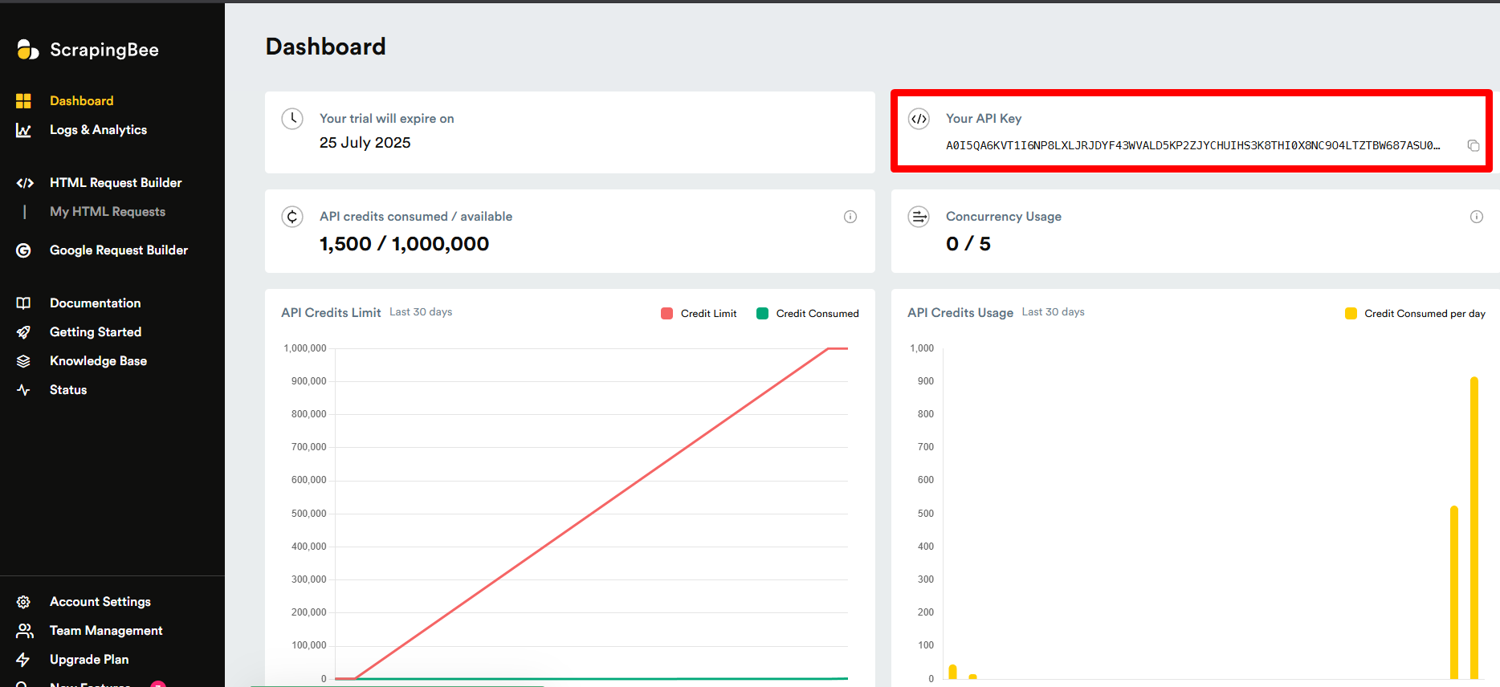
When I first signed up, I was impressed by how quickly I could get started. The free tier gives you 1,000 API calls to test things out, which is plenty for experimenting with movie database scraping.
Step 2: Install Required Libraries
You'll need Python 3.8 or newer and the requests library. When scraping IMDb data, Python requires these necessary libraries to establish a connection to the target website and process the data:
pip install requests
If you're starting fresh, you can create a new virtual environment:
python -m venv imdb-scraper
source imdb-scraper/bin/activate  # Use `imdb-scraper\Scripts\activate` on Windows
pip install requests
Now, go ahead and create a new file named scrape_imdb.py.
I always recommend using virtual environments for projects. It keeps your dependencies organized and prevents conflicts between different projects.
The ScrapingBee documentation provides excellent examples if you need more guidance on setting up your environment.
Step 3: Scraping a Movie Page
When you want to scrape data, planning what to extract before writing any code saves a lot of time. For movie data, you might need the movie name, rating, genres, director, cast, release date, and plot summary.
I'll use Inception as an example, since it's one of my favorites.
We'll start by defining the target URL:
https://www.imdb.com/title/tt1375666/
Typically, when scraping dynamic pages, such as a movie database, you need to handle JavaScript-rendered content. ScrapingBee does this automatically.
Now, let's create a basic Python code to establish a connection to the webpage:
import requests

API_KEY = 'your_scrapingbee_api_key'
url = 'https://www.imdb.com/title/tt1375666/'

params = {
    'api_key': API_KEY,
    'url': url,
}

response = requests.get('https://app.scrapingbee.com/api/v1', params=params)

with open('inception_raw.html', 'w', encoding='utf-8') as f:
    f.write(response.text)
This script uses the requests library to make an HTTP request to ScrapingBee's API, which then fetches the IMDb page for us.
It's time to extract specific movie details. Let's identify the elements we want to capture:
- Name: Found in the
<h1>tag - Rating: Look for
span[role='img'] - Genres: Inside
div[data-testid='genres'] - Runtime
- Release Date
- Director(s), Actors, Writers
Step 4: Using Extraction Rules for Clean JSON
One of my favorite features is extraction rules. Instead of parsing HTML content yourself, you can tell the web scraping solution exactly what data you want, and it returns clean JSON. This saves so much time and makes your code much simpler.
The following command shows how it supports extraction rules to turn HTML content into structured JSON:
import requests
import json

API_KEY = 'your_scrapingbee_api_key'
url = 'https://www.imdb.com/title/tt1375666/'

params = {
    'api_key': API_KEY,
    'url': url,
    'premium_proxy': 'true',
    'extract_rules': json.dumps({
        "title": {"selector": "h1", "type": "text"},
        "rating": {"selector": "span[role='img']", "type": "text"},
        "genres": {"selector": "div[data-testid='genres'] a", "type": "list"},
        "summary": {"selector": "span[data-testid='plot-xl']", "type": "text"},
        "director": {"selector": "a[href*='/name/']", "type": "text"}
    })
}

response = requests.get('https://app.scrapingbee.com/api/v1', params=params)
data = response.json()

print(json.dumps(data, indent=2))
The extract_rules parameter is where the magic happens. You define CSS selectors for each piece of data you want, and ScrapingBee extracts it for you. The output looks something like this:
{
  "title": "Inception",
  "rating": "8.8/10",
  "genres": ["Action", "Adventure", "Sci-Fi"],
  "summary": "A thief who steals corporate secrets...",
  "director": "Christopher Nolan"
}
You can save this data to a JSON file for analysis:
with open('inception.json', 'w', encoding='utf-8') as f:
    json.dump(data, f, indent=2)
If you prefer a CSV file for your data, you can easily convert the JSON to CSV using Python's built-in libraries. I often use pandas for this when I need to analyze movie data or perform research.
Final Code Example
Now, let's put everything together with a complete sample:
import requests
import json

# Replace with your actual ScrapingBee API Key
API_KEY = 'YOUR_SCRAPINGBEE_API_KEY'

url = 'https://www.imdb.com/title/tt1375666/'

params = {
    'api_key': API_KEY,
    'url': url,
    'premium_proxy': 'true',
    'extract_rules': json.dumps({
        "title": {"selector": "h1", "type": "text"},
        "rating": {"selector": "span[role='img']", "type": "text"},
        "genres": {"selector": "div[data-testid='genres'] a", "type": "list"},
        "summary": {"selector": "span[data-testid='plot-xl']", "type": "text"},
        "director": {"selector": "li[data-testid='title-pc-principal-credit']:first-child a", "type": "text"}
    })
}

response = requests.get('https://app.scrapingbee.com/api/v1', params=params)
data = response.json()

print(json.dumps(data, indent=2))

# Optional: Save to file
with open('inception.json', 'w', encoding='utf-8') as f:
    json.dump(data, f, indent=2)
Example output:
{
  "title": "Inception",
  "rating": "8.8/10",
  "genres": ["Action", "Adventure", "Sci-Fi"],
  "summary": "A thief who steals corporate secrets through the use of dream-sharing technology is given the inverse task of planting an idea into the mind of a CEO.",
  "director": "Christopher Nolan"
}
Hopefully, after following this tutorial, you will get the exact results you need. Now, let's take a look at common challenges of extracting movie data at scale.
Common Issues with IMDb Scraping
In my years of web scraping, I've encountered numerous challenges with sites like IMDb. Let's talk about some common issues and how our platform helps solve them.
First, IMDb has implemented strict anti-scraping measures, including IP blocks and CAPTCHAs, making it challenging to scrape data directly. If you're using basic HTTP requests or even Beautiful Soup, you'll miss a lot of data. ScrapingBee handles JavaScript rendering automatically, so you get the complete page as if you were viewing it in a browser. Services like ScrapingBee and Oxylabs offer proxy rotation and CAPTCHA handling to facilitate scraping efforts at scale.
Second, to scrape from IMDb effectively, it is recommended to use proxy rotation to avoid IP blocks during high-volume scraping. I once had a project where I needed to collect data on thousands of movies for a research paper, and my IP got blocked after just 50 requests. Rotating proxies help by changing the IP address with each request or at set intervals. Residential proxies are ideal for accessing IMDb data from around the world since they are harder for anti-bot systems to detect, while datacenter proxies are faster and more cost-effective but more easily flagged. Using a combination of residential and datacenter proxies can optimize performance by balancing speed and anonymity.
Third, IMDb's layout changes frequently. When you're parsing HTML content directly, these changes can break your scraper. The extraction rules feature is more resilient to layout changes since it focuses on specific elements rather than the overall structure.
For more complex data extraction tasks, the platform offers JS Scenarios, which let you automate interactions like clicking buttons or scrolling. This is useful for gathering user reviews or accessing content that loads dynamically as you scroll. If you prefer a no-code option, tools like Octoparse allow you to scrape data without coding skills, using auto-detect features and preset templates.
Start Scraping IMDb Now with ScrapingBee
Ready to learn how to extract data from IMDb webpages? Try ScrapingBee with 1,000 free API calls, no credit card needed. Skip the proxy and headless browser setup and focus on what matters: the data.
I've used the platform for several projects, from analyzing movie trends, searching for new TV series to watch, to comparing IMDb ratings with Rotten Tomatoes scores. The time and cost saved on infrastructure alone made it worth it for me.
Whether you're conducting market research, building a movie recommendation system, or simply exploring movie trends, our platform makes web scraping IMDb accessible and reliable.
Frequently Asked Questions (FAQs)
Is it legal to scrape IMDb?
Web scraping IMDb is generally legal, but you should always check the terms of service. Scraping public data from IMDb such as movie titles, ratings, and genres is generally considered legally permissible under fair use for research or personal analysis. However, IMDb terms of service scraping rules explicitly prohibit automated screen scraping for commercial purposes, and permission must be obtained in writing from the Licensing Department for commercial use. Does IMDb allow web scraping entirely? No, while small amounts for personal non-commercial use are sometimes overlooked, extensive scraping is prohibited. IMDb also provides official plain-text data dumps for personal and non-commercial use, and a commercial IMDb API is available exclusively through AWS Data Exchange for structured JSON data. Our platform helps you scrape responsibly by respecting robots.txt and rate limits.
Can ScrapingBee bypass IMDb CAPTCHA or JavaScript?
Yes, ScrapingBee can extract information by handling both CAPTCHAs and JavaScript rendering automatically. Its premium proxies and browser rendering capabilities ensure you get the complete page content without being blocked.
What are the main IMDb page types you can scrape in 2026?
The main page types are title pages (/title/), name pages (/name/), search results (/find/), chart pages (/chart/), and reviews pages. Title pages are the most common starting point since they contain ratings, genres, cast, and plot data in one place.
Which IMDb pages are best for scraping movie details, reviews, and cast data?
Title pages (/title/tt1234567/) are best for movie details and cast. For user reviews, use the dedicated reviews page (/title/tt1234567/reviews). For cast and biography data, name pages (/name/nm1234567/) give you the most complete information.
Is IMDb still server-rendered enough for BeautifulSoup scraping in 2026?
Partially. The JSON-LD block embedded in IMDb title pages is server-rendered and reliable for BeautifulSoup extraction. However, ratings, full cast lists, and dynamic content like user reviews require JavaScript rendering, which means ScrapingBee or a headless browser is needed for complete data.
What happens if IMDb blocks my scraper?
With ScrapingBee, this is rarely an issue, as it rotates IPs and utilizes premium proxies. If you do encounter blocks, try reducing your request frequency or contact ScrapingBee support for assistance with optimizing your parameters.
What does IMDb robots.txt scraping policy allow and how should scrapers follow it?
IMDb's robots.txt web scraping guidelines disallow automated access to several paths including search and certain data exports. For compliant scraping, stick to publicly accessible title and name pages, respect crawl delays, and avoid scraping at a rate that could be mistaken for a DDoS attack.