CAPTCHAs are one of the biggest obstacles in modern web scraping. Systems like reCAPTCHA and hCaptcha use browser fingerprinting, behavioral analysis, and invisible scoring to detect automation and trigger CAPTCHA challenges during scraping workflows. In this guide, we cover the different types of challenges you will encounter and provide actionable strategies for finding a reliable hCaptcha bypass and solving reCAPTCHA programmatically.
TL;DR
The most effective way to avoid CAPTCHAs during web scraping is to prevent them from appearing in the first place using high-quality residential proxies and properly configured headless browsers. For websites with strict security thresholds that still trigger CAPTCHAs, integrating a programmatic captcha solver API as a reliable fallback keeps your data extraction pipelines running smoothly.
- Prevention is better than solving: Successfully avoiding CAPTCHAs relies on masking your browser fingerprint, utilizing residential IPs, and pacing your requests to mimic human behavior.
- Invisible scoring is the new standard: Modern systems like reCAPTCHA v3 and Cloudflare Turnstile rarely rely on visual puzzles. Instead, they assign an invisible bot-score based on your background activity.
- Captcha solver services come with trade-offs: A captcha solver API is a reliable fallback when prevention fails, but it adds per-solve costs and latency to your scraping jobs.
- Targeted tools save time: Instead of building complex bypass systems from scratch, a dedicated web scraping API handles proxy rotation and captcha solver integration under the hood.
How to bypass reCAPTCHA when web scraping
There are two primary approaches: solve CAPTCHA challenges programmatically using a captcha solver API, or prevent challenges entirely through residential proxies, browser fingerprint management, and realistic request behavior.
Solve CAPTCHAs using a captcha solver service
Automated CAPTCHA solving helps keep scraping workflows running by handling challenges programmatically instead of requiring manual input. Many captcha solver services utilize machine learning algorithms to detect and solve CAPTCHAs automatically, improving success rates. Popular captcha solver platforms include captchas.io, 2captcha.com, anti-captcha.com, and capsolver.com. We will walk through a working captcha solver implementation in the next section.
Avoid CAPTCHAs altogether
Sites trigger CAPTCHAs when requests exceed a threshold or match bot-like patterns. To stay under the radar: use a properly configured headless or anti-detect browser, route requests through residential proxies, and pace and randomize request timing. Integrating a captcha solver into scraping workflows helps manage retries, token failures, automated IP rotation, and repeated captcha challenges more efficiently.
What is a captcha solver?
A captcha solver is a third-party API service that automates solving captcha challenges on your behalf. Most captcha solver platforms use OCR systems, machine learning algorithms, AI models, or human-assisted workflows to generate valid challenge tokens for reCAPTCHA and hCaptcha systems.
Bypassing using a reCAPTCHA solving API service
If you are new to these types of scripts, check out our guide on web scraping with Python first. I tested this captcha solver implementation using anti-captcha.com. Start by installing the required packages:
pip install webdriver-manager selenium anticaptchaofficial
Once we have those installed, we can move straight to the code. So without further ado, here is the full code sample:
from selenium import webdriver
from selenium.webdriver.chrome.service import Service as ChromeService
from webdriver_manager.chrome import ChromeDriverManager
from selenium.webdriver.common.by import By
from selenium.webdriver.support.ui import WebDriverWait
from selenium.webdriver.support import expected_conditions as EC
from anticaptchaofficial.recaptchav2proxyless import recaptchaV2Proxyless
import re


def solve_recaptcha_v2(url, sitekey):
    solver = recaptchaV2Proxyless()
    solver.set_verbose(1)
    solver.set_key("YOUR_API_KEY_HERE")
    solver.set_website_url(url)
    solver.set_website_key(sitekey)
    return solver.solve_and_return_solution()


def bypass_recaptcha_v2():
    driver = webdriver.Chrome(
        service=ChromeService(ChromeDriverManager().install())
    )
    try:
        url = "https://recaptcha-demo.appspot.com/recaptcha-v2-checkbox-explicit.php"
        driver.get(url)
        WebDriverWait(driver, 10).until(
            EC.presence_of_element_located((By.CSS_SELECTOR, ".g-recaptcha"))
        )
        sitekey_match = re.search(r"(6L[\w-]{30,})", driver.page_source)
        if not sitekey_match:
            print("Site key not found")
            return
        sitekey = sitekey_match.group(1)
        print(f"Site key: {sitekey}")
        driver.find_element(By.CSS_SELECTOR, 'input[name="ex-a"]').send_keys("username")
        driver.find_element(By.CSS_SELECTOR, 'input[name="ex-b"]').send_keys("password")
        token = solve_recaptcha_v2(driver.current_url, sitekey)
        if token == 0:
            print("CAPTCHA solving failed — check your API key and balance")
            return
        print("Token received, injecting...")

        driver.execute_script(
            "document.querySelector(arguments[1]).innerHTML = arguments[0];",
            token,
            "#g-recaptcha-response"
        )
        driver.find_element(By.CSS_SELECTOR, 'button[type="submit"]').click()
        WebDriverWait(driver, 10).until(
            EC.presence_of_element_located((By.CSS_SELECTOR, ".recaptcha-success"))
        )
        print("reCAPTCHA v2 bypassed successfully")

    finally:
        driver.quit()

bypass_recaptcha_v2()
Beautiful, isn't it? Let's walk through it one step at a time.
- We import all the necessary libraries, then define
solve_recaptcha_v2, which performs the actual captcha solver API call. Note that we userecaptchaV2Proxyless- not v3. Using the wrong class causes silent failures. - We initialise a Chrome driver instance, navigate to the target URL, and wait for the
.g-recaptchaelement to confirm the widget has fully loaded. - We extract the sitekey using a regex. Google reCAPTCHA v2 sitekeys always start with
6L. - We fill in the form fields, then call our captcha solver function, a blocking call that may take a few seconds. Once it returns, we inject the token into the hidden
#g-recaptcha-responsetextarea to set our CAPTCHA solution and click submit.
Bypassing hCaptcha
hCaptcha uses a different solver class and injects its sitekey into the DOM via JavaScript rather than as a static HTML attribute, which means you need to pull it from the rendered DOM, not the raw page source.
We tested this against the official hCaptcha demo page:
from selenium import webdriver
from selenium.webdriver.chrome.service import Service as ChromeService
from webdriver_manager.chrome import ChromeDriverManager
from selenium.webdriver.common.by import By
from selenium.webdriver.support.ui import WebDriverWait
from selenium.webdriver.support import expected_conditions as EC
from anticaptchaofficial.hcaptchaproxyless import hCaptchaProxyless

def solve_hcaptcha(url, sitekey):
    solver = hCaptchaProxyless()
    solver.set_verbose(1)
    solver.set_key("YOUR_API_KEY_HERE")
    solver.set_website_url(url)
    solver.set_website_key(sitekey)
    return solver.solve_and_return_solution()

def bypass_hcaptcha():
    driver = webdriver.Chrome(
        service=ChromeService(ChromeDriverManager().install())
    )

    try:
        url = "https://accounts.hcaptcha.com/demo"
        driver.get(url)
        WebDriverWait(driver, 15).until(
            EC.presence_of_element_located(
                (By.CSS_SELECTOR, "iframe[src*='hcaptcha.com']")
            )
        )
        sitekey = driver.execute_script(
            "var el = document.querySelector('[data-sitekey]');"
            "return el ? el.getAttribute('data-sitekey') : null;"
        )
        if not sitekey:
            print("Site key not found")
            return
        print(f"Site key: {sitekey}")
        token = solve_hcaptcha(driver.current_url, sitekey)
        if token == 0:
            print("hCaptcha solving failed — check your API key and balance")
            return
        print("Token received, injecting...")
        driver.execute_script(
            "document.querySelector(arguments[1]).innerHTML = arguments[0];",
            token,
            '[name="h-captcha-response"]'
        )
        driver.find_element(By.CSS_SELECTOR, '[type="submit"]').click()
        WebDriverWait(driver, 10).until(
            EC.presence_of_element_located((By.CSS_SELECTOR, ".hcaptcha-success"))
        )
        print("hCaptcha bypassed successfully")

    finally:
        driver.quit()

bypass_hcaptcha()
The hCaptcha captcha solver workflow closely mirrors the reCAPTCHA captcha solver implementation, with three important differences:
- We use
hCaptchaProxyless, a separate captcha solver class with a separate API endpoint. Mixing them up causes silent failures. - We use
execute_scriptto pull the sitekey from the rendered DOM after JS runs, since hCaptcha injects it dynamically. - We inject the token into
[name="h-captcha-response"], not#g-recaptcha-response.
Avoiding reCAPTCHA and hCaptcha using a web scraping API
Most sites do not employ CAPTCHAs by default, only once requests exceed some custom-defined threshold or follow a pattern atypical for regular users. For those sites, staying invisible is the goal.
Real browser environment
Nothing identifies a scraper faster than a default HTTP client user agent:
Java-http-client/17.0.7
PycURL/7.44.1 libcurl/7.81.0 GnuTLS/3.7.3 zlib/1.2.11 nghttp2/1.43.0 librtmp/2.3
Switching to a standard browser user agent string is not enough either, scraping protection systems check far more than the user agent. They evaluate the full browser engine fingerprint, the TLS handshake specifics, and JavaScript execution capability. Configuring an anti-detect browser or properly managed headless browser helps reduce captcha challenges by mimicking legitimate browser fingerprints and human browsing behavior. This lets your scraper behave more like a real browser session, reducing the chance that bot-detection systems flag it as automation.
ISP addresses
Requests originating from AWS or GCP instances arrive with datacenter IP addresses that immediately stand out. In fact, most requests from any major datacenter IPs stand out immediately. Residential proxies tunnel requests through regular ISP networks. Using residential proxies enhances bypass effectiveness as they mimic real user behavior and are less likely to trigger CAPTCHAs. Automated IP rotation is a key feature of proxy services, allowing scrapers to maintain access while minimizing interruptions.
Knowing the site's audience
If you are scraping a service with a geographically specific audience, traffic suddenly arriving from across the globe will raise flags. Proxies that let you route requests through the target region are essential for geo-restricted content and for keeping request patterns believable.
Pacing requests
A scraper can fire hundreds of requests per second; no real user does that. Implement realistic delays between requests, randomize your crawl order to avoid sequential patterns, and account for the fact that a full page load involves more than just the HTML document (stylesheets, images, scripts).
ℹ️ For a deeper look at staying undetected, see our guide on Web Scraping without getting blocked.
Using Scraping APIs
Instead of building complex bypass scripts from scratch, utilizing the best web unblockers, like ScrapingBee's dedicated API, does all that heavy lifting for you out-of-the-box. This includes seamless access to headless browser instances, transparent handling of proxies (including residential ones), native JavaScript support, and request throttle management, all in one place.
A dedicated API can manage browser rendering, proxy rotation, JavaScript execution, residential proxy access, and request throttling in one workflow, so you can focus on the data instead of maintaining the anti-bot layer yourself.
hCaptcha: what you need to know
hCaptcha is favored by privacy-focused sites because it does not rely on Google's tracking ecosystem and does not track users across the web. It often involves image labeling tasks such as identifying objects in a grid, and presents multiple difficulty tiers, making it harder for automation tools to achieve a consistent success rate compared to reCAPTCHA.
For accessibility, hCaptcha offers official options for users with visual, auditory, or motor impairments designed to align with WCAG 2.2 AA standards. hCaptcha provides legitimate, structured methods to bypass standard visual challenges for accessibility users, although their effectiveness is debated. The primary method is through a specialized accessibility cookie. The text-based Accessibility Challenge is also available if the website owner has explicitly enabled it in their settings. hCaptcha also supports Privacy Pass, a browser extension that lets users solve a challenge once and receive blinded tokens to bypass future challenges on other sites.
A common method for bypassing hCaptcha programmatically involves using a captcha solver API service that sends the challenge to a solving service and returns a token for form submission, as shown in the implementation above.
What are the different types of CAPTCHAs?
CAPTCHAs originally started with simple distorted-text images that users entered into a text field.
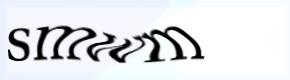
Over time, OCR improved and CAPTCHA systems evolved. Today, you will encounter these variants:
- Text-based
- Checkbox
- Image-based
- Audio-based
- Sliders
- 3D objects
- Math calculations
- Invisible and passive
Text
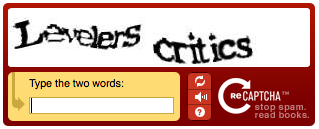
One of the most common types, requiring the user to decipher text in an image and provide the correct answer.
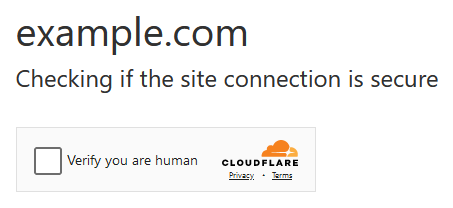
Checkboxes
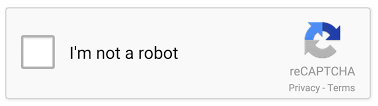
The user simply checks a box to confirm they are not a bot, commonly seen in Google's reCAPTCHA v2.
Another common service using this approach is Cloudflare with Turnstile:
💡 Interested in bypassing Cloudflare protection? Check out our guide on bypassing Cloudflare antibot protection.
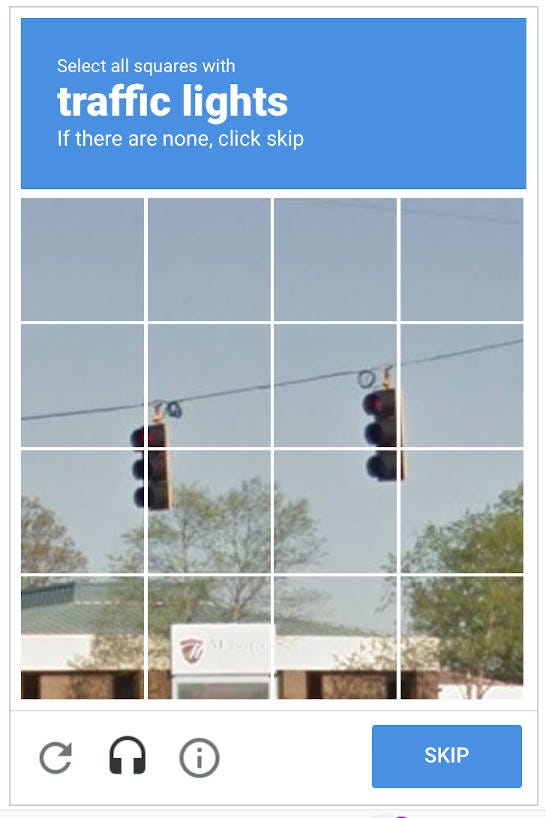
Images
The dreaded 🚦, right?
Image CAPTCHAs require users to match images against a certain task, the classic traffic lights and crosswalks, a method popularized by Google's reCAPTCHA.
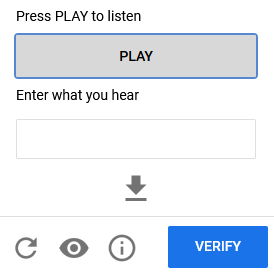
Audio
Audio CAPTCHAs require users to listen to a short audio clip and transcribe the words into text, providing an alternative for visually impaired users.
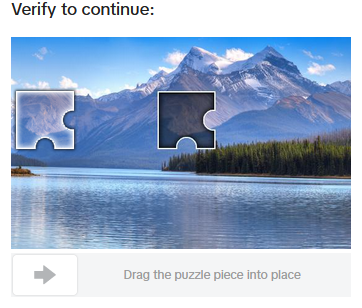
Sliders
Newer or niche variants requiring visual or cognitive tasks beyond text matching.
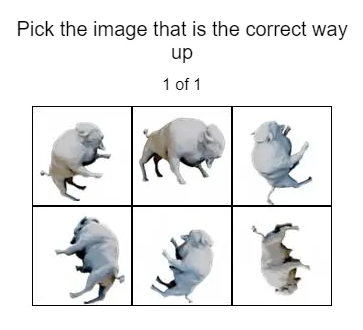
3D objects
A newer format that presents three-dimensional objects and asks the user to identify or manipulate them. Harder to solve programmatically than flat image challenges.
Math calculations
The user solves a basic arithmetic problem. Simple to implement for site owners and straightforward for users, though trivially solvable by most OCR tools.

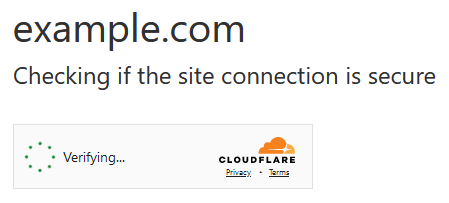
Invisible CAPTCHAs
Invisible CAPTCHAs operate transparently in the background without requiring user interaction, commonly implemented by reCAPTCHA v3 and Cloudflare Turnstile.
What is reCAPTCHA?
reCAPTCHA is a free CAPTCHA service launched by Google in 2007. Version 1 used distorted text. Version 2, released in 2013, introduced behavioral fingerprinting and the familiar checkbox. Version 3, introduced in 2018, removed all user interaction. It continuously calculates a bot-score based on background behavior, which is why a poorly configured headless browser gets flagged without ever seeing a visible challenge.
Summary
CAPTCHAs are a real obstacle for scrapers, but they are not insurmountable. The most reliable long-term approach is prevention: use residential proxies, properly configured headless browsers, realistic request pacing, and a scraping API that handles the anti-bot layer for you. When that is not enough and you need to solve challenges directly, captcha solver APIs like 2captcha, anti-captcha.com, and capsolver integrate cleanly into Python scraping scripts and handle both reCAPTCHA and hCaptcha challenges.
You don't want your scraping jobs spending their time on traffic lights when there is data to collect.
Happy scraping!
FAQs
What are CAPTCHA solvers, and how do they work?
A captcha solver is an API service that decodes CAPTCHAs on behalf of your scraper. You send the challenge details to the captcha solver service, which uses AI models or human workers to solve it and returns a valid response token. Your scraper injects the token into the page to proceed.
How to bypass captcha human verification during automated scraping?
The most effective method is to avoid triggering CAPTCHAs entirely. Use residential proxies to mask your IP, configure an anti-detect browser to pass fingerprint checks, and pace your requests realistically. If CAPTCHAs still appear, integrate a captcha solver API as a fallback.
Is it legal to bypass CAPTCHAs when web scraping?
Scraping publicly available data is generally considered legal, but bypassing technical protections may violate a website's Terms of Service. In the US, it can potentially violate the Computer Fraud and Abuse Act (CFAA) if it results in unauthorized access. Always review the ToS of the site you are scraping and consult legal counsel for commercial use cases.
Can headless browsers trigger reCAPTCHA v3?
Yes. reCAPTCHA v3 continuously analyzes browser fingerprints and behavioral signals in the background. A poorly configured headless browser, one with default settings, predictable timing, or missing browser capabilities, will produce a low bot-score and get blocked without any visible challenge appearing. Proper anti-detect configuration is essential.
What is the difference between reCAPTCHA and hCaptcha?
Both protect sites from bots, but hCaptcha does not rely on Google's tracking ecosystem. The captcha solver approach is similar for both, a captcha solver service handles the challenge and returns a token, but hCaptcha uses a different captcha solver class and injects its sitekey via JavaScript, so your implementation needs to handle each type explicitly.
Before you go, check out these related reads: