The best AI web scraping tools in 2026 depend on your use case, because the best tool for a developer building an LLM pipeline or pulling entity data at scale is different from the best tool for a non-developer monitoring competitor pricing.
In our tests, we stopped one tool after twelve minutes because parsing was taking too long, and another returned a confidently wrong date. In all, we tested nine of the ten tools below against the same two real pages, a dynamic Decathlon product listing and a Cloudflare blog post, and drew on published documentation for the tenth, which we could not get access to in time.
For each one, we recorded what it got right, the extraction time, and what it returned.
Quick Answer (TL;DR)
- Use Browse AI for no-code monitoring, Firecrawl for LLM and RAG pipelines, Crawl4AI for open-source and self-hosting, ScrapingBee to extract clean Markdown from sites with a single API call, and Bright Data for enterprise scale.
- AI extraction adapts to layout changes but costs more per page than a selector-based scraper, so it pays off on pages that vary, not on stable templates at high volume.
- LLMs consume tokens to process page content semantically, so per-page costs for LLM scrapers are higher than for selector-based scrapers.
- Nearly every tool here has a free tier large enough to test two real sites, so test on your target pages before you commit.
Top AI Web Scraping Tools Comparison Table (Quick Overview)
| Tool | Type | Best for | Free tier | Starting price |
|---|---|---|---|---|
| ScrapingBee | Managed API with AI extraction | Blocked and JavaScript-heavy sites | 1,000 credits, no card | $19 monthly |
| Firecrawl | AI-native extractor | LLM and RAG ingestion | 1,000 credits monthly, no card | $19 monthly |
| Crawl4AI | AI-native extractor | Self-hosted AI pipelines | Free, self-hosted | Free |
| Browse AI | No-code platform | Non-developers tracking pages | 50 credits monthly, 2 sites | $48 monthly |
| Octoparse | No-code platform | Non-developers tracking pages | 10 tasks, unlimited pages per run | $83 monthly |
| Kadoa | AI-native extractor | Pipelines involving websites that need self-healing | Evaluation period only | Not published |
| Diffbot | AI-native extractor | Entity data at scale | 10,000 credits monthly, no card | $299 monthly |
| ScrapeGraphAI | AI-native extractor | Developers wanting model choice | 500 credits, or self-host free | $20 monthly |
| Apify | No-code platform | Multi-step workflows and crawls | $5 usage monthly, no card | $19 monthly. However, AI Web Scraper Actor starts at $20 per 1,000 page extractions |
| Bright Data | AI-native extraction (Scraper Studio) | Global scale and proxy reach | 5,000 free credits, no card | Pay as you go: $1.50 per 1,000 page loads |
Pricing checked 3 September 2026.
How We Tested
We ran these tests in August 2026. Apart from Kadoa, the remaining nine AI scraping tools were tested on the same two pages: a JavaScript-heavy Decathlon product listing and a Cloudflare blog post. Neither page sits behind an anti-bot challenge, so we didn’t test anti-bot resilience.
Here’s the prompt for the product page: “Extract the product information from this e-commerce product page. Return the product name, current price (number only), currency, and average customer rating.” Here’s the prompt for the Cloudflare page: “Extract the article metadata from this blog post. Return the title, author, publication date, and a one-sentence summary.”
Since the blog article didn’t have a predefined summary section, Browse AI and Octoparse couldn’t extract a summary as they extract based on what is readily available on the page, and Diffbot has no predefined summary field, so it couldn’t return one either. Crawl4AI and ScrapeGraphAI require you to supply your own model. We gave both gemini-flash-latest through a free-tier Google API key, at default settings.
Also, we could not test Kadoa. It screens signups manually, and access had not cleared by the time we published, so what we say about it below comes from its published documentation and pricing page. For each tool, we recorded whether extraction succeeded, whether the returned fields were correct, how long the extraction took, and which output formats it returned.
The 10 Best AI Web Scraping Tools, by Use Case
We grouped these by the job they do, because no single AI web scraping tool fits every use case. The numbered list doesn’t indicate any performance or ranking; rather, it’s based on the various use cases for AI web scraping.
When the problem is access
Tool requirement: Returns extraction-ready output from a URL in one request, with rendering, proxy rotation, and anti-bot handling included, and no domain template required.
1. ScrapingBee
Best for: AI extraction from sites with anti-bot protection. It extracts clean web data with a single API call.
What it does: The ScrapingBee API handles headless rendering, proxy rotation, and anti-bot measures inside a single request. We didn’t test the anti-bot handling since neither target was behind a challenge. return_page_markdown and return_page_text return the page as Markdown or plain text, with no parsing step. ai_query takes extraction instructions in plain English, and ai_extract_rules returns specific fields as structured JSON.
Output formats: Markdown, JSON, HTML.
Free tier: 1,000 API credits, no card required.
Limitation: AI extraction adds 5 credits per request on top of the regular API cost.
Test result: It returned all four product fields correctly in 7.0 seconds. On the article, it returned the title, author, and summary correctly in 3.9 seconds but without a publication date. Setup involved an API key and a single HTTP call.
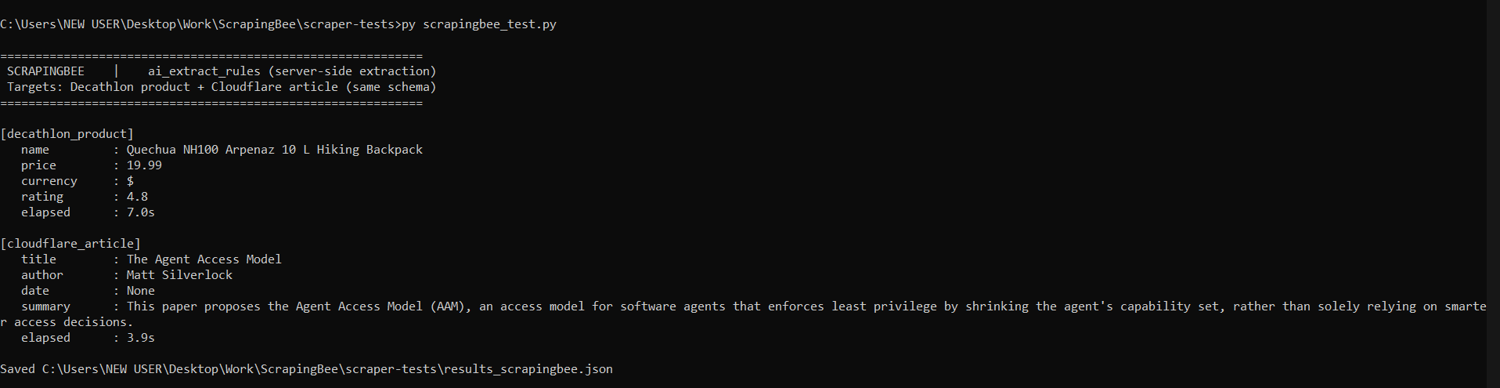
ScrapingBee’s run on both pages
For LLM and RAG pipelines
Tool requirement: Returns clean Markdown or structured text from a URL ready for AI pipelines.
2. Firecrawl
Best for: Turning whole sites into clean Markdown for LLM ingestion.
What it does: Firecrawl searches, crawls, maps, and scrapes through one API. Give it a URL, describe what you want in plain English, and it returns normalized Markdown, JSON, or HTML. Also, when you give it a domain, it crawls the site and returns the same normalized output for every page it finds. It handles rendering and content cleaning server-side.
Output formats: Markdown, JSON, HTML.
Free tier: 1,000 credits per month, no credit card required.
Limitation: Scraping, crawling, and mapping each cost one credit per page, but JSON output and Enhanced Mode add credits on top, so a fully featured extraction workflow burns through the free tier considerably faster than a plain scrape.
Test result: On the Decathlon product, it returned all four fields correctly in 5.8 seconds. On the Cloudflare article, it got the title, author, and summary right in 3.1 seconds. Still, the publication date was wrong even after retrying: 1 September 2023 on the first run and 14 August 2026 on the second, as opposed to the correct date, 5 August 2026 (both results are shown below). Setup involved an API key and a single POST request.
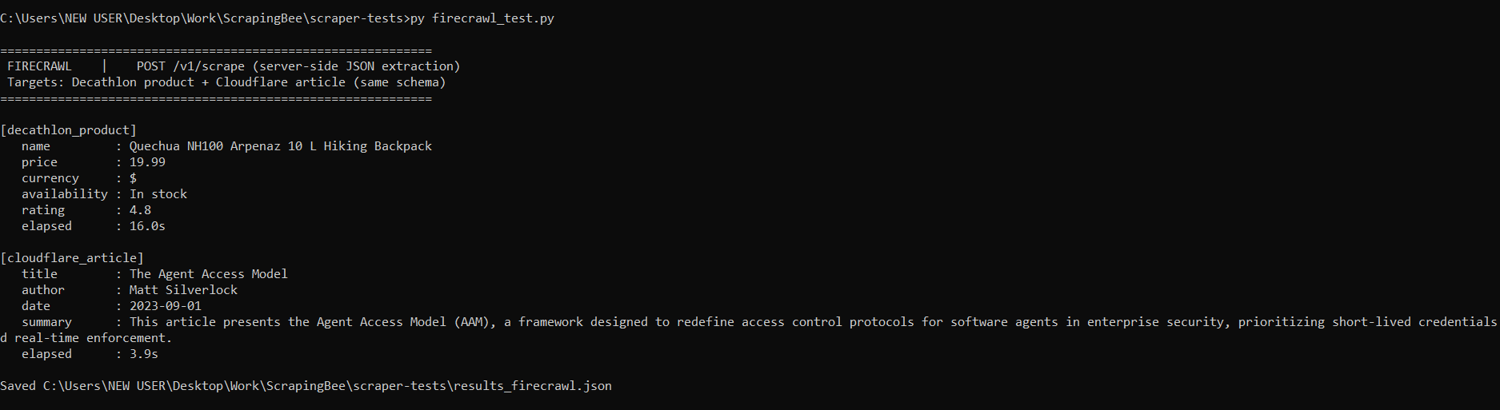
Firecrawl’s first run on both pages
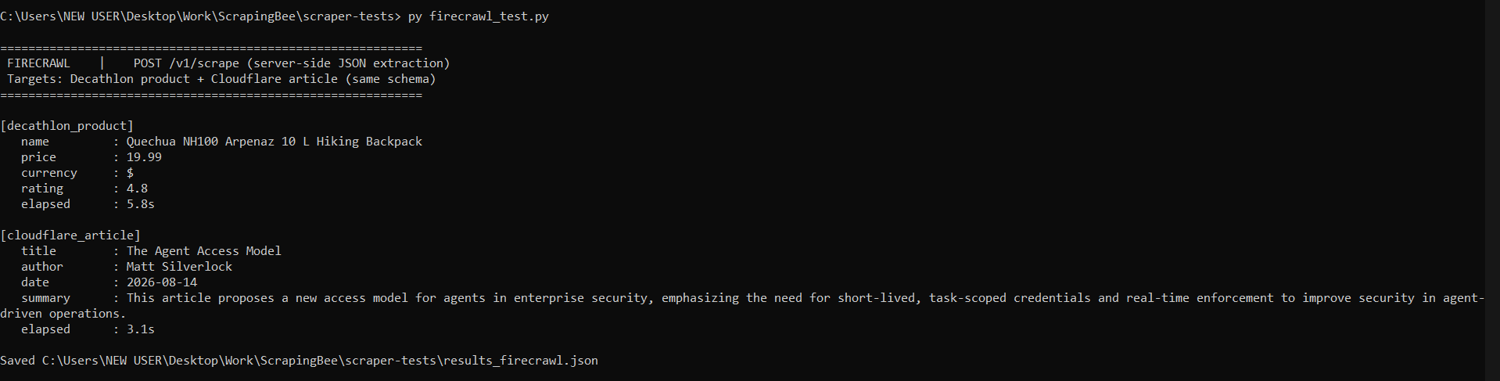
Firecrawl’s second run on both pages
3. Crawl4AI
Best for: Self-hosted RAG pipelines where you control the crawler.
What it does: Crawl4AI is an open-source asynchronous Python crawler that produces AI-ready output. You run it yourself, so there is no per-request bill. It handles content cleaning and Markdown generation in a single pass during the crawl, and you can choose your desired extraction model.
Output formats: Markdown, JSON, HTML.
Free tier: Free and open source. Server and LLM API costs are yours.
Limitation: You own proxies, retries, and anti-bot handling yourself, and there is no service-level agreement (SLA) when a target starts refusing you.
Test result: Backed by gemini-flash-latest, it returned all four product fields and all four article fields correctly, including the right 5 August 2026 date. Extraction took 16.3 seconds on the product and 8.2 seconds on the article. Setup involved installing the package, installing a headless browser, defining the schema, and supplying your own model key.
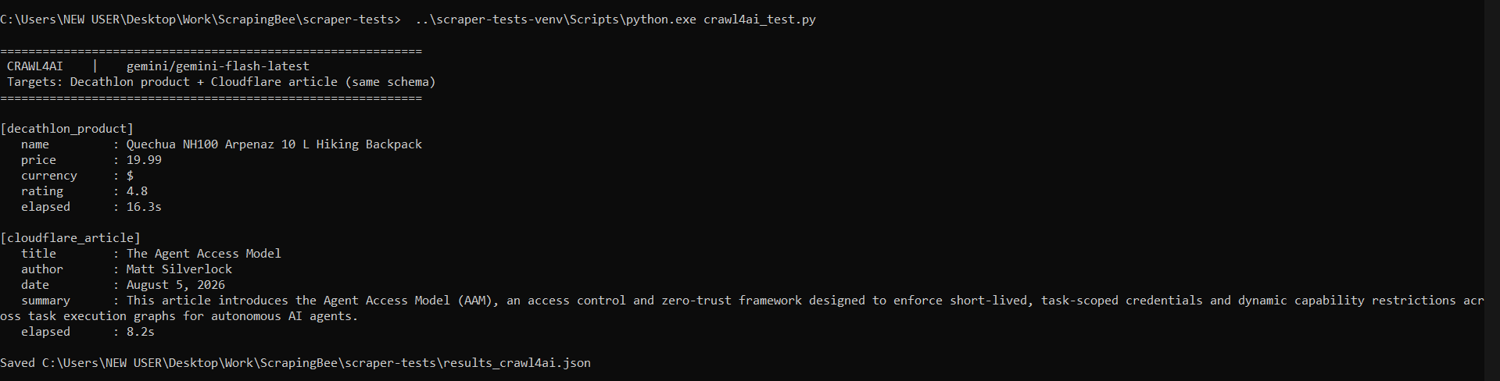
Crawl4AI’s run on both pages
For non-developers and monitoring
Tool requirement: Trained by pointing and clicking, runs on a schedule without code, and alerts you when something changes.
4. Browse AI
Best for: Non-developers tracking a set of pages on a schedule.
What it does: Browse AI records your clicks as you walk through a page. You train it by demonstrating the extraction, then set a schedule and get alerted when a tracked value changes. Browse AI says its selectors self-heal, so small layout edits do not always break the robot.
Output formats: CSV, JSON.
Free tier: 50 credits per month across two websites.
Limitation: Plans cap the number of distinct websites one can extract from.
Test result: Trained by pointing and clicking, it captured all four product fields correctly with an additional unrequested field named “extra”. On the article, it captured only the title and date. It didn’t recognize the author as visible text. Also, because it captures visible text rather than generating it, it couldn’t extract a summary as the page doesn’t have a predefined summary section.
The product robot took 8.5 minutes to run because much of the Decathlon page loads dynamically, while the article robot took about a minute. Setup involved training two robots by clicking through each page in its recorder and marking the fields.
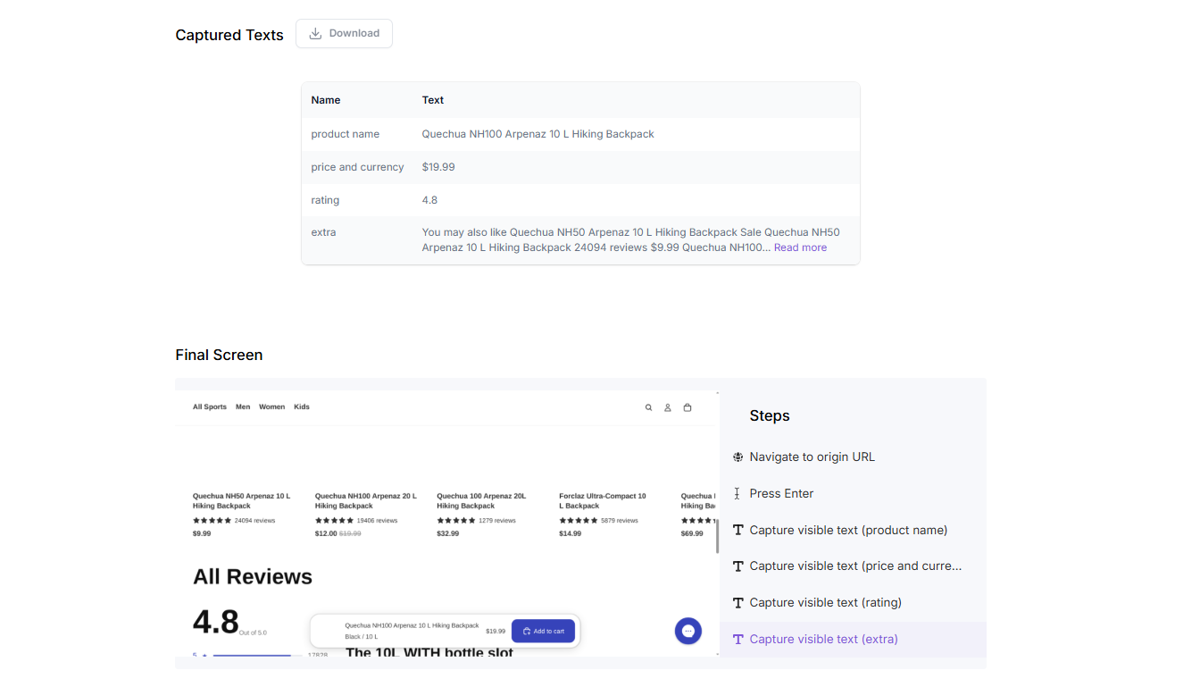
Browse AI’s run on Decathlon’s product page
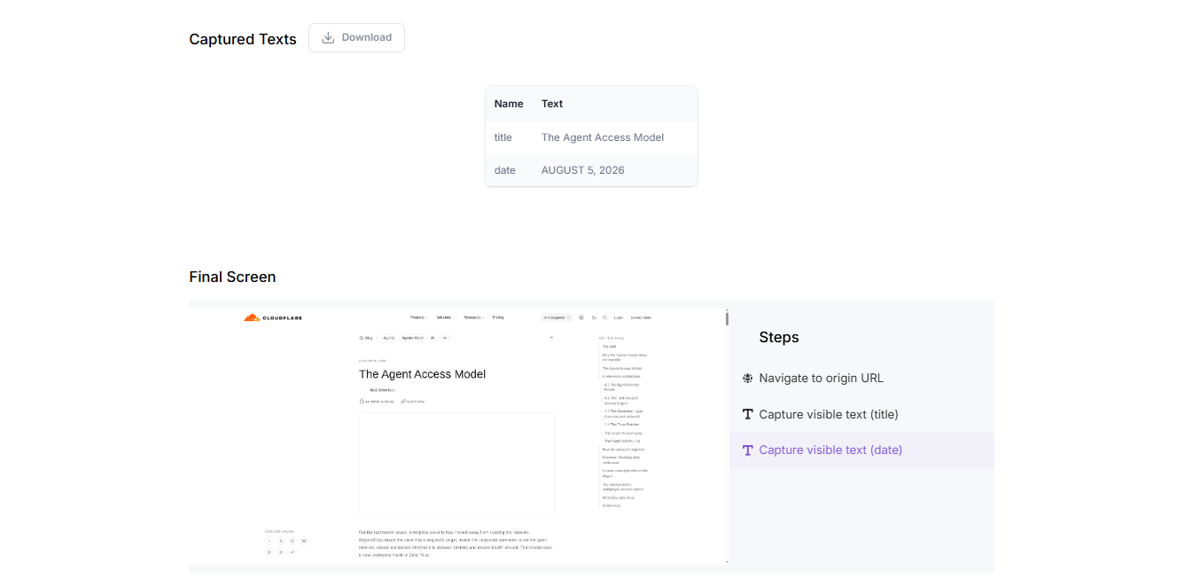
Browse AI’s run on Cloudflare’s blog post
5. Octoparse
Best for: Visual extraction jobs that run to a schedule.
What it does: Octoparse is a visual workflow builder. It auto-suggests fields to extract, or you can click through the page in its browser, mark the fields you want, and it builds the extraction workflow behind the interface. The free plan runs tasks locally, but on paid plans you can run jobs on a schedule, and the output is written to a file or directly into a database.
Output formats: CSV, JSON, HTML, Excel file.
Free tier: 10 tasks and unlimited pages per run.
Limitation: Because AI only assists with field suggestions and auto-detection, it relies on older, selector-based scraping. This makes it more fragile than the AI-native tools above.
Test result: In the desktop app, we stopped the extraction process on the JavaScript-rendered Decathlon page after 12 minutes, still without success because parsing was taking too long. On the Cloudflare article, extraction took about a minute, and auto-detection returned the title, publication date, and body text, but no author or summary, along with two unrequested columns containing “26 MINUTE READ” and “COPY URL”. It didn’t recognize the author as visible text.
Setup involved installing the desktop app and building a task per page in its built-in browser, with auto-detection proposing the fields.
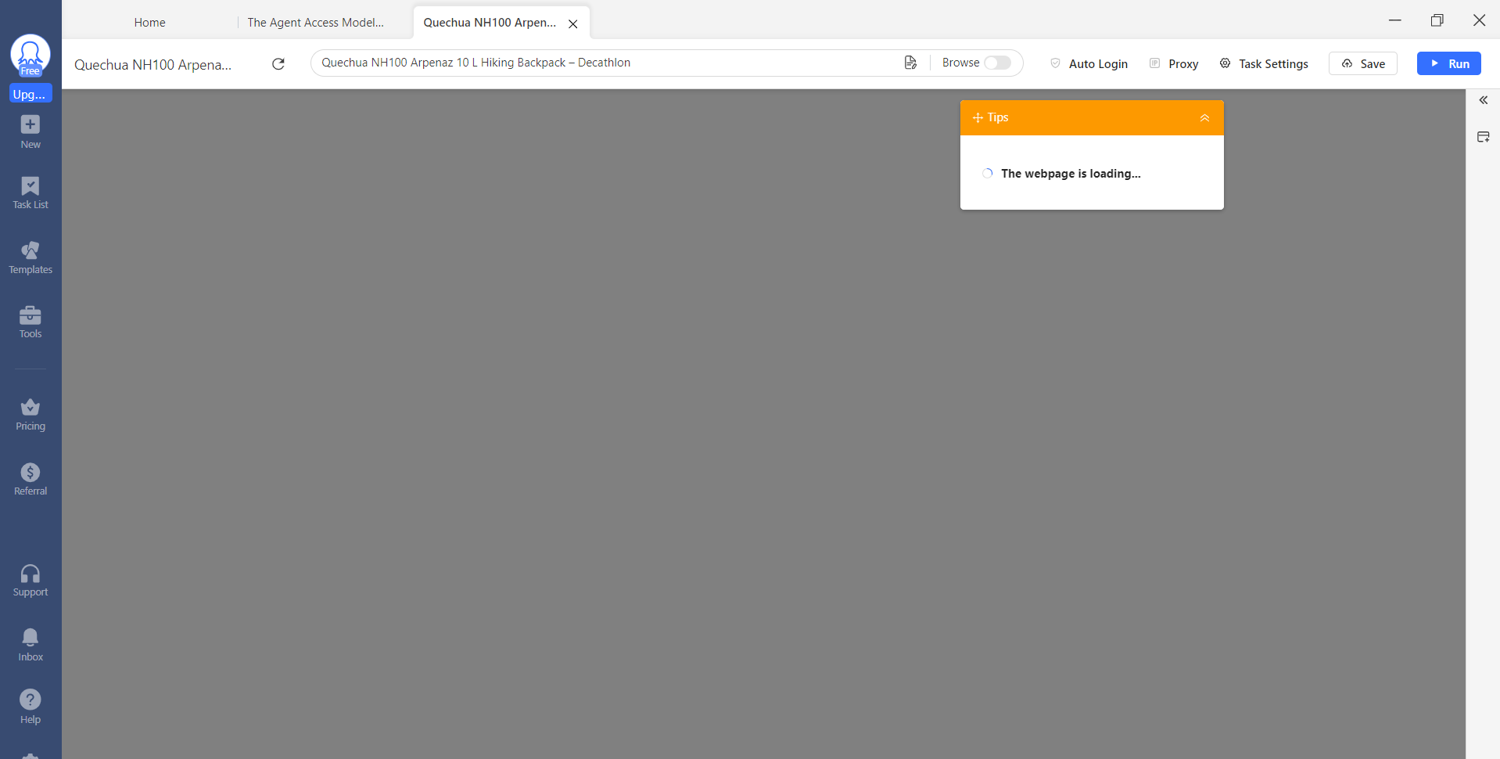
Octoparse’s run on Decathlon’s product page
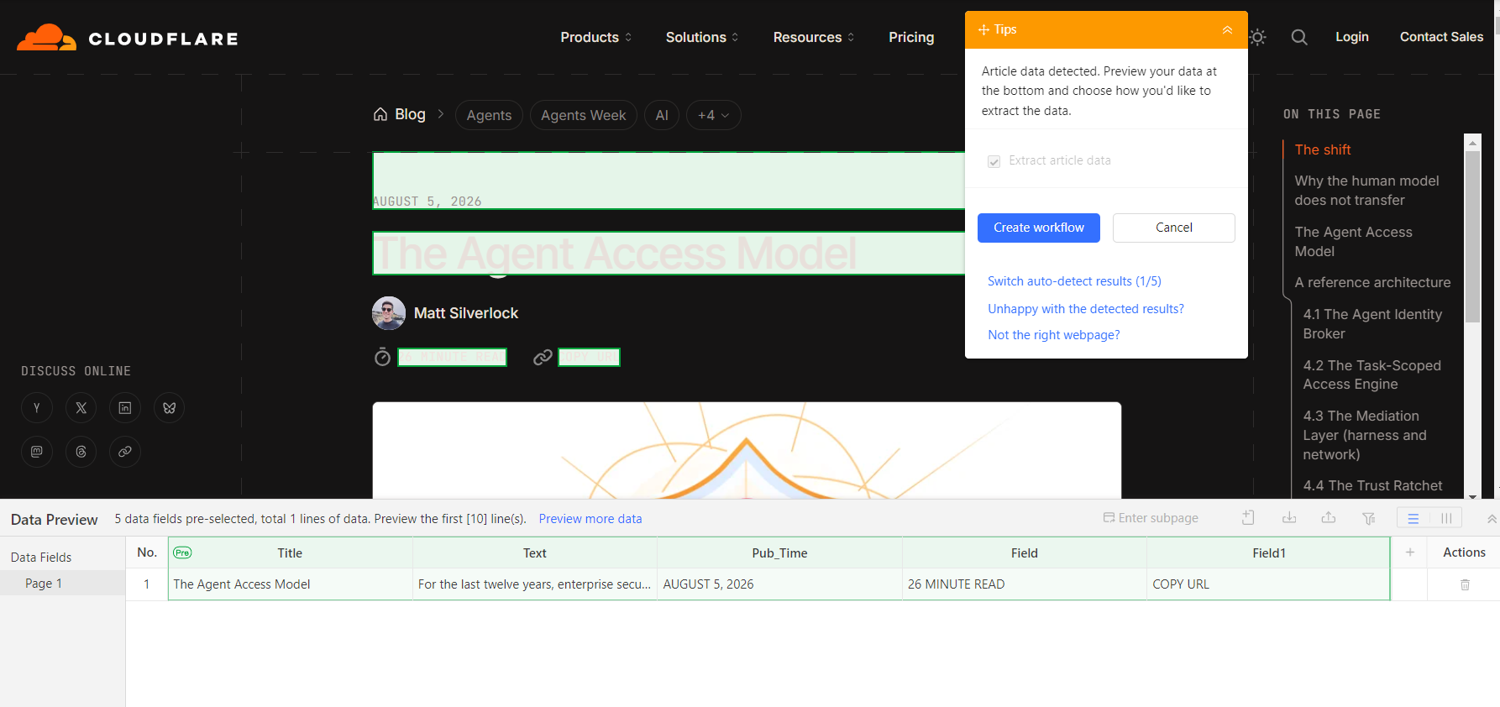
Octoparse’s run on Cloudflare’s blog post
For extraction that has to keep working unattended
Tool requirement: Detects and adapts to layout changes itself, rather than needing you to retrain it.
6. Kadoa
Best for: Pipelines that must survive layout changes without you having to watch.
What it does: Kadoa generates the extraction logic for a page itself and then maintains it, so a redesign should be absorbed automatically. You describe the fields you want once, via a no-code interface or the API, and it normalizes the responses so the schema stays stable across sites that present the same data differently.
Output formats: JSON, CSV, Excel file.
Free tier: A no-commitment evaluation period rather than a standing free tier.
Limitation: Kadoa no longer publishes rates. Its pricing page lists a consumption-based Flex plan and a custom Enterprise plan with no per-credit or monthly figure, so you cannot budget without talking to sales.
Test result: We could not test Kadoa first-hand. Setup begins with a manually screened signup, and access had not cleared by the time of publication.
7. Diffbot
Best for: Entity and article data at scale without templates.
What it does: Diffbot automatically classifies a web page's type, such as an article, a product, a discussion, or an organization. That classification runs on machine learning, so it extracts data from entirely new, unseen page layouts. Diffbot then links those entities to its global Knowledge Graph, which places the data you pulled inside a much larger set of connected entities.
Output formats: JSON, CSV, Excel file.
Free tier: 10,000 credits per month, no credit card required.
Limitation: The jump from free to paid is at $299 per month for the Startup tier. The automatic classification can also misidentify fields on layouts that do not resemble a standard article or product page.
Test result: Its analyze endpoint classified both pages correctly without being told what they were. For the product, it returned the name, price, and currency but not the rating. On the article, it returned the title, author, and the most precise date of any tool, timestamped to the second, but it has no prompted-summary field, so it returned the opening sentence of the body instead. It extracted the article in 1.8 seconds. Setup involved an API token and a single GET request.
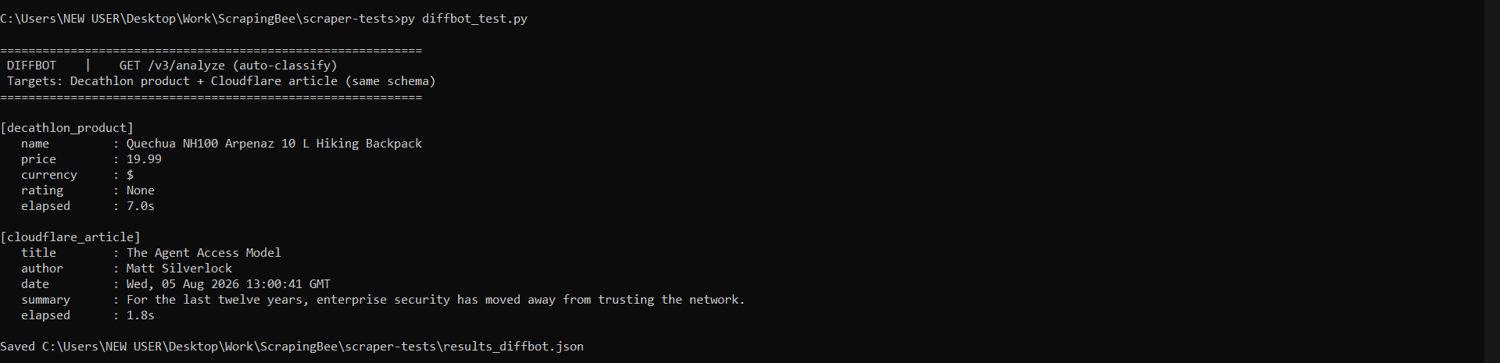
Diffbot’s run on both pages
For open-source and developer control
Tool requirement: Self-hosted, source available, and you choose the model. Use this when the scraped data cannot leave your infrastructure, or when per-request pricing does not fit your volume.
8. ScrapeGraphAI
Best for: Developers who want extraction logic plus model choice.
What it does: ScrapeGraphAI builds extraction pipelines from natural-language instructions. You describe the fields you want in a prompt, and it assembles the graph that gets them, with endpoints for single-page, search, full-site, and multi-step extraction. When self-hosted, you bring your own model, whether OpenAI, Anthropic, Gemini, or a local one like Ollama. With a local model the data path and the spend are both yours; with a hosted one, page content goes to that provider like any other API.
Output formats: JSON, Markdown, Text.
Free tier: Free to self-host. The hosted API has a separate free plan of 500 credits.
Limitation: You bring and pay for your own LLM, which determines your output quality. On the hosted API, a single extract call costs five credits against a 500-credit free plan.
Test result: On the same gemini-flash-latest model, it matched Crawl4AI field-for-field: all four product fields and all four article fields were correct. Extraction took 19.3 seconds on the product and 13.8 seconds on the article. Setup took longer here: installing dependencies, then writing a graph definition and supplying your own model key.
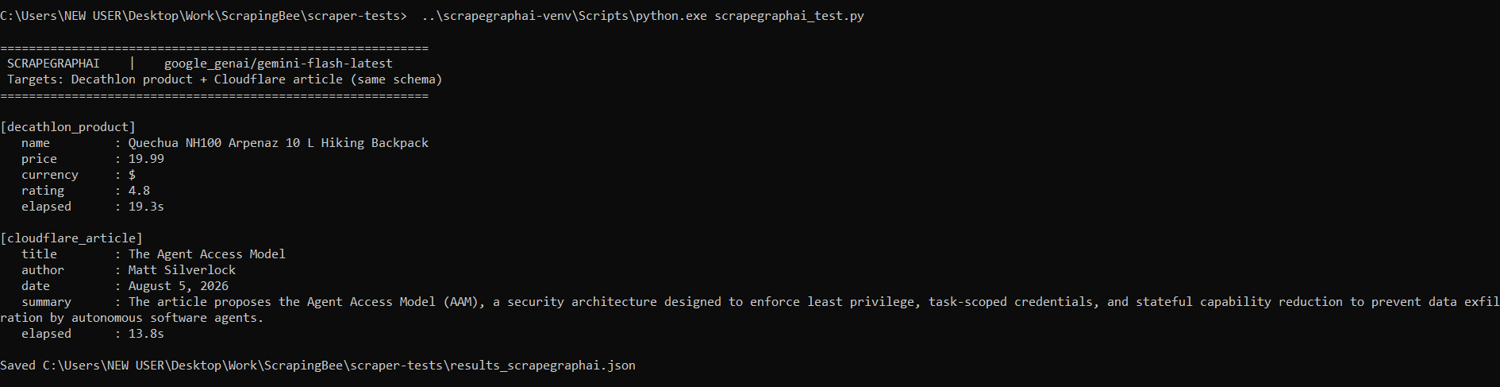
ScrapeGraphAI’s run on both pages
For multi-step workflows and pre-built scrapers
Tool requirement: Runs chained jobs and offers a library of ready-made scrapers you can run without building one. Here, you are scheduling several steps that feed each other, and often the scraper you need already exists.
9. Apify
Best for: Chained jobs and ready-made scrapers.
What it does: Apify is a cloud platform that runs Actors, which are packaged scraping and automation programs. Its Store holds thousands of ready-made Actors, so you often configure an existing one instead of writing your own. Actors chain, so one job's output becomes the next job's input, and the platform handles scheduling, storage, and proxies.
Output formats: JSON, CSV, Excel file, HTML.
Free tier: $5 in platform usage per month, no credit card required.
Limitation: Apify bills by the compute unit, where one unit is 1 GB of memory for 1 hour, so a memory-heavy headless run costs far more than a lightweight request returning the same rows. Proxies bill separately, and some Store Actors charge their own per-result fees on top of that.
Test result: Using its first-party AI Web Scraper Actor, it returned all four product fields and all four article fields correctly. The product extraction took 101.5 seconds, while the article extraction took 23.2 seconds. Setup involved creating an account, selecting the Actor from the Store, and configuring its input schema.
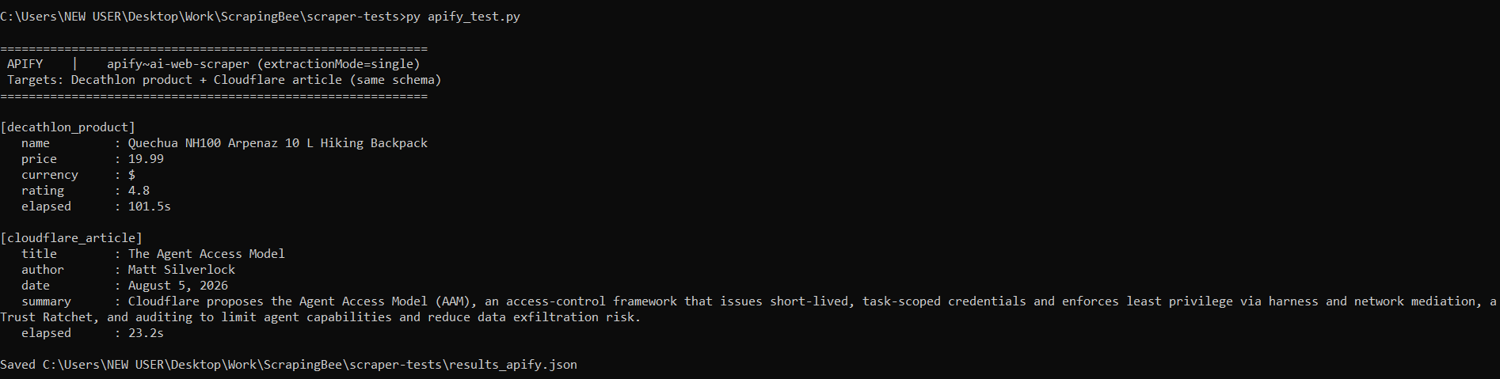
Apify’s run on both pages
For enterprise scale
Tool requirement: Global proxy reach and volume pricing for obtaining millions of records.
10. Bright Data
Best for: Enterprise volume, proxy reach, and compliance controls.
What it does: Bright Data runs one of the largest proxy networks available and layers a web scraper API, template-based collectors, a no-code IDE, and pre-built datasets on top. It has a Scraper Studio with AI extraction features and a built-in IDE where you define your data needs in a short, step-by-step flow and AI instantly generates the scraper API with built-in proxies.
Output formats: CSV, JSON, Markdown, HTML, Excel file.
Free tier: 5,000 free credits with no card required.
Limitation: The AI-native extraction tool (Scraper Studio) starts at $1.50 per 1,000 page loads, but residential proxy traffic, Browser API bandwidth, and datasets are all billed on separate meters.
Test result: On the Decathlon product, Bright Data’s Scraper Studio detected an existing prebuilt Decathlon scraper and routed us to it rather than generating one. That scraper failed after about 165 seconds with a crawler error. On the Cloudflare article, AI extraction returned all four fields correctly, including the right 5 August 2026 date. Setup involved creating an account and working through the Studio chat flow to define the extraction.
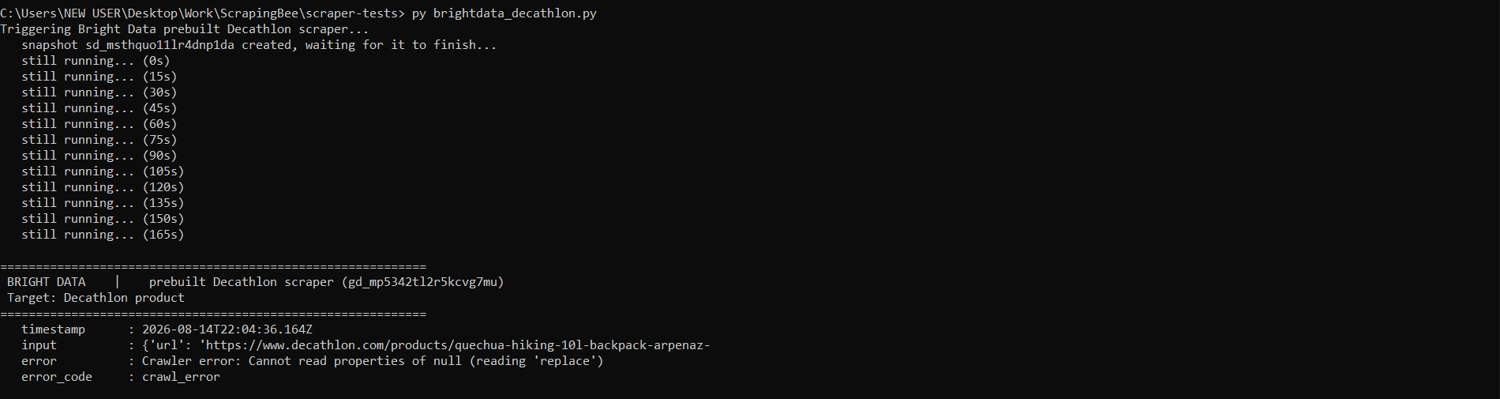
Bright Data’s run on Decathlon’s product page
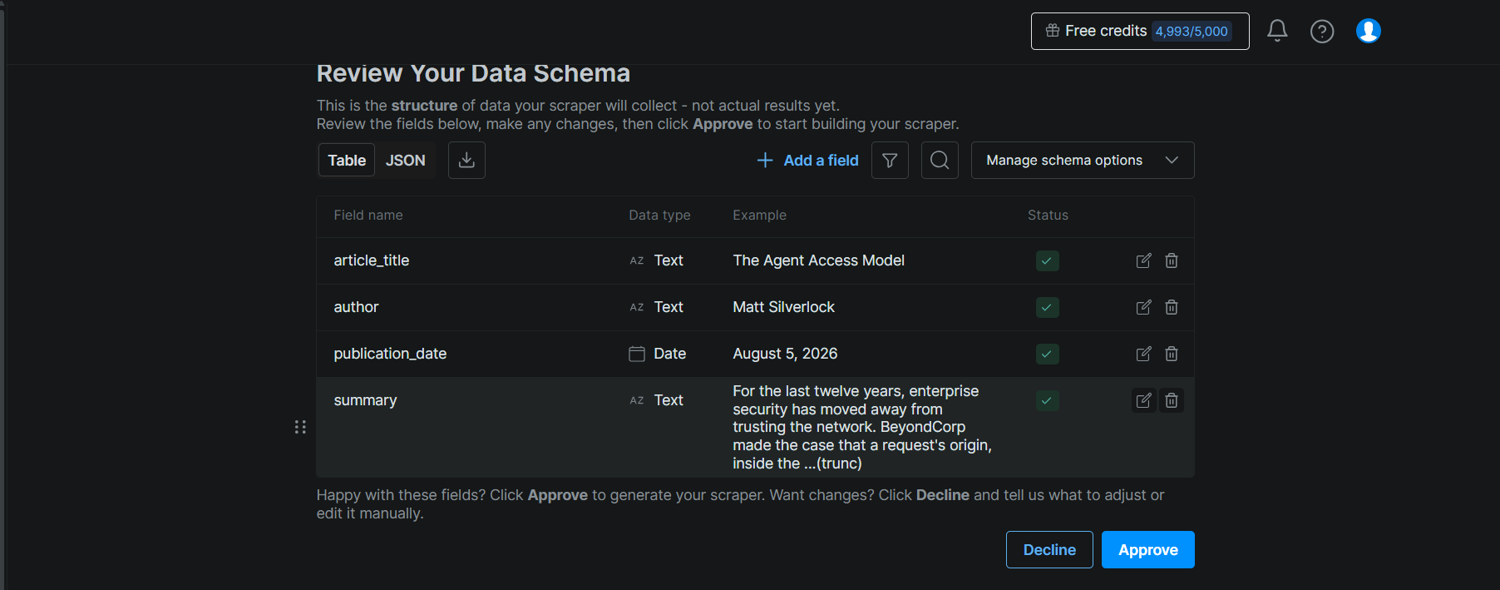
Bright Data’s run on Cloudflare’s blog post
What Are AI Web Scraping Tools?
AI web scraping tools use machine learning (ML) and natural language processing (NLP) to automate data extraction from web pages by learning what the data means. Some use an LLM to read the page and identify fields by meaning, while others use trained models to build and repair selectors. They provide output in a structured format, such as JSON, CSV, or Markdown.
Tools like Scrapy, Beautiful Soup, Playwright, Selenium, and Crawlee work differently. They are selector-driven or browser-driven: you tell them exactly where to look, and they do it, but you write and maintain the extraction logic yourself. Here is the difference in practice. Your selector was .price-now. They renamed it to .pdp-price. The selector returns null. The prompt usually still finds the price, though it can also miss it or return the wrong one.
Proxy-first vendors such as Oxylabs, Zyte, and Decodo also ship AI extraction features, but their core product is the access layer, so we cover them in our 17 best web scraping tools article rather than here.
How AI Scraping Works
AI web scraping runs in four possible stages: crawl, render, parse, and extract.
- Crawl. The tool requests the URL, usually through a proxy to avoid rate limits and IP bans, and follows links if it needs more than one page. Note that crawling discovers and retrieves pages, while scraping extracts specific data from them. For the full distinction, see “scraping vs. crawling”.
- Render. On modern sites, the raw HTML from a traditional request often doesn’t contain the data you need. So, the AI tool executes the JavaScript, ensuring that the price, review count, or article body exists on the page before anything tries to read it.
- Parse. Instead of matching a fixed CSS selector tied to one class name, the model reads the rendered page and identifies each field by meaning: this number is the price, this line is the author, this block is the body. That is why an AI scraper survives a class-name change that would return null for a selector-based scraper. For more on turning raw markup into structured fields, see our data parsing guide.
- Extract. This is the output step. The identified fields come back as structured data, usually JSON or clean Markdown that drops straight into a database or an LLM pipeline.
Note these stages aren’t universal; it’s just a broad overview of the possible stages.
How to Choose the Right AI Scraper
Find the row that describes your situation and start with the tools named in it.
| Your situation | Start with | Why |
|---|---|---|
| Not a developer | Browse AI, Octoparse | Point-and-click training, scheduling, and monitoring are built in, so no one has to maintain code |
| Feeding an LLM or RAG pipeline | Firecrawl, Crawl4AI | Markdown output is clean enough to chunk and embed without a separate parsing step |
| Developer wanting open-source control | Crawl4AI, ScrapeGraphAI | Self-hosted, no per-request billing, and you choose the model |
| At enterprise scale | Bright Data, Diffbot | Proxy reach and volume pricing |
| Getting blocked while trying to extract data with your prompt | A managed scraping API like ScrapingBee | Its AI web scraping API also handles anti-bot systems such as CAPTCHAs, alongside JavaScript rendering and proxy rotation |
Note that if your problem is extraction that must run unattended, start with Kadoa or Diffbot; if you need to chain several steps together in a low-code web scraping workflow, as with n8n, start with Apify.
Limits and Honest Caveats of AI Scraping
- Output is probabilistic. Where output is based on inference, like the summary field of the article, it’s probabilistic. Run the tools that generate a summary (Firecrawl, Apify, ScrapingBee, ScrapeGraphAI, and Crawl4AI) twice, and the wording differs each time, while the fixed fields stay the same. Here’s an example with Crawl4AI: the first run uses “introduces” in the opening phrase and the second uses “proposes”:
Crawl4AI’s first run on both pages
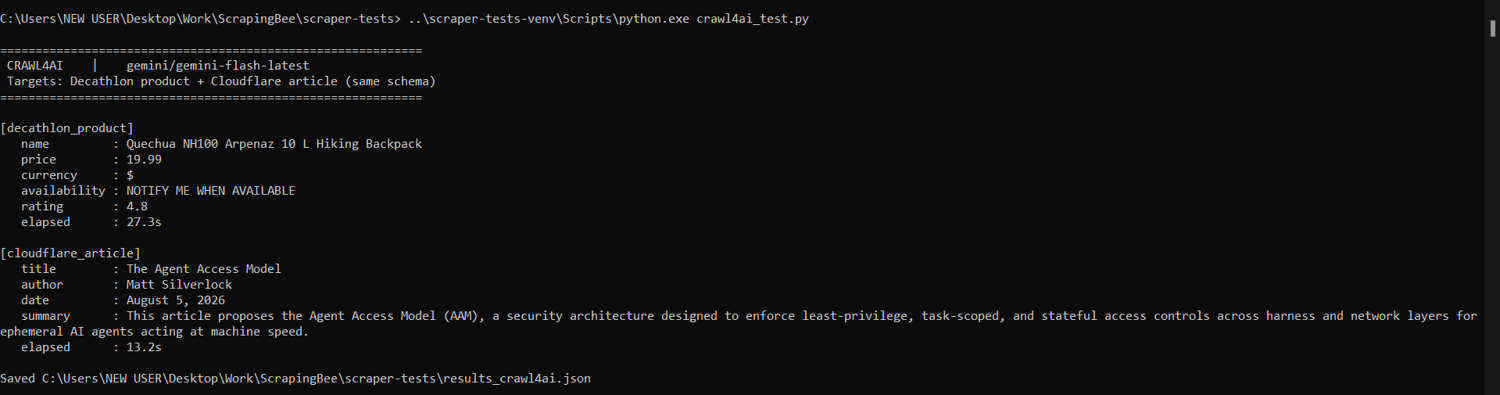
Crawl4AI’s second run on both pages
- Wrong interpretation leads to wrong output. A tool that extracts data from an ambiguous layout can produce incorrect values due to poor interpretation. For instance, a discounted price, a member price, a previous price, and a bundle price could all be interpreted as the item's original price.
- Per-page costs for LLM scrapers are higher than for selector-based scrapers. Because LLMs consume tokens to process page content semantically, they incur higher runtime costs than writing upfront extraction code. For instance, ScrapeGraphAI charges five credits per extraction call compared to just one credit for a standard Markdown scrape.
- Latency. This is often the disqualifier before cost. An AI model in the request path sometimes adds seconds or minutes per page, which makes it a poor fit for latency-sensitive agent workflows and user-facing requests, though asynchronous or background jobs tolerate it fine.
- An AI layer does not make a request harder to block. Extraction and access are separate problems. Whether you get the page still depends on the HTTP or browser layer, your request rate, and how you handle the target site's defenses.
When a Managed Scraping API Is the Better Fit
Reach for a managed scraping API when the hard part is access rather than extraction: JavaScript rendering, proxy rotation, CAPTCHAs, and anti-bot systems that hand back an empty page or a block.
ScrapingBee's AI web scraping API handles both page fetching and AI extraction. It adapts to different site layouts and extracts from prompts, and it handles headless rendering, proxy rotation, CAPTCHAs, and other anti-bot mechanisms in a single request.
ScrapingBee's free tier gives you 1,000 API credits with no card required. Try it for your AI extraction use case first.
Best AI Web Scrapers FAQs
What is an AI web scraping tool?
An AI web scraping tool extracts data from web pages using machine learning and natural language processing. You describe the fields you want, and a model reads the rendered content after a browser or rendering layer has loaded it and returns them as structured JSON or Markdown. Because nothing points at a fixed element, a layout change does not automatically break the extraction.
What is the best AI web scraper?
It depends on the job. Browse AI and Octoparse suit non-developers; Firecrawl and Crawl4AI suit LLM and RAG pipelines; Crawl4AI and ScrapeGraphAI suit teams wanting open-source control; Bright Data and Diffbot suit enterprise scale; and a managed API such as ScrapingBee suits developers dealing with anti-bot sites.
Are there free AI web scrapers?
Yes. Crawl4AI and ScrapeGraphAI are open source and free to self-host, and most commercial tools offer a free tier large enough to test at least one real site. Free tiers usually cap pages, sites, and concurrency, so check the limits against your volume first.
Do AI web scrapers hallucinate data?
They can. LLM-based extraction is probabilistic, so an ambiguous layout can produce a confidently wrong value. Validate output against a schema, spot-check a sample of records against the live page, and prefer deterministic selectors for the fields where accuracy matters most.
Can AI web scrapers get blocked?
Yes. An AI layer changes how a page is parsed, not how it is fetched, so access still depends on the HTTP or browser layer, your request rate, and the site's anti-bot defenses. Tools that bundle proxy rotation and rendering, or a managed scraping API like ScrapingBee, address that separately.
Are AI scrapers better than traditional scraping scripts?
The right tool depends on the job. AI extraction wins when layouts vary between pages or change often. A selector-based scraper is faster, cheaper, and more predictable on a stable template at high volume. Many production setups use both, choosing per target.
Can AI help clean messy HTML or dynamic pages?
Yes, and this is one of its clearer strengths. A model reads the rendered page, so inconsistent markup, inline scripts, and content injected after load are handled without you writing conditionals. Most tools return clean Markdown or JSON.
What is the easiest way to start AI scraping?
A non-developer should start with a no-code tool, where you demonstrate the extraction once and schedule it. A developer should start with a managed scraping API like ScrapingBee that returns Markdown or structured JSON from a URL in one call.